WhatsApp group chats are wonderful little ecosystems. They can plan birthdays, coordinate office projects, share family photos, and somehow turn a simple “What time are we meeting?” into 78 unread messages before lunch. That is exactly why learning how to tag someone on WhatsApp on Android is useful. A tag, also called a mention, lets you point a message at a specific person in a group chat by typing the @ symbol and choosing their name.
When you mention someone, WhatsApp highlights that person in the message and helps get their attention. It is especially handy when a group is busy, muted, chaotic, or full of people who respond to everything except the one question meant for them. In other words, it is a polite digital tap on the shoulderless dramatic than sending five question marks, but more effective than hoping they scroll back.
This guide explains how to tag someone on WhatsApp on Android in seven easy steps, what happens after you mention them, when to use @all, why tagging may not work, and how to use mentions without becoming the person everyone secretly wants to mute.
What Does It Mean to Tag Someone on WhatsApp?
To tag someone on WhatsApp means to mention a specific member of a group chat using the @ symbol. After you type @, WhatsApp shows a list of group members. You tap the person you want to mention, type your message, and send it. The person’s name appears as a clickable mention inside the message.
On WhatsApp, tagging is mainly a group chat feature. You do not need to tag someone in a one-on-one chat because, well, the conversation is already with them. That would be like walking into an empty room, pointing at the only other person there, and yelling their name. Technically possible in life, but unnecessary on WhatsApp.
Mentions are useful in family groups, school groups, work groups, neighborhood chats, travel planning groups, sports teams, volunteer groups, and any chat where important messages get buried under stickers, GIFs, and someone’s uncle forwarding a “very urgent” rumor from 2017.
How to Tag Someone on WhatsApp on Android: 7 Easy Steps
Follow these steps on your Android phone to mention a person in a WhatsApp group chat.
Step 1: Open WhatsApp on Your Android Phone
Unlock your Android phone and open the WhatsApp app. Make sure you are using a recent version of WhatsApp. If the app looks outdated, visit the Google Play Store and update it. Newer WhatsApp versions are more likely to include the latest group chat, mention, notification, and privacy features.
Step 2: Go to the Group Chat
From the Chats tab, tap the group conversation where you want to tag someone. Remember, tagging works inside group chats. If you are in a private one-on-one chat, you can simply type the message normally.
For example, if you are in a group called “Weekend Trip Planning,” open that group before typing your message. If you are in the wrong group, tagging will not help. It will only create the classic modern problem: confidently sending the right message to the wrong audience.
Step 3: Tap the Message Box
Tap the message field at the bottom of the screen. Your Android keyboard should appear. This is where you normally type messages, emojis, grocery lists, apologies, and the occasional “Sorry, wrong group.”
Step 4: Type the @ Symbol
Type the @ symbol. WhatsApp should display a list of members in that group. This list may include saved contact names, phone numbers, or profile names depending on your contact settings and how people appear in the group.
If you do not see the list immediately, pause for a second after typing @. On some phones, the keyboard or app may need a tiny moment to show the member suggestions. Technology is fast, but even apps occasionally need to take a breath.
Step 5: Select the Person You Want to Tag
Tap the name of the group member you want to mention. WhatsApp will insert that person’s name into your message. You can tag one person or mention several people in the same message by repeating the process.
For example:
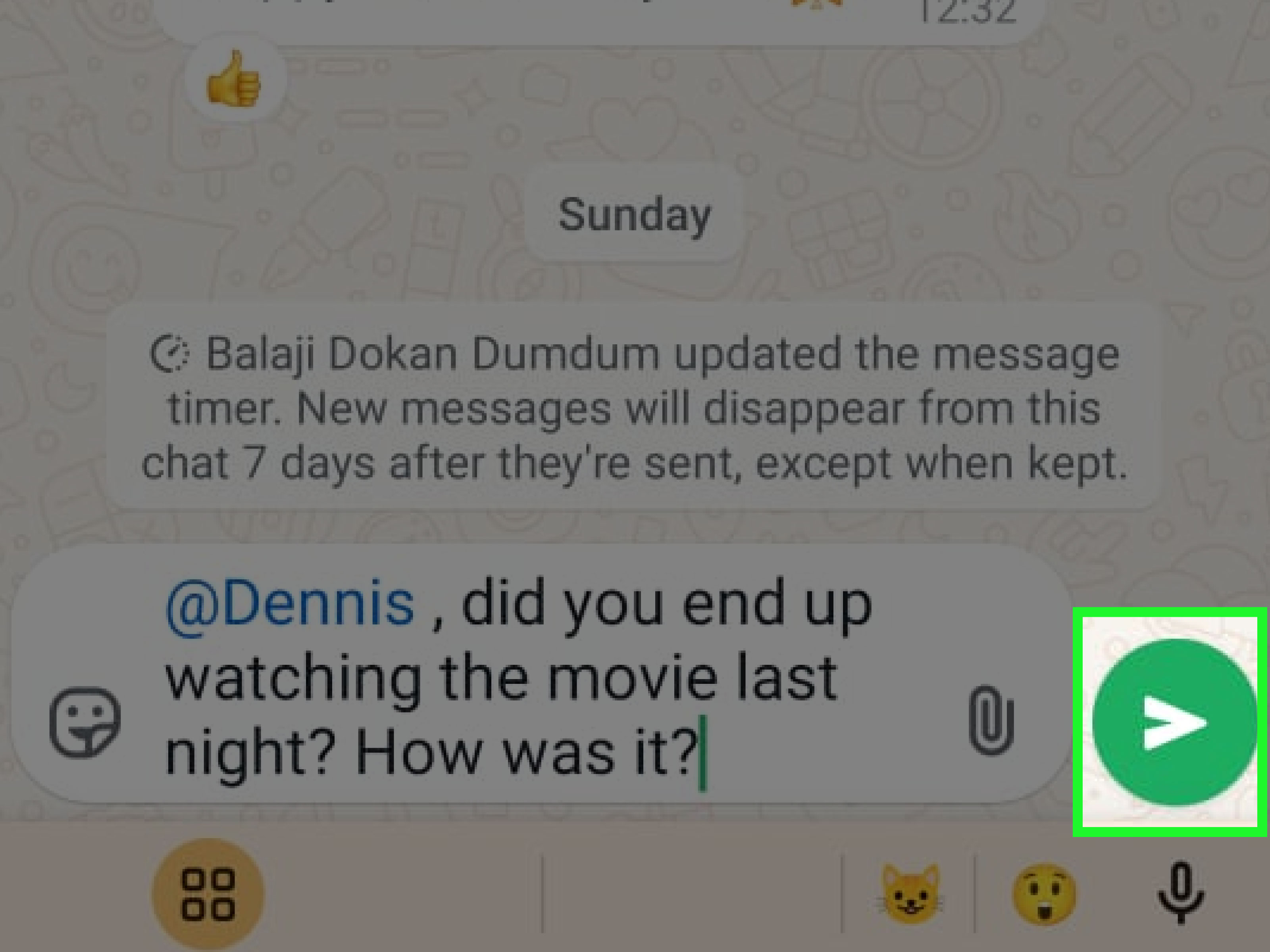
@Alex can you bring the charger?
Or:
@Maya @Jordan please confirm the meeting time.
This is much cleaner than typing, “Hey you, the person who said they had the projector cable last Tuesday.” Mentions reduce confusion and save everyone from becoming a part-time detective.
Step 6: Type Your Message Clearly
After selecting the person, write your message. Be specific. A good mention gives the person enough context to reply without reading the entire group history.
Instead of writing:
@Chris thoughts?
Try:
@Chris can you confirm whether the restaurant booking is for 7:00 p.m. or 7:30 p.m.?
The second version is better because it tells Chris exactly what you need. The first version forces Chris to scroll through 47 messages and guess whether “thoughts” refers to dinner, parking, dessert, or the mysterious group debate about pineapple on pizza.
Step 7: Tap Send
Tap the send button. Your message will appear in the group chat with the mention included. The tagged person can tap the mention, notice the message more easily, and respond directly in the group.
That is it. You have officially tagged someone on WhatsApp on Android. No ceremony required, although a small internal celebration is acceptable.
Can You Tag Everyone in a WhatsApp Group?
WhatsApp supports a group-wide mention called @all in eligible group chats. Instead of tagging one person, you type @all, select the @all suggestion, write your message, and send it. This can notify all members of the group, depending on their notification settings and feature availability.
Use @all carefully. It is powerful, but it should not be treated like a party horn in a library. Good reasons to use @all include schedule changes, urgent group updates, safety information, deadline reminders, or final decisions that every member truly needs to see.
Bad reasons include “Look at this meme,” “Who is awake?” or “I found my missing sock.” Unless the sock is managing payroll, spare the group.
What Happens When You Mention Someone?
When you tag someone in a WhatsApp group, the mention appears in the group message. The tagged person may receive a notification, even if the group is muted, depending on their WhatsApp notification settings. WhatsApp also provides controls that let users manage group notifications and mute certain mention alerts, including broader mention notifications such as @all.
This is why mentions are useful in busy groups. A normal message can disappear under the avalanche of chat activity, but a mention is more direct. It signals, “This part is for you.”
However, mentions are not magic. They do not force someone to reply, explain your message for you, or make a chronically late friend suddenly become punctual. They only improve visibility.
Why You Might Not Be Able to Tag Someone on WhatsApp
If tagging does not work on your Android phone, one of several common issues may be responsible.
You Are Not in a Group Chat
Mentions are designed for group conversations. If you are messaging one person directly, the @ mention list may not appear because there is nobody else to select.
Your WhatsApp App Needs an Update
An outdated app can cause features to behave strangely. Open the Google Play Store, search for WhatsApp, and tap Update if an update is available. Keeping WhatsApp updated also helps with security, performance, and compatibility with newer Android versions.
The Person Is No Longer in the Group
You can only tag people who are current members of the group. If someone left or was removed, their name will not appear in the mention list. WhatsApp will not summon them back like a group-chat wizard.
Contact Permission Is Limited
If WhatsApp does not have access to your contacts, names may display differently. You may see phone numbers instead of saved names. On Android, you can check this by going to your phone’s settings, opening Apps, selecting WhatsApp, and reviewing permissions such as Contacts.
Your Keyboard or App Is Glitching
Sometimes the simplest fix works: close WhatsApp and reopen it. If that fails, restart your phone. If the issue continues, check for Android system updates, clear temporary app problems, or confirm that your internet connection is stable.
Best Practices for Tagging Someone on WhatsApp
Mentions are helpful when they are used with a little social intelligence. A tag should make communication easier, not louder.
Tag Only the People Who Need the Message
If your question is for one person, tag one person. If it is for three people, tag three people. Avoid tagging the entire group for a message that only concerns one member. Group chats already produce enough noise; they do not need extra seasoning.
Keep the Message Short but Complete
A good WhatsApp mention is direct. Include the person’s name, the reason you are tagging them, and the action you need. For example:
@Taylor please upload the final PDF before 5 p.m.
That message is clear, specific, and easy to answer. Compare it to:
@Taylor hey
That is not a message. That is a suspense movie.
Do Not Abuse @all
The @all feature can be useful for announcements, but it can also annoy people if overused. Before tagging everyone, ask yourself: “Does every person in this group need this right now?” If the answer is no, use a normal message or tag only the relevant people.
Use Mentions for Accountability, Not Embarrassment
Mentions can help assign tasks and clarify responsibility. But avoid using them to shame someone in front of a group. Instead of writing, “@Sam why did you forget again?” try, “@Sam can you confirm when the file will be ready?” Same goal, fewer emotional explosions.
Pair Mentions With Replies When Needed
If you are responding to a specific earlier message, use WhatsApp’s reply feature along with a mention. Long-press the message, tap reply, then tag the person if needed. This keeps the conversation organized and prevents the dreaded “What are we talking about?” spiral.
Tagging Someone vs. Replying to a Message
Tagging and replying are related, but they are not the same thing.
A tag gets a person’s attention by mentioning their name with @. A reply connects your response to a specific message in the chat. If the group is moving quickly, replies help preserve context, while mentions help direct attention.
For example, if someone asks, “Who can bring the projector?” and you want Alex to answer, you can reply to that message and write:
@Alex do you still have the projector from last week?
That combination is clean, clear, and much better than dropping a vague message into the group like a paper airplane in a storm.
Can You Tag Someone in a WhatsApp Status?
WhatsApp also supports mentions in Status updates in some contexts. Status mentions are different from group chat mentions. A group chat mention happens inside a conversation, while a Status mention is connected to a temporary update that disappears after 24 hours. If your goal is to get someone’s attention inside a group discussion, use the group chat mention method described above.
Privacy and Etiquette When Tagging People
WhatsApp is widely used for private conversations, group chats, calls, media sharing, documents, and everyday coordination. Even though group chats can feel casual, a mention can draw attention to a person publicly inside that group. Use it with respect.
Do not tag someone repeatedly because they have not answered within 30 seconds. People may be in class, at work, driving, sleeping, cooking, or heroically ignoring their phone for mental peace. If something is urgent, say so clearly. If it is not urgent, give them time.
Also avoid tagging people in sensitive conversations unless necessary. If a topic involves personal information, money, health, private plans, or conflict, consider whether a direct message would be better than a public group mention.
Quick Troubleshooting Checklist
If you cannot tag someone on WhatsApp on Android, try this checklist:
- Confirm you are inside a WhatsApp group chat.
- Type @ in the message box and wait for the member list.
- Make sure the person is still a member of the group.
- Update WhatsApp from the Google Play Store.
- Check WhatsApp contact permission in Android settings.
- Restart WhatsApp or restart your phone.
- Check your internet connection if the app is lagging.
Examples of Smart WhatsApp Tags
Here are a few practical examples you can copy and adapt:
For work: @Nina can you review the spreadsheet before the 3 p.m. meeting?
For family: @Dad please confirm if you are picking up Grandma tomorrow.
For school: @Liam can you share the notes from today’s class?
For travel: @Ava did you book the airport transfer?
For urgent group updates: @all the meeting location changed to Room 204.
Notice that each example is specific. The best WhatsApp mentions do not just grab attention; they make the next action obvious.
Common Mistakes to Avoid
Tagging Without Context
A lonely mention like @Morgan is not helpful. Add context so Morgan knows why they were summoned from the digital wilderness.
Using Mentions as Pressure
Tagging someone repeatedly can feel pushy. One clear mention is usually enough. If it is truly urgent, follow up politely or contact them directly.
Tagging Everyone Too Often
When every message is urgent, no message is urgent. Save @all for updates that genuinely matter to the entire group.
Forgetting That Group Chats Are Public to Members
Everyone in the group can see the message. If the topic is private, move it to a direct chat.
My Experience: What Tagging Someone on WhatsApp Actually Feels Like in Real Life
After using WhatsApp mentions in different types of group chats, one thing becomes obvious: tagging is not just a technical trick; it is a communication habit. Used well, it saves time. Used badly, it makes people want to throw their phones into a decorative pond.
The best experience with WhatsApp tagging usually happens in practical groups. In a work group, tagging someone is perfect for assigning a clear task. Instead of sending a general message like “Can someone send the report?” you can write, “@Jamie can you send the final report before noon?” That message has a person, an action, and a deadline. Nobody has to guess. Nobody has to pretend they did not see it. The group becomes less foggy.
In family groups, mentions are helpful but should be used gently. Families have a special talent for turning one message into six side conversations, three unrelated photos, and a debate about dinner. Tagging helps cut through that noise. For example, “@Mom what time should we arrive?” works better than dropping the question into the group and hoping the right person sees it between baby pictures and weather updates.
Travel groups may be where WhatsApp tags shine the most. When people are booking hotels, rides, tickets, luggage, food, and meeting points, mentions prevent confusion. A message like “@Ryan please send the booking confirmation” is simple and useful. Without the tag, Ryan may miss it completely, and suddenly five people are standing in a hotel lobby explaining that the reservation is “definitely somewhere in the chat.” That is not a plan. That is a scavenger hunt.
The biggest lesson is that tagging should reduce friction. If a mention creates clarity, use it. If it only adds noise, skip it. People appreciate being tagged when the message is relevant to them. They do not appreciate being tagged because someone is bored, impatient, or excited about a meme involving a dancing banana.
Another useful habit is combining a mention with a complete sentence. “@Sara update?” is short, but it is not very friendly or clear. “@Sara can you update us on the delivery time when you get a chance?” feels more human. The extra few words make the message easier to answer and less like a tiny courtroom summons.
I have also learned that @all should be treated like hot sauce: excellent in the right amount, painful when overused. For a changed meeting time, urgent deadline, or safety update, it is perfect. For casual chatter, it is too much. In large groups, excessive mass mentions can make people mute notifications or disengage entirely.
In short, tagging someone on WhatsApp on Android is easy. The real skill is knowing when and how to use it. Be clear, be specific, be respectful, and your group chats will feel less like a crowded cafeteria and more like an actual conversation.
Conclusion
Learning how to tag someone on WhatsApp on Android is simple: open a group chat, type @, choose the person, write a clear message, and tap send. That tiny symbol can make group communication faster, cleaner, and far less chaotic. Mentions help direct attention, organize responsibilities, and keep important messages from vanishing under a mountain of emojis and side conversations.
Use tags thoughtfully. Mention the right person, include useful context, avoid overusing @all, and remember that every notification lands on a real human being with a real life and possibly a very low phone battery. When used well, WhatsApp mentions are not just a feature; they are group-chat manners with a keyboard shortcut.