Posture is one of those things most people ignore until their neck starts sounding like a bowl of breakfast cereal: snap, crackle, and please-help-me. The good news? You do not need to become a statue, wear a medieval back brace, or walk around balancing a dictionary on your head like a finishing-school movie extra. A well-made video on ways to improve posture can help you see exactly how to sit, stand, stretch, strengthen, and move with less strain.
Improving posture is not about forcing yourself into a stiff “soldier pose” all day. Healthy posture means keeping the body aligned while still allowing natural movement. Your spine has natural curves in the neck, upper back, and lower back, and the goal is to support those curves instead of exaggerating them. Good posture can reduce unnecessary stress on muscles, joints, ligaments, and the spine. It may also help with common problems such as neck tension, shoulder tightness, low back discomfort, and desk-worker fatigue.
This guide explains what an effective posture video should teach, how to follow posture exercises safely, and how to build better habits at your desk, on your phone, while standing, and even while sleeping. Think of it as your friendly posture coach, minus the whistle and judgmental clipboard.
Why a Video Is One of the Best Ways to Learn Better Posture
Posture advice can be confusing when it is only written down. “Keep your ears over your shoulders” sounds simple until you realize your ears have apparently moved three zip codes forward after years of laptop use. A posture improvement video helps because you can see body alignment in real time. Visual instruction makes it easier to copy proper form, avoid overcorrecting, and understand what “neutral spine” actually looks like.
A good posture correction video should show both the wrong and right ways to perform each movement. For example, when teaching a chin tuck, the instructor should explain that the motion is not a dramatic downward nod. It is a gentle glide of the head backward, as if making a small “double chin” while keeping the eyes level. Glamorous? Not exactly. Effective? Very.
Videos are especially helpful for posture exercises because tiny details matter. A shoulder blade squeeze should not become a shrug. A wall angel should not turn into a lower-back arching contest. A desk setup tutorial should show monitor height, chair support, keyboard position, and foot placement, not just say, “Sit better,” which is about as useful as telling a tired person to “just have more energy.”
What Good Posture Actually Means
Good posture does not mean standing perfectly straight like a broom with opinions. It means your body is positioned so your muscles and joints do not have to work harder than necessary. In standing posture, your head should generally be above your shoulders, your shoulders over your hips, and your weight balanced between both feet. Your knees should be relaxed, not locked. Your core should be lightly engaged, not clenched like you are preparing for a surprise sneeze.
For sitting posture, the basics are similar: keep your feet supported, knees around hip level, lower back supported, shoulders relaxed, and screen at a height that does not force your head to crane forward. The best posture is also not one single frozen position. Even a technically “perfect” sitting posture becomes uncomfortable if you hold it for hours. The body likes movement. Your spine did not apply for a full-time job as a coat rack.
Key Elements Every Posture Improvement Video Should Include
1. A Simple Posture Check
A helpful video should begin with a posture check that viewers can do at home. One easy method is the wall test. Stand with your back near a wall, feet a few inches away, and notice whether your head, upper back, and hips can comfortably align without forcing your ribs forward. This is not a pass-or-fail exam. It is simply a way to notice your current habits.
The video can also show a side-view check. From the side, the ear, shoulder, hip, knee, and ankle should generally appear stacked. If the head sits far forward, the shoulders round, or the pelvis tilts excessively, the body may be compensating for muscle tightness, weakness, work habits, or long hours of sitting.
2. Desk Ergonomics for Real People
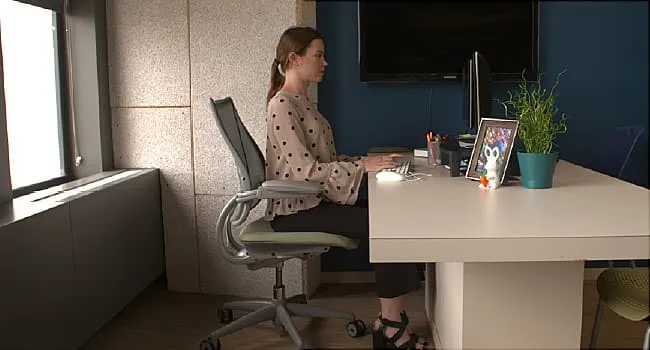
A useful video on ways to improve posture should include desk ergonomics because many posture issues are born at the workstation. The monitor should be directly in front of you, with the top of the screen around eye level or slightly below. Your chair should support the natural curve of your lower back. Your feet should rest flat on the floor or on a footrest. Your elbows should stay close to your body, and your shoulders should remain relaxed while typing.
The key idea is neutral positioning. Neutral does not mean fancy. It means your joints are naturally aligned and not stuck in awkward angles. If your laptop is low, your neck may bend forward. If your keyboard is too high, your shoulders may creep toward your ears like they are trying to escape Monday morning. If your phone is in your lap, your neck may spend the afternoon folded like a taco.
3. Movement Breaks
A posture video should emphasize movement breaks. Better posture is not only about “sitting correctly.” It is also about not sitting in one position forever. Try standing, walking, stretching, or changing positions every 30 to 60 minutes. Even one or two minutes can help reset your body.
For example, after a long session at the computer, stand up, roll your shoulders, gently extend your hips, and take a few slow breaths. This small habit can reduce stiffness and remind your muscles that their job description includes movement, not just silently suffering under a hoodie.
Best Exercises to Include in a Posture Video
Posture exercises work best when they combine mobility, stretching, and strengthening. Stretching alone may feel good temporarily, but stronger support muscles help maintain better alignment throughout the day. A balanced video should include exercises for the neck, shoulders, upper back, chest, core, hips, and lower back.
Chin Tucks
Chin tucks help train better head and neck alignment. Sit or stand tall. Keep your eyes level. Gently draw your head backward, as though sliding it along a shelf. Hold for three to five seconds, then relax. Repeat five to ten times.
A video should warn viewers not to jam the chin downward or push the head aggressively. The movement should be small and controlled. If it feels like you are auditioning for a turtle documentary, you are probably doing it right.
Shoulder Blade Squeezes
Shoulder blade squeezes strengthen the upper back and help counter rounded shoulders. Sit or stand with your shoulders relaxed. Draw your shoulder blades gently back and slightly down. Hold for five seconds, then release. Repeat eight to twelve times.
The important detail is to avoid shrugging. Your shoulders should not climb toward your ears. Keep the neck relaxed and imagine placing your shoulder blades into your back pockets.
Wall Angels
Wall angels are popular posture exercises because they challenge shoulder mobility and upper-back control. Stand with your back against a wall, feet slightly forward, and keep your ribs from flaring. Place your arms against the wall in a goalpost position if comfortable, then slowly move them up and down.
This exercise should be gentle. If you cannot keep your arms fully against the wall, that is okay. Reduce the range of motion. The goal is not to win the Wall Angel Olympics. The goal is smooth, pain-free movement.
Chest Doorway Stretch
Many people with rounded shoulders have tight chest muscles. A doorway stretch can help. Place your forearms on either side of a doorway, step one foot forward, and gently lean until you feel a stretch across the chest. Hold for 20 to 30 seconds while breathing normally.
A good video should show how to avoid arching the lower back. Keep the ribs down and the neck relaxed. Stretching should feel like a polite invitation, not a wrestling match with your own skeleton.
Pelvic Tilts
Pelvic tilts help improve awareness of the lower back and pelvis. Lie on your back with knees bent and feet flat. Gently flatten your lower back toward the floor by tightening your abdominal muscles, then release to a neutral position. Repeat slowly for eight to twelve repetitions.
This exercise is excellent for beginners because it teaches control without requiring complicated equipment. It also reminds the lower back that it does not have to do every job alone.
Bird Dog
The bird dog strengthens the core, back, and hip stabilizers. Start on hands and knees. Extend one arm forward and the opposite leg back while keeping your hips level. Hold briefly, then return and switch sides. Move slowly and avoid twisting.
A posture video should show the exercise from the side and front so viewers can see how to keep the spine steady. The best bird dog is controlled, not dramatic. Nobody needs a living-room gymnastics routine before breakfast.
Glute Bridges
Glute bridges strengthen the hips and support the pelvis. Lie on your back with knees bent and feet hip-width apart. Tighten your glutes and lift your hips until your body forms a line from shoulders to knees. Pause, then lower slowly. Repeat eight to twelve times.
Strong glutes can help reduce excessive strain on the lower back, especially for people who sit much of the day. When the glutes are sleepy, the lower back often tries to become the unpaid intern of every movement.
How to Improve Sitting Posture Without Becoming Miserable
Sitting posture should be comfortable and sustainable. Start by scooting back in your chair so your lower back is supported. If your chair does not support your lumbar curve, use a small pillow or rolled towel. Keep your feet supported. Avoid crossing your legs for long periods if it causes your hips to tilt or your back to twist.
Your screen should be close enough that you do not lean forward to read. Your keyboard and mouse should be near your body. If you use a laptop for long hours, consider raising the laptop on a stand and using a separate keyboard and mouse. This simple setup can prevent the classic laptop hunch, also known as “tech-neck goblin mode.”
Most importantly, change positions often. Sit tall for a while, lean back with support for a while, stand for a call, walk during a short break, and stretch between tasks. The healthiest posture is usually your next posture.
How to Improve Standing Posture
Standing posture begins with balance. Keep your weight evenly distributed across both feet. Let your knees stay soft. Stack your rib cage over your pelvis. Keep your chin level and shoulders relaxed. Avoid locking your knees, pushing your hips forward, or dramatically arching your lower back.
If you stand for long periods, place one foot on a low stool or step and alternate sides. This can reduce strain on the lower back. Supportive shoes also matter. If your shoes have no support and your floor is hard, your posture may start negotiating with gravity by lunchtime.
Phone Posture: The Tiny Screen, Big Problem
Phones are posture troublemakers because they encourage the head to drop forward. Over time, this can contribute to neck and upper-back tension. The fix is simple but not always glamorous: bring the phone closer to eye level, relax your shoulders, and take breaks. Instead of bending your head down, lift the device up.
Try the “phone reset.” Before checking your screen, roll your shoulders back and down, gently tuck your chin, and hold the phone higher. Will this make every text message more elegant? No. But your neck may send you a thank-you card.
Sleeping Position and Posture
Posture does not clock out when you go to bed. Your sleeping position can affect how your neck and back feel in the morning. If you sleep on your back, a pillow under the knees may help maintain the natural curve of the lower back. If you sleep on your side, a pillow between the knees can help keep the hips aligned. Your neck pillow should support your head without pushing it too far forward or letting it drop too low.
There is no single perfect sleeping position for everyone. Comfort, spinal support, and waking up without feeling like you lost a wrestling match to your mattress are good signs.
Common Mistakes in Posture Videos
Not every posture video online is helpful. Some videos make posture correction look like a magical five-minute fix. Others encourage aggressive stretching, rigid bracing, or unrealistic “perfect posture” goals. Be careful with videos that promise instant permanent results, tell everyone to do the exact same routine, or ignore pain signals.
A trustworthy posture video should encourage gradual progress. It should explain when to stop, how to modify exercises, and why posture improvement requires daily habits. It should also remind viewers that pain, numbness, tingling, weakness, dizziness, or symptoms after an injury deserve professional medical attention.
A Simple 10-Minute Posture Video Routine
If you are creating or following a short posture video, here is a practical structure:
Minute 1: Posture Check
Stand or sit tall. Notice your head, shoulders, ribs, hips, and feet. Take three slow breaths.
Minutes 2–3: Neck Reset
Perform gentle chin tucks and slow neck rotations within a comfortable range.
Minutes 4–5: Shoulder Mobility
Do shoulder rolls, shoulder blade squeezes, and wall angels or modified wall slides.
Minutes 6–7: Chest and Upper Back
Use a doorway chest stretch and a seated upper-back extension over a chair.
Minutes 8–9: Core and Hips
Practice pelvic tilts, glute bridges, or bird dogs. Move slowly and keep the spine controlled.
Minute 10: Desk Habit Reset
Adjust your chair, screen, keyboard, and phone position. Finish by standing up and walking for 30 seconds.
Experience Section: What Improving Posture Feels Like in Real Life
Improving posture is rarely a dramatic movie transformation. There is no thunderclap, no glowing spine, no choir of physical therapists descending from the ceiling. Most of the time, it starts with noticing small things. You realize your shoulders are tense while answering emails. You catch yourself leaning toward the screen even though the screen has not moved. You discover that your “comfortable” couch position looks suspiciously like a question mark wearing socks.
One common experience is that posture correction feels awkward at first. Sitting tall may feel strange because your body is used to old habits. The first few chin tucks might feel silly. The first doorway stretch may reveal that your chest muscles have been quietly operating under a strict “no expansion” policy. That does not mean you are doing it wrong. It means your body is learning a new default.
Another real-life lesson is that better posture comes from repetition, not heroic effort. A person who does a 10-minute posture video once and then spends eight hours folded over a laptop may not notice much change. But someone who practices short posture breaks every day, adjusts their screen, strengthens their upper back, and moves regularly will usually feel more aware and more comfortable over time.
Many people also notice that posture is connected to mood and energy. When you sit collapsed for hours, breathing may feel shallow and fatigue can creep in faster. When you sit or stand with more support and openness, you may feel more alert. This does not mean posture solves every problem. It will not pay your bills, answer your emails, or convince your cat to respect your keyboard. But it can make your body feel less like it is carrying the entire internet on its neck.
A good personal strategy is to connect posture practice to routines you already have. Do a shoulder blade squeeze after sending an email. Perform a chin tuck when you unlock your phone. Stand up whenever you refill water. Stretch your chest after lunch. Place a sticky note on your monitor that says “neck check” or, for dramatic flair, “release the goblin.” Humor helps because posture practice should not feel like punishment.
It also helps to record yourself briefly from the side while sitting or standing, the same way a posture video demonstrates alignment. Many people are surprised by what they see. The goal is not criticism; it is awareness. Once you can see the habit, you can change the habit. Over time, the best result is not perfect posture every second. It is faster recovery. You slouch, notice it, reset, move, and continue with your day.
After a few weeks of consistent practice, people often report feeling less stiff during computer work, more confident standing, and more aware of how their desk setup affects their body. The improvement is usually gradual, but it is meaningful. Better posture is not about becoming a flawless human ruler. It is about giving your muscles and joints a better work environment, so they stop filing daily complaints.
Conclusion
A well-designed video on ways to improve posture can make posture correction easier, clearer, and more realistic. The best videos show how to align the head, shoulders, spine, hips, and feet while also teaching movement breaks, desk ergonomics, stretching, and strengthening exercises. Good posture is not stiff. It is supported, flexible, and adaptable.
Start small. Adjust your screen. Support your lower back. Lift your phone. Take movement breaks. Practice chin tucks, shoulder blade squeezes, wall angels, pelvic tilts, bird dogs, and glute bridges. Most importantly, be patient. Your posture habits were built over time, and they improve the same way: one small reset at a time.
Note: This article is for educational purposes only. If you have persistent pain, numbness, tingling, weakness, dizziness, recent injury, or symptoms that interfere with daily life, consult a qualified healthcare professional or physical therapist before starting a new posture exercise routine.