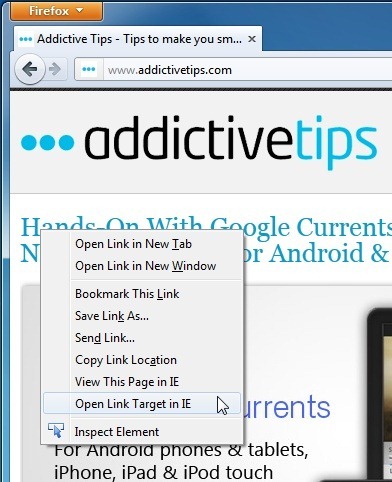
Note: This article reflects the historical role of IE View and the modern reality of Internet Explorer compatibility in 2026. In plain English: Firefox can still help you launch legacy sites toward Microsoft tools, but it is not a true native Internet Explorer replacement.
Some browser tools are flashy. Some are revolutionary. And some are gloriously practical, like that one screwdriver in your kitchen drawer that has repaired everything from cabinet hinges to your will to live. IE View for Firefox falls into that third category. It was never the cool kid at the browser party, but for people stuck with ancient corporate portals, cranky internal dashboards, or websites that behaved as if the web stopped evolving in 2009, it was a lifesaver.
The basic idea was simple: when a site would not behave in Firefox, IE View let you open that page in Internet Explorer with a click instead of a groan-filled copy-and-paste routine. That sounds small, but in the world of legacy web apps, small conveniences can feel like pure luxury.
Today, the story is more complicated. Internet Explorer has been retired, Firefox does not support ActiveX, and the supported path for true IE-dependent websites is now Microsoft Edge IE mode, not Firefox itself. Still, the topic remains useful because many people searching for “IE View Firefox” are really asking a bigger question: How do I open old IE-only websites when Firefox is my main browser?
This guide explains what IE View is, how it worked, why it mattered, where it falls short, and what the smartest compatibility strategy looks like now.
What Is IE View for Firefox?
IE View is a Firefox extension designed to open the current page or a selected link in Internet Explorer. Historically, that made it useful for people who preferred Firefox for daily browsing but occasionally needed IE for a stubborn website that depended on old Microsoft-specific technology.
That distinction is important. IE View was not originally a magical “turn Firefox into Internet Explorer” switch. It was more like a browser handoff tool. You stayed in Firefox for normal browsing, and when a legacy site started throwing a tantrum, IE View sent that specific page to Internet Explorer.
That made perfect sense in the era when many internal business systems were built around IE-only features such as:
- ActiveX controls
- Legacy document modes
- Old intranet authentication flows
- Java and Silverlight-era web dependencies
- Custom uploaders, viewers, and enterprise add-ons
In later years, Firefox add-on listings such as IE View WE continued that idea in a modernized form. The newer versions were built around WebExtensions and usually required a native helper component on Windows. In other words, they kept the convenience, but they still relied on Microsoft’s old browser infrastructure to do the real compatibility heavy lifting.
Why Firefox Users Needed IE View in the First Place
Firefox has long attracted users who value speed, privacy, extensions, and standards-based browsing. Internet Explorer, meanwhile, carried a lot of baggage: odd rendering behavior, security headaches, and a reputation for being the browser equivalent of a rusty filing cabinet on wheels.
Yet organizations kept building tools around it. Banks, hospitals, insurance companies, government systems, industrial dashboards, and school admin portals often depended on IE-specific behavior. If you lived in Firefox but had to visit one of those sites, you had three choices:
- Switch to Internet Explorer manually every time
- Make IE your default browser and feel mildly betrayed
- Use a tool like IE View and preserve your dignity
That convenience is exactly why IE View built a loyal following. It reduced friction. And when a website already wasted enough of your day, cutting a few annoying steps mattered more than browser philosophy.
How IE View Worked
1. Open a page or link in Internet Explorer
The classic behavior was straightforward. Right-click a page or a link in Firefox, choose the IE option, and the content opened in Internet Explorer. No manual URL copying. No opening another browser and pasting the address like it was 1998.
2. Send certain websites to IE automatically
One of the most practical features was an always-open-in-IE list. If you knew that your company’s invoicing portal, a document management site, or a government filing page only worked in IE, you could create rules so Firefox automatically handed those sites off.
3. Keep Firefox as your main browser
This was the real charm. You did not have to abandon Firefox. You kept your preferred browser for modern websites and only used IE when legacy compatibility made it unavoidable.
4. Reduce user error in enterprise settings
In an office environment, even a small workflow improvement can save time. If employees knew that “this one site opens in IE automatically,” support requests tended to shrink. Nobody had to remember obscure instructions taped to a monitor with fading yellow sticky notes.
The Big Limitation: Firefox Was Never True IE Compatibility
This is where search intent and technical reality part ways. Many people look up “Internet Explorer compatibility for Firefox” hoping Firefox can directly run an IE-only website. Usually, that is not how things work.
Firefox does not natively support ActiveX. It also moved away from old plugin technologies years ago. That means a lot of legacy IE-dependent content simply cannot run inside Firefox itself, no matter how charmingly you ask.
So if a website depends on true IE rendering or old Microsoft browser technologies, Firefox cannot just wear a fake mustache and pretend to be Internet Explorer. A handoff extension can launch the site in an external IE-based environment, but Firefox alone is not the engine doing the work.
This matters because users often confuse three different things:
- User-agent tricks: Pretending to be IE in a header string
- Handoff tools: Sending a page from Firefox to IE
- Real IE rendering: Using Microsoft’s legacy engine for compatibility
Only the third option solves true IE-only site problems. IE View was mostly about the second one.
Firefox, Plugins, and the End of the Old Compatibility Era
Part of the confusion around IE View comes from how much the web changed. Years ago, old business sites often leaned on plugins and proprietary browser components. Over time, Firefox and other modern browsers moved away from that entire model for performance, stability, and security reasons.
Once Firefox dropped support for most legacy plugins, the gap between modern browsing and old enterprise web apps became even clearer. For regular users, that was a win. The web became faster, safer, and less dependent on questionable add-ons. For organizations running fossilized internal apps, it was less fun.
That shift also explains why tools like IE View became more about workflow management than true browser emulation. Firefox modernized. Legacy business apps did not always get the memo.
Is IE View Still Relevant Today?
Yes, but with an asterisk the size of a filing cabinet.
IE View is still relevant as a concept for people who use Firefox as their daily browser and need a quick way to open certain legacy pages elsewhere. It can still be helpful in niche environments where an old website remains stuck in the Internet Explorer age.
But as a long-term compatibility solution, it is no longer the star of the show. The real supported path now is Microsoft Edge with IE mode. That is where Microsoft intentionally preserved support for legacy IE-based websites and enterprise apps.
So the modern decision looks like this:
- If you just want a quick handoff from Firefox to an IE-based environment, an IE View-style extension can still be useful.
- If you need true support for old enterprise websites that rely on IE technologies, use Edge IE mode.
- If you control the website, modernize it. Seriously. Your future IT team will thank you with tears in their eyes.
Why Edge IE Mode Matters More Than Firefox Compatibility Now
Microsoft retired Internet Explorer as a standalone desktop browser, but it did not simply abandon every organization still tethered to older web apps. Instead, it moved the supported compatibility path into Microsoft Edge IE mode.
That matters because Edge IE mode can handle many of the legacy behaviors organizations actually need, including old document modes and certain IE-dependent technologies. For companies still using internal portals built years ago, this is the bridge between ancient web architecture and modern browser management.
In practical terms, Edge IE mode is more than nostalgia. It is a business continuity feature.
Firefox, by contrast, is not trying to become a legacy IE platform. And honestly, that is probably for the best. Firefox’s job is to be a modern browser, not a museum exhibit with tabs.
Best Use Cases for IE View-Style Tools
Legacy intranet portals
Some internal company systems still depend on IE-era code. If employees browse in Firefox but occasionally need those systems, a handoff tool keeps their workflow smoother.
Testing old site behavior
Developers, QA teams, and support staff sometimes need to verify how a legacy site behaves in an IE-based environment. IE View-style tools simplify jumping between browsers.
Transitional environments
Organizations migrating from IE to Edge or modern web standards may still need a temporary bridge. A Firefox-to-IE workflow can serve as that bridge while systems are being updated.
Users who prefer Firefox for everything else
Some people simply do not want to live in Edge full time. Fair enough. If ninety-nine percent of your browsing works beautifully in Firefox, it makes sense to keep Firefox front and center and reserve legacy compatibility for the one percent of websites behaving like it is still the Bush administration.
Security and Maintenance Considerations
Any conversation about Internet Explorer compatibility should include one uncomfortable truth: old web technologies are often old for a reason. They can be harder to secure, harder to maintain, and more likely to break in unexpected ways.
That does not mean every legacy site is dangerous by definition. It does mean organizations should treat IE-dependent workflows as technical debt. If you still rely on them, isolate them, manage them carefully, and plan a migration path.
For individual users, the smartest mindset is this: use a modern browser for modern browsing, and use legacy compatibility only when absolutely necessary. Think of it like keeping a spare tire in your trunk. It is useful. It is important. But you do not drive on it forever.
The Verdict on IE View for Firefox
IE View for Firefox earned its place because it solved a very real problem with very little drama. It let Firefox users open troublesome websites in Internet Explorer quickly, efficiently, and without surrendering their whole browsing life to Microsoft’s legacy browser.
Its greatest strength was not flashy technology. It was practical compatibility. It respected the fact that users wanted Firefox, but work sometimes demanded IE.
Today, however, the browser landscape has changed. Firefox remains a strong modern browser, but it is not a true Internet Explorer compatibility platform. If you need genuine support for IE-only sites, Edge IE mode is the supported answer. If you just want a faster workflow from Firefox when legacy websites appear, an IE View-style extension can still be useful.
So the honest modern summary is this: IE View is a handy bridge, not the destination. It belongs to a fascinating chapter in browser history, and for some workplaces, it still solves a specific problem. But the future of legacy compatibility is no longer “make Firefox act like IE.” It is “use the right tool for the legacy job, then get back to modern browsing as quickly as possible.”
Real-World Experiences With IE View and Legacy Sites
In real office environments, the value of IE View was rarely about technical elegance. It was about getting work done before a deadline, before payroll closed, before a form submission window expired, or before somebody in accounting started sending “friendly reminders” with suspiciously aggressive punctuation.
One common experience involved internal HR or payroll portals that looked normal at first glance but quietly depended on IE-only scripting. Employees would log in through Firefox, click a button to open a benefits form, and suddenly hit a wall: the upload tool would not load, a signature box would stay blank, or a dropdown menu would refuse to do anything except stare back in silence. In those cases, IE View was useful because it turned a multi-step troubleshooting process into a predictable action. Right-click, open in IE, continue working. Not glamorous, but wildly effective.
Another frequent scenario showed up in healthcare, logistics, and manufacturing settings. These environments often relied on old dashboards tied to scanners, badge readers, label printers, or reporting tools that expected Internet Explorer behavior. Firefox worked perfectly for documentation, research, email, and the rest of the modern web. But the minute a staff member needed to access a device portal or view a control panel built ten years ago, the compatibility cracks appeared. IE View gave those users a reliable escape hatch without forcing them to use Internet Explorer all day for everything else.
Developers and QA testers had their own version of this experience. A site might render properly in modern standards-based browsers but still break for a client who had not updated an internal platform. Testing those edge cases manually could be annoying. IE View made it easier to move from Firefox to an IE-based environment and verify what the client was actually seeing. That saved time during bug triage, reduced guesswork, and cut down on the classic back-and-forth message that every support team dreads: “It works for me.”
There was also a psychological advantage. Users felt more confident when they had a clear fallback. Instead of wondering whether Firefox was broken, whether the site was broken, or whether Mercury was in retrograde again, they knew there was a simple next step. That kind of predictability matters more than people think, especially in workplaces where the same legacy website causes the same problem every single week.
At the same time, real-world use also exposed the limits of IE View. Many users expected it to magically make Firefox itself compatible with Internet Explorer technologies. When that did not happen, confusion followed. The tool could pass a page to IE, but it could not transform Firefox into an ActiveX-friendly browser. That misunderstanding still shows up in searches today, and it is why modern guidance has to be blunt: if a site truly requires Internet Explorer technology, the supported long-term route is Edge IE mode or, better yet, a full modernization of the site.
Even so, the experience many people remember is surprisingly positive. IE View was one of those humble utility add-ons that did exactly what it promised. It respected the user’s browser preference, reduced daily friction, and provided a practical workaround during a messy transition period in web history. In that sense, its legacy is bigger than the feature list. It represents a time when the web was split between modern standards and old enterprise reality, and users needed tools that helped them survive both worlds with minimal drama.
Conclusion
IE View remains a memorable and useful part of Firefox’s extension history because it solved a stubborn problem with remarkable simplicity. It let users stay in Firefox for everyday browsing while quickly handing off broken legacy pages to Internet Explorer when necessary. That made it practical, efficient, and oddly lovable in a very unglamorous way.
But the modern takeaway is clear. Firefox is not true Internet Explorer compatibility. For real IE-only sites, the supported route is now Microsoft Edge IE mode. If your goal is smoother workflow from Firefox, IE View-style tools still have value. If your goal is deep legacy support, Edge is the proper compatibility lane. And if you own the legacy site, the best solution is still modernization, because no organization wants to build its future around browser archaeology.