We have all been there: a song comes on, your brain says, “Wow, this is my new personality,” and then five minutes later your brain also says, “Cool, I forgot the title, artist, album, and possibly my own name.” Thankfully, Spotify gives you a few ways to retrace your musical footsteps. Some are obvious, some are tucked away like a secret snack drawer, and some are better for quick checks than deep detective work.
If you are trying to see your recently played songs on Spotify, the good news is that it is usually easy. The slightly less good news is that the path can look a little different depending on whether you are using the mobile app, the desktop app, or digging into your account data for a longer listening history. Once you know where to look, though, it becomes much easier to find that one song you loved, that playlist you accidentally abandoned, or that podcast episode you swore you would finish “later.”
This guide breaks down the easiest ways to find your Spotify listening history, what counts as recently played, what does not, and what to do when Spotify seems determined to act like your last song never happened. We will also cover privacy settings, long-term history options, and a few real-world tips so your listening history works for you instead of against you.
The Quick Answer
If you just want the fastest route, here it is:
On the Spotify mobile app
Open Spotify, tap your profile picture, and look for Listening history. In some versions of the app, you may also notice a recent activity or recents area on the Home screen, which helps you jump back into songs, albums, podcasts, or audiobooks you played recently.
On the Spotify desktop app
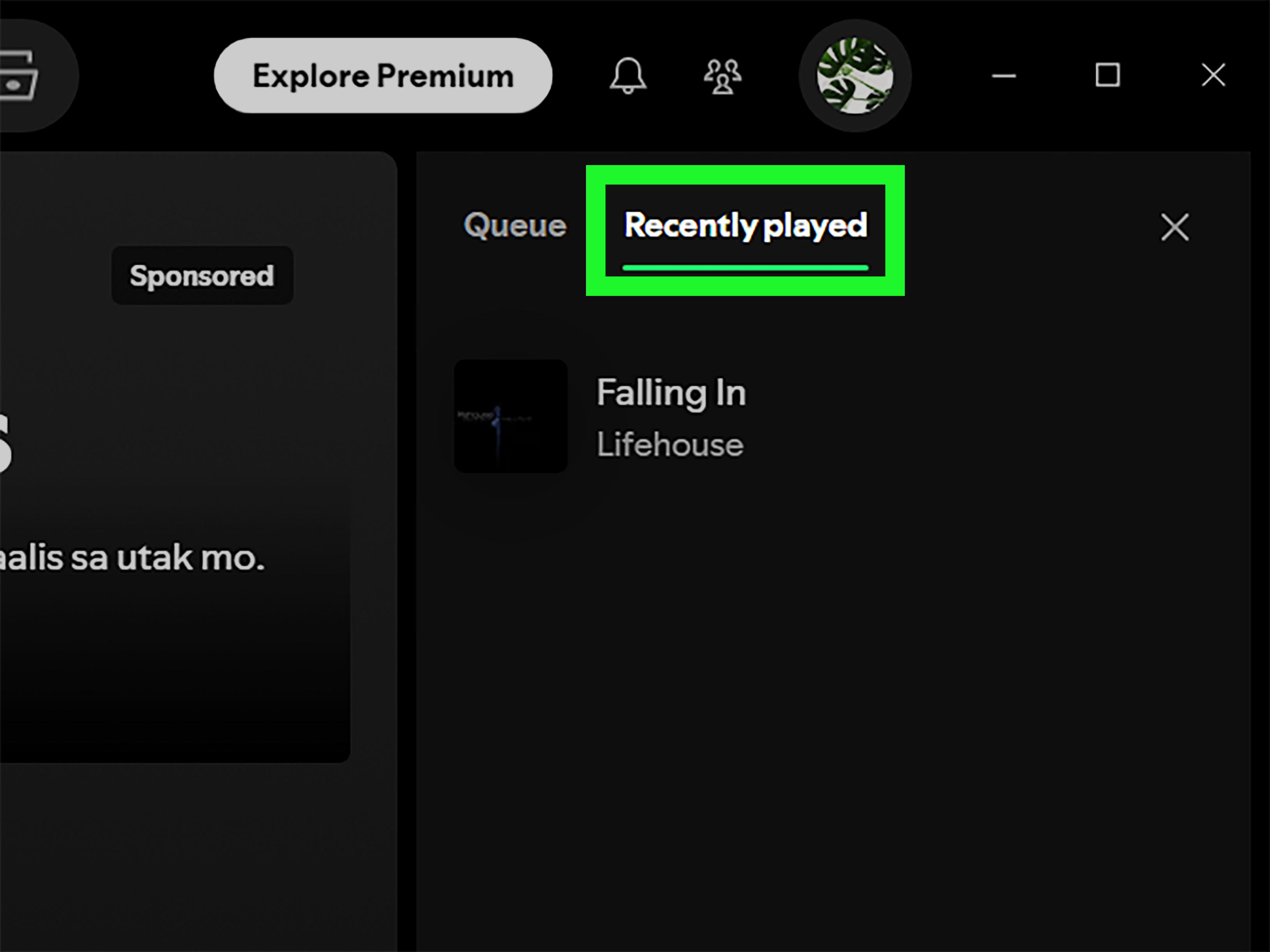
Open Spotify, click the Queue button near the bottom-right corner, and then choose Recently Played. This is usually the clearest way to see your recent listening activity on a computer.
If you want more than a quick list
Spotify also offers an account-data route for users who want a broader history. That is the grown-up version of checking your musical receipts.
How to See Your Recently Played Songs on Spotify Mobile
The mobile app is where most people do their daily listening, so let’s start there. Spotify’s mobile interface changes more often than people change their “current favorite song,” so the wording may shift slightly from one version to another. Still, the basic idea stays the same: your profile and your Home screen are the two main places to check.
Method 1: Use Listening History
- Open the Spotify app on your iPhone or Android phone.
- Tap your profile picture.
- Tap Listening history.
- Scroll through your recent activity to find the song, artist, album, or episode you want.
This method is usually the most direct. It is especially useful when you want a clean, recent trail of what you just played instead of a giant pile of recommendations shouting for your attention.
Method 2: Check the Home or Recents Area
Spotify also surfaces recent listening on the Home screen or in a Recents-style section, depending on your version of the app. This can include songs, playlists, podcasts, audiobooks, and other items you recently touched. It is handy when you remember the album art but not the title. Album art is the visual equivalent of “I know that face from somewhere.”
The main thing to remember is that mobile history is designed for convenience, not a perfect archive. It is great for finding what you played recently, but it is not always the best tool for long-term tracking or detailed data.
How to See Your Recently Played Songs on Spotify Desktop
If mobile feels a little too streamlined, the desktop app is often the better choice. It gives you a more straightforward “show me what I played” experience instead of making you wander through the app like a lost tourist in your own playlist library.
- Open the Spotify desktop app on your PC or Mac.
- Click the Queue icon in the lower-right area.
- Select Recently Played.
- Browse your recent songs and other audio you have played.
This is one of the simplest ways to see your Spotify listening history. If you are trying to track down a song from earlier in the day, desktop is often the easiest place to do it. It is also useful if you suspect someone else used your account and you want to spot unfamiliar plays quickly.
What Counts as “Recently Played” on Spotify?
Here is where things get interesting. “Recently played” on Spotify is not always limited to songs. Depending on the device and the view, it can also include:
- Albums
- Artists
- Playlists
- Podcast episodes
- Audiobooks or audiobook chapters
That means the feature is more like a recent activity snapshot than a pure song-only ledger. So if you were hoping for a neat museum of only tracks, Spotify may instead hand you a mixed bag of your latest audio adventures. Useful, yes. Hyper-organized, not always.
Recently Played vs. Listening History vs. Wrapped
These terms sound similar, but they are not the same thing. If you mix them up, you are not alone. Spotify does not exactly make the naming feel like a clean filing cabinet.
Recently Played
This is your short-term activity view. It helps you revisit content you listened to recently.
Listening History
This is the mobile-friendly way of reviewing recent listening activity in the app. It often overlaps with Recently Played, but the presentation can differ depending on the platform and app version.
Spotify Wrapped
This is your annual recap. It highlights top songs, artists, genres, and habits from the year. Wrapped is great for bragging, self-reflection, and learning that you spent an alarming amount of time listening to one sad song on repeat.
Extended Streaming History
This is the deeper, account-data version. If you want more than just a quick glance at recent plays, this is where Spotify becomes less “fun music app” and more “here are the records, detective.”
How to See More of Your Spotify History
If the in-app history is not enough, you still have options.
Request Your Spotify Data
Spotify lets users download account data, including more detailed streaming history. This is the best route if you want a broader record of what you played over time. It is especially useful if you are curious about patterns, creating a personal archive, or settling an argument with yourself about whether you really listened to that album “all summer.”
For people who love data, this option is the VIP lounge. You are not just seeing the last thing you played; you are looking at a bigger picture of your listening behavior.
Use Spotify Wrapped for Big-Picture Trends
If you are less interested in the exact last song and more interested in your overall habits, Wrapped is the flashy year-end option. It will not replace recently played, but it is great for seeing your broader music identity over time.
For Developers: Use Spotify’s Recently Played Endpoint
If you build apps or like tinkering with your music data, Spotify’s developer platform includes a recently played tracks endpoint. That can help pull recent track activity in a more technical way. Just note that the official developer route is for tracks and does not cover podcast episodes in the same way. In other words, it is useful, but not magical.
Why Your Recently Played Songs Might Not Show Up
If your history looks incomplete, empty, or weirdly selective, there are a few common reasons.
1. Your app version changed the layout
Spotify loves moving buttons around just enough to keep life interesting. If you do not see Recently Played where you expect it, check your profile, Home screen, or desktop Queue panel.
2. You are checking the wrong device
Desktop and mobile do not always display history in exactly the same way. If mobile feels limited, try the desktop app for a clearer view.
3. You need to log out and back in
Sync issues happen. Logging out and back in can refresh account activity and fix minor display problems.
4. You are expecting a full archive from a recent-activity feature
This one is easy to miss. Recently Played is not the same thing as a complete lifetime history. If you want deeper records, request your data instead.
Can Other People See What You Recently Played?
Potentially, yes, at least in part. Spotify has a separate setting for recently played artists on your profile. That means someone visiting your profile may be able to see artists you listened to recently unless you turn that feature off.
If privacy matters to you, it is worth checking your settings. This is especially smart if your Spotify taste swings wildly between workout anthems, movie soundtracks, lo-fi study beats, and one suspicious amount of 2000s breakup songs.
How to protect your privacy
- Review your Spotify privacy and social settings.
- Turn off visibility for recently played artists if you do not want them shown on your profile.
- Use a Private Session when you want listening activity to stay more low-key.
Tips for Getting More Value From Your Spotify History
Rebuild forgotten playlists
If you heard three amazing songs this week and forgot to save them, your recent history can help you rebuild your accidental masterpiece.
Spot account misuse
If your Recently Played list suddenly looks like a stranger borrowed your ears, it may be a sign that someone else accessed your account.
Train your recommendations
Your listening behavior influences Spotify recommendations. If you use the service for sleep sounds, kids’ music, party playlists, or temporary obsessions, those plays can shape future suggestions. Spotify now also gives users more control over recommendation inputs, including tools that reduce the impact of certain songs or playlists on taste-based recommendations.
Reflect on your habits
Sometimes your recently played list is less about finding one song and more about realizing you listened to the same track seven times in a row. No judgment. Repetition is just enthusiasm wearing headphones.
Should You Use Third-Party Spotify Stats Tools?
There are third-party apps and websites that promise deeper Spotify insights, including top tracks, favorite artists, and extended listening stats. Some people love them. Some people connect them once, look at the data, and feel personally attacked by their own choices.
If you use a third-party tool, be careful. Stick with services you trust, read the permission requests, and remember that official Spotify data exports are the safer route if privacy is your top concern.
Final Thoughts
Learning how to see your recently played songs on Spotify is one of those tiny life upgrades that pays off immediately. Whether you are trying to recover a song, revisit a playlist, check whether your account was hijacked by a smooth-jazz enthusiast, or simply admire your own excellent taste, Spotify gives you several ways to look back.
The best method depends on what you need. For quick access, use Listening history on mobile or Queue > Recently Played on desktop. For a bigger-picture view, use Wrapped or request your Extended Streaming History data. For privacy, review your settings and manage what appears on your profile. Easy, useful, and much less dramatic than trying to hum the mystery song into a search engine.
Experiences With Finding Recently Played Songs on Spotify
One of the most relatable Spotify experiences is hearing an incredible song during a commute, a workout, or a late-night scrolling session, then forgetting to save it because you were convinced you would remember it. You never do. Your brain stores random trivia forever but decides a song title from 12 minutes ago is classified information. That is exactly where recently played history becomes ridiculously useful.
A lot of users discover this feature after a tiny music emergency. Maybe they heard a song in a friend’s car, maybe autoplay served up an unexpected gem, or maybe Spotify’s algorithm finally got something so right it deserved a thank-you card. Instead of trying to search lyrics like “oh oh yeah baby moonlight forever” and hoping for the best, they open Spotify history and retrace their steps. Suddenly the mystery is solved, and civilization continues.
Another common experience is using listening history as a memory tool. People do not just use Spotify to consume music; they use it to soundtrack their routines. There are songs for cleaning the kitchen, songs for pretending emails are exciting, songs for dramatic walks, and songs for staring at the ceiling like you are in an indie film. Looking back at recently played tracks can actually help people remember what they were doing, where they were, or what phase they were in. Music has a weirdly powerful way of pinning moments in place.
Some listeners also use Spotify history as a playlist rescue machine. You may not have saved every track, but your recently played list can help you recreate the vibe. This is especially handy after parties, road trips, study sessions, or those random afternoons when Spotify accidentally becomes the best DJ in your life. Instead of starting from scratch, you can scroll back and rebuild the whole mood one song at a time.
There is also the privacy angle, which feels funny until it suddenly feels very real. Plenty of people check their recently played list not because they forgot a song, but because they saw something odd in their recommendations. If your history suddenly shows artists, playlists, or podcasts you absolutely did not choose, that can be the clue that someone else used your account. In that sense, recently played is not just a convenience feature. It is a tiny security alarm with album art.
Then there are the users who love patterns. They check their history and notice they always play mellow songs on Sunday nights, energetic tracks on weekday mornings, or the same comfort album whenever life gets chaotic. That kind of self-awareness sounds dramatic, but it can be surprisingly useful. Spotify history becomes a mirror, showing not just what you listened to, but how you move through your days.
And, of course, sometimes the experience is just hilarious. You open your listening history expecting a cool portrait of your taste and instead find a completely unhinged mix: one classical piece, two gym tracks, a podcast about productivity, three movie soundtracks, and a song you played nine times because it made you feel like the main character while folding laundry. That is the beauty of it. Your recently played list is not always polished, but it is honest. Messy, useful, revealing, and occasionally chaotic in the most entertaining way.