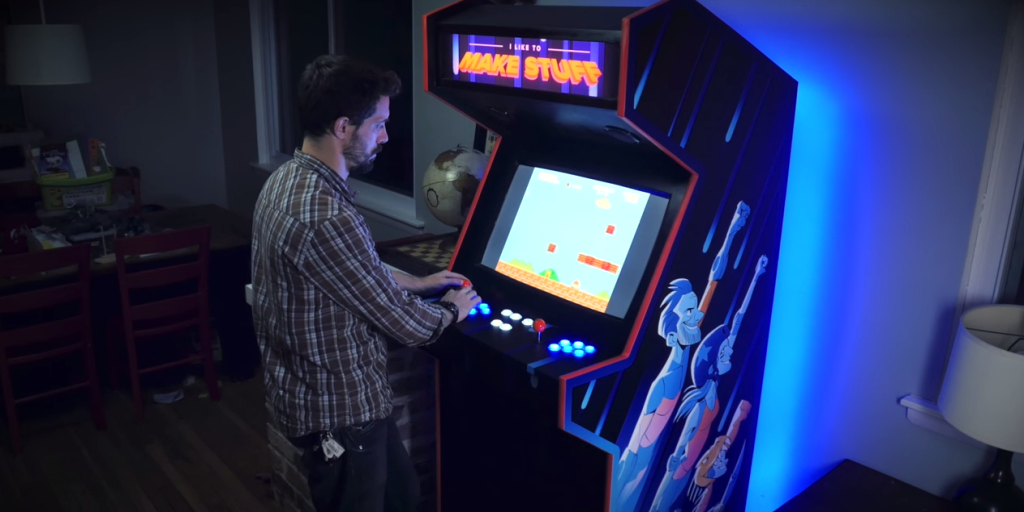
Building an arcade cabinet for gaming and storage is the kind of project that makes your inner child high-five your adult self. You get the nostalgic glow of a classic arcade machine, the satisfaction of a real DIY woodworking build, and a sneaky storage solution that hides controllers, cables, game accessories, board games, and all the mysterious adapters nobody remembers buying.
The best part? A home arcade cabinet does not have to be a giant, coin-hungry beast from the 1980s. Today, you can build a practical cabinet using plywood or MDF, a modern flat-screen monitor, arcade buttons, joysticks, speakers, a small computer or Raspberry Pi, and smart shelving inside the lower cabinet. The result is a functional game-room centerpiece that looks fun, plays beautifully, and keeps clutter from multiplying like bonus enemies.
This guide explains how to build an arcade cabinet for gaming and storage from planning to finishing. We will cover design choices, materials, tools, electronics, ventilation, storage layout, assembly, safety, and the little details that separate a wobbly box from a cabinet you proudly show off when guests come over.
Why Build an Arcade Cabinet With Storage?
A DIY arcade cabinet is already a great conversation piece, but adding storage turns it into a practical piece of furniture. Many home arcades fail the “real life” test because they look exciting but do nothing about the piles of controllers, chargers, cartridges, HDMI cables, manuals, and gaming headsets that gather nearby. A cabinet with built-in storage solves that problem elegantly.
Instead of building only a gaming station, think of the cabinet as a vertical entertainment hub. The upper section holds the monitor, marquee, speakers, and control panel. The lower section becomes storage for game gear, extra parts, power strips, cleaning cloths, portable consoles, or even snacks. Yes, snack storage counts as engineering when done with confidence.
Choose the Right Arcade Cabinet Style
Before cutting wood, decide what kind of arcade cabinet fits your room, budget, and gaming habits. A full-size upright arcade cabinet delivers the most classic experience. It usually stands around five to six feet tall and works well in a game room, basement, garage lounge, or media room. It also offers the most internal storage space.
A bartop arcade cabinet is smaller and sits on a counter, desk, or custom base. It is easier to build, costs less, and takes up less room, but storage is limited unless you build a separate pedestal underneath. A slim wall-leaning cabinet is another smart option for apartments because it keeps the retro look without dominating the room.
For a gaming-and-storage build, a full-size upright or pedestal-style arcade cabinet is usually the best choice. It gives you enough depth for shelves, cable management, a service door, and a stable base. If your home has limited floor space, design the cabinet slightly narrower and use vertical storage inside.
Plan the Dimensions Before You Buy Materials
Good arcade cabinet design begins with dimensions. A typical DIY upright cabinet may be about 24 to 30 inches wide, 24 to 30 inches deep, and 60 to 72 inches tall. These measurements can change depending on your monitor size, player layout, and room. A two-player control panel needs more width than a one-player setup, especially if you want both players to avoid accidental elbow combat.
Start by choosing the monitor. Many builders use a 24-inch to 32-inch flat-screen display because it is affordable, easy to mount, and lighter than old CRT monitors. Once you know the screen size, sketch the cabinet around it. Leave room for a bezel, ventilation, mounting brackets, speakers, and future maintenance.
Next, plan the control panel height. For comfortable standing play, the joystick surface often lands around waist height. If the cabinet will be used by kids and adults, consider a small step stool or a lower control panel angle. Comfort matters because the goal is joyful button-mashing, not wrist yoga.
Materials: Plywood, MDF, or Both?
The two most common materials for a DIY arcade cabinet are plywood and MDF. Plywood is strong, lighter than MDF, and holds screws well. It is an excellent choice for the cabinet structure, especially the side panels, base, shelves, and back supports. Cabinet-grade plywood also handles movement better if you ever need to relocate the machine.
MDF has a very smooth surface, which makes it great for painted panels, control panels, speaker boards, and areas where you want a clean finish. It is often affordable and easy to shape, but it is heavy, creates fine dust when cut, and does not like moisture. If you use MDF, wear a respirator or high-quality dust mask when cutting and seal the edges before painting.
A smart hybrid approach is to use plywood for the structure and MDF for cosmetic or flat painted surfaces. For example, build the side panels and shelves from 3/4-inch plywood, then use MDF for the control panel and marquee face. This gives you strength where it matters and smoothness where people will actually stare.
Tools You Will Need
You do not need a professional cabinet shop to build a home arcade cabinet, but you do need basic woodworking tools and patience. Helpful tools include a circular saw or table saw, jigsaw, drill, router, orbital sander, clamps, measuring tape, square, pencil, countersink bit, hole saw or Forstner bits, and a screwdriver set.
A router is especially useful if you want rounded edges, recessed panels, or T-molding along the sides. T-molding is the plastic trim commonly seen on arcade cabinets. It gives the cabinet a polished arcade look and protects the edges from bumps. If you plan to install it, cut the slot before painting or applying side art.
For electronics, you may need wire strippers, crimp connectors, zip ties, a small screwdriver, and labels for cables. Labeling wires may feel unnecessary at first. Then, two months later, you open the cabinet and discover a spaghetti festival. Label now; thank yourself later.
Designing Storage Inside the Arcade Cabinet
The storage section should be planned as carefully as the gaming section. The lower cabinet is the best place for shelves, drawers, or cubbies. Adjustable shelves are ideal because gaming gear changes over time. Today it is controllers and cartridges; tomorrow it may be VR accessories, handheld consoles, or a mysterious box labeled “important cables” that nobody is brave enough to sort.
Storage Ideas That Work Well
Install one fixed shelf near the bottom to strengthen the cabinet and create a stable storage zone. Above that, use adjustable shelf pin holes so you can move shelves up or down. Add small bins for USB drives, adapters, button caps, spare switches, and cleaning tools. A shallow drawer under the control panel can hold instruction cards, microfiber cloths, and spare batteries.
If you have physical games, add vertical dividers like a media cabinet. If you have many controllers, mount hooks or small brackets on the inside of the cabinet door. For cables, use Velcro straps and a dedicated cable box. Avoid stuffing cords directly beside hot electronics or blocking airflow.
Build the Cabinet Frame
Once your plan is ready, make a full-size side panel template from cardboard, hardboard, or cheap plywood. The side profile defines the entire cabinet, including the screen angle, marquee slope, control panel position, and base. After you are happy with the shape, trace it onto your main sheet material and cut two identical side panels.
Clamp the two side panels together and sand the edges at the same time. This keeps the shape consistent. Then cut the base, top, back rails, monitor shelf, speaker panel, control panel support, and storage shelves. Dry-fit the pieces before glue or screws. Dry-fitting is the DIY version of asking, “Are we about to make a terrible decision?”
Use wood glue and screws to assemble the frame. Pre-drill holes to prevent splitting, especially near panel edges. Keep checking for square as you assemble. A cabinet that is slightly out of square may still stand, but doors, shelves, and monitor mounts become much harder to align.
Create the Control Panel
The control panel is where the arcade cabinet earns its personality. A basic two-player layout usually includes two joysticks, six buttons per player, start buttons, coin/select buttons, and possibly administrative buttons for menu navigation. Some builders add a trackball, spinner, or dedicated hotkeys, but beginners should keep the first build simple.
Print or draw a drilling template before making holes. Standard arcade buttons often require large round holes, commonly drilled with a hole saw or Forstner bit. Drill slowly, support the underside of the panel, and test-fit each button. If the control panel will have artwork under acrylic, drill the wood first, then use it as a guide for the acrylic.
For wiring, many DIY builders use a USB arcade encoder. The joystick microswitches and button switches connect to the encoder, and the encoder connects to the computer or Raspberry Pi by USB. This setup is popular because it keeps wiring manageable and makes the controls appear as a game controller or keyboard input.
Pick the Gaming Hardware
Your arcade cabinet needs a brain. The most common options are a Raspberry Pi, a small Windows or Linux PC, a mini PC, or an older computer you already own. A Raspberry Pi with RetroPie or similar retro-gaming software can be compact, efficient, and affordable. A PC offers more power and flexibility, especially for newer indie arcade games, Steam titles, or demanding emulation.
MAME is widely used for preserving and emulating classic arcade systems, while RetroPie helps turn a Raspberry Pi or PC into a retro-gaming machine. Whatever platform you choose, use games and ROMs legally. The cabinet may look like it belongs in 1987, but copyright law did not stay behind with the neon carpet.
Mount the hardware where it is easy to access. Do not bury the computer behind permanent panels. Use a rear service door or removable back panel. Leave space for USB ports, HDMI cables, power access, and airflow.
Install the Monitor, Speakers, and Marquee
The monitor should be securely mounted to internal supports, not balanced like a pizza box on a shelf. Use a VESA mount if the display supports it, or build a sturdy wooden frame that holds the monitor from behind. Angle the screen slightly upward for comfortable viewing.
Add a bezel around the screen to hide the monitor edges and create a clean arcade look. The bezel can be made from thin plywood, foam board, acrylic, or printed artwork. For the marquee at the top, use a translucent panel with printed graphics and LED lighting behind it. Keep LED strips accessible so they can be replaced later.
For sound, small powered speakers or a compact amplifier with arcade-style speaker grilles work well. Mount the speakers above or below the monitor. Avoid placing speakers directly against loose panels that may rattle. Nothing ruins a heroic final boss fight like cabinet buzz that sounds like an angry refrigerator.
Plan Ventilation and Electrical Safety
Arcade cabinets contain electronics, and electronics create heat. Add ventilation holes or grilles near the back, top, and lower section of the cabinet. A quiet computer fan can help move warm air out. Keep storage items away from vents, power supplies, and exposed electronics.
Use a quality surge protector or power strip rated for the devices you are plugging in. Do not overload outlets, do not daisy-chain power strips, and do not run cords where they can be pinched by doors or shelves. If you are unsure about electrical work, keep the wiring simple and use ready-made, safety-certified components.
Install a single rear power entry or a clean cable exit hole with a grommet. Inside the cabinet, secure cables with clips or Velcro straps. Good cable management improves airflow, makes repairs easier, and reduces the chance of accidentally unplugging something during a dramatic cleaning session.
Sand, Paint, and Finish the Cabinet
Once the cabinet is assembled and tested, disassemble removable parts and prepare for finishing. Fill screw holes, sand rough edges, and seal exposed MDF edges if you used MDF. Primer is your friend, especially on MDF, because raw edges drink paint like they just crossed a desert.
For a classic arcade look, paint the cabinet black and add colorful side art. For a modern living-room-friendly build, choose satin navy, charcoal, white, walnut veneer, or matte green. You can apply vinyl graphics, stencil designs, or keep the cabinet clean and minimalist.
Add T-molding after painting and side art. Use a rubber mallet and work slowly around curves. Trim carefully at corners so the molding seats properly. The final trim makes a huge visual difference and helps the cabinet look less like a box and more like a real arcade machine.
Add Doors, Hinges, and Hidden Storage Features
For the storage section, choose either a front cabinet door, double doors, or an open shelf design. Doors make the cabinet look cleaner and hide clutter. Open shelves make accessories easier to grab. A good compromise is one closed lower compartment and one open shelf for frequently used controllers.
Use concealed hinges for a furniture-like finish or simple surface hinges for easier installation. Add magnetic catches so doors stay closed. If the cabinet will be used by children, consider soft-close hinges and avoid storing heavy items on high shelves.
You can also add a charging station inside the cabinet. Mount a USB charging hub to an interior wall and route cables through clips. This turns the arcade cabinet into a home base for wireless controllers, handheld systems, and rechargeable batteries.
Test Everything Before Final Assembly
Before closing the cabinet, test every button, joystick direction, speaker, light, fan, USB port, and power connection. Open the software and map the controls. Play several games that use different button layouts. If player two keeps jumping when player one presses start, you probably have a wiring or mapping issue.
Test the storage too. Put real items on the shelves and check whether the doors close, cables stay clear, and airflow remains open. Make sure the cabinet does not tip forward when the storage door is open or when players lean on the control panel. A wide base and proper weight distribution make the cabinet safer and more comfortable.
Common Mistakes to Avoid
The first common mistake is designing the cabinet around looks only. A beautiful cabinet that hurts your wrists or blocks access to the computer will become decoration, not entertainment. Build for comfort, maintenance, and airflow.
The second mistake is skipping templates. Control panels need accurate holes. Side panels need matching curves. Monitor openings need clean alignment. Templates save time and prevent the kind of “creative adjustments” that involve muttering in the garage.
The third mistake is ignoring storage until the end. Storage should be part of the structure, not an afterthought. Shelves can strengthen the cabinet if placed correctly. Doors, cubbies, and cable channels are much easier to add before everything is painted and wired.
The fourth mistake is using cheap power solutions. A home arcade cabinet combines a screen, computer, speakers, lights, and sometimes fans. Treat power management seriously. Use properly rated components, avoid damaged cords, and keep the inside neat.
Estimated Cost of a DIY Arcade Cabinet
The cost depends on size, materials, and hardware. A budget build using existing tools, a used monitor, and a Raspberry Pi or spare PC may cost a few hundred dollars. A polished full-size cabinet with quality plywood, custom graphics, LED marquee, premium controls, speakers, and a mini PC can cost significantly more.
Typical expenses include sheet goods, screws, glue, primer, paint, T-molding, buttons, joysticks, USB encoder, monitor, speakers, lighting, hinges, handles, fans, and storage bins. The best way to control cost is to decide early where quality matters most. Spend on the structure, controls, and safe power setup. Save money on decorative extras that can be upgraded later.
Experience Notes: What Building an Arcade Cabinet Teaches You
Building an arcade cabinet for gaming and storage is not just a weekend project; it is a tiny adventure in problem-solving. The first thing you learn is that measuring twice is not a cliché. It is survival. A cabinet has many connected parts, and one wrong measurement can affect the screen angle, control panel fit, door clearance, and shelf placement. The most successful builders slow down during planning because every minute spent with a pencil saves several minutes of sanding, patching, or pretending a gap was “intentional ventilation.”
The second lesson is that comfort matters more than flashy features. It is tempting to add every possible control: trackball, spinner, four-player layout, cup holder, glowing buttons, maybe a fog machine if enthusiasm gets out of hand. But a clean two-player setup with comfortable spacing often feels better than a crowded panel. When guests play, they notice whether the joystick feels natural, whether the screen is easy to see, and whether the buttons respond quickly. They rarely complain that you forgot a button dedicated entirely to one obscure submarine game from 1983.
Storage also changes the way the cabinet feels in daily life. A cabinet with shelves becomes useful even when nobody is playing. You can store controllers, small consoles, extension cables, cleaning supplies, and extra parts in one place. This makes the arcade cabinet feel less like a novelty and more like intentional furniture. The trick is to separate “gaming storage” from “random household storage.” Once the cabinet starts holding batteries, tape, receipts, and a screwdriver with no known origin, organization starts to lose the boss fight.
Another experience-based tip is to make the back panel removable. Many first-time builders focus on the front because that is what everyone sees. But the back is where repairs happen. A removable rear panel or access door makes it easier to update software, replace a fan, adjust cables, or swap a monitor. The same applies to the control panel. If possible, design it to lift or unscrew without destroying the artwork. Buttons and switches are replaceable, but only if you can reach them without becoming a cabinet archaeologist.
Painting and finishing usually take longer than expected. The cabinet may be playable after assembly, but the finish determines whether it looks homemade in a charming way or homemade in a “we ran out of daylight” way. Sand between coats, let paint cure, and avoid rushing vinyl or side art. Clean edges, smooth paint, and properly installed trim make the cabinet look professional even if the internal wiring has the emotional complexity of a soap opera.
Finally, the best arcade cabinet is the one people actually use. Build it for your favorite games, your available space, and your household. If kids will use it, make it sturdy and safe. If adults will use it during game nights, add practical storage and comfortable controls. If it will live in a living room, choose a finish that blends with the décor. A DIY arcade cabinet does not have to copy a commercial machine exactly. It can be a retro gaming station, storage cabinet, conversation piece, and personal trophy all at once. That is the magic of the project: it stores your gear, plays your games, and quietly announces that you are the kind of person who looked at a normal cabinet and thought, “This needs joysticks.”
Conclusion
Learning how to build an arcade cabinet for gaming and storage is a rewarding project because it combines woodworking, electronics, design, organization, and pure nostalgia. The process starts with a smart plan: choose the cabinet style, size the monitor, design the control panel, and map out storage before cutting materials. From there, use strong sheet goods, build a square frame, install reliable controls, manage airflow, and finish the cabinet with paint, trim, and artwork that matches your space.
The storage element is what makes this project especially useful. Instead of creating another bulky game-room object, you create a cabinet that earns its footprint every day. It hides clutter, protects accessories, charges controllers, and keeps gaming gear ready for action. With careful planning and a little patience, your DIY arcade cabinet can become the most entertaining storage unit in the house.