Software Defined Radio, usually shortened to SDR, is one of those phrases that sounds like it was invented in a lab by someone wearing safety glasses and holding a coffee mug that says “I void warranties.” Yet the idea is wonderfully practical: take many jobs that old radios handled with fixed analog circuits, move them into software, and suddenly one small box can become an FM receiver, aircraft tracker, weather satellite listener, ham radio experiment platform, spectrum analyzer, or wireless research tool.
In the Hackaday universe, SDR is where radio meets code, antennas meet curiosity, and a twenty-dollar USB dongle can send you down a weekend rabbit hole so deep that your family starts asking why the laptop is listening to airplanes. It is not magic. It is signal processing. But, to be fair, good signal processing often looks suspiciously like magic with math.
This Hackaday Dictionary entry explains what software defined radio means, how SDR hardware and software work together, why hackers love it, what you can actually do with it, and what beginners should know before turning the radio spectrum into their newest playground.
What Is Software Defined Radio?
Software Defined Radio is a radio system in which many functions traditionally built from dedicated analog hardware are performed by software running on a computer, embedded processor, FPGA, or system-on-chip. In a classic receiver, filtering, tuning, demodulation, and signal shaping are handled largely by physical circuits. In an SDR, the radio front end still matters, but much of the interesting work happens after the signal is converted into digital samples.
That shift changes everything. Instead of buying one radio for broadcast FM, another for aircraft signals, another for amateur radio experiments, and another for digital modulation research, an SDR lets you change behavior by changing software. The same hardware may become a scanner today, a packet decoder tomorrow, and a spectrum monitor after lunch. Traditional radios are like toasters: excellent at one job. SDR is more like a kitchen full of programmable appliances. Sometimes brilliant, sometimes chaotic, always capable of making a mess if you click the wrong thing.
The Short Definition
In plain American English: an SDR is a radio whose personality is controlled by software. It still needs antennas, amplifiers, mixers, clocks, and analog-to-digital or digital-to-analog conversion. However, software decides how the incoming or outgoing signal is interpreted, filtered, displayed, decoded, or generated.
That is why SDR matters to hobbyists, engineers, students, researchers, and hardware hackers. It lowers the barrier to experimenting with radio signals. You no longer need a bench full of specialized receivers to explore the spectrum. You need compatible SDR hardware, the right antenna, decent software, patience, and perhaps a willingness to explain to your neighbors that the metal thing in your window is not part of a weather-control device.
How SDR Works
Every radio system has to deal with electromagnetic waves. An antenna catches a tiny voltage from the air, and the radio must tune, amplify, filter, and demodulate that signal into something useful. In an SDR receiver, the process usually looks like this:
1. The Antenna Collects RF Energy
The antenna is the radio’s ear. A poor antenna can make even expensive SDR hardware seem deaf. A good antenna placed in a reasonable location can make a cheap dongle surprisingly capable. Different frequencies often require different antenna sizes and designs, which is why SDR beginners quickly discover that “one antenna to rule them all” is mostly fantasy with coax attached.
2. The RF Front End Tunes and Conditions the Signal
The SDR hardware selects a slice of spectrum, amplifies it, and converts it to a form that can be sampled. Depending on the device, this front end may include low-noise amplifiers, filters, mixers, oscillators, gain controls, and protection circuits. This stage matters because software cannot recover detail that the analog front end never captured.
3. The ADC Turns Radio Into Numbers
An analog-to-digital converter, or ADC, samples the signal and produces digital values. Many SDR systems use I/Q samples, short for in-phase and quadrature. These paired samples preserve both amplitude and phase information, which allows software to perform flexible demodulation and analysis. I/Q samples are the raw ingredients of SDR cooking. Burn them, and the whole recipe suffers.
4. Software Does the Heavy Lifting
Once the signal becomes data, software can filter it, shift its frequency, visualize it on a waterfall display, demodulate it, decode digital modes, record it, or feed it into other tools. Applications such as GNU Radio, SDR#, SDR++, GQRX, SDRangel, CubicSDR, and custom Python scripts can transform raw samples into meaningful information.
Why Hackers Love SDR
SDR fits the hacker mindset because it turns radio from a sealed appliance into an open experiment. With the right hardware and legal operating practices, you can observe signals that were always around you but invisible: FM broadcast stations, aircraft ADS-B beacons, NOAA weather radio, amateur radio signals, pager-like telemetry in approved contexts, satellite downlinks, garage-door noise, tire-pressure sensors, wireless weather stations, and mysterious blips that may or may not be your neighbor’s questionable LED lamp.
For Hackaday readers, SDR also has an irresistible combination of ingredients: cheap entry-level hardware, open-source tools, visible results, weird edge cases, and endless opportunities to build antennas out of objects that were never meant to be antennas. It rewards both software people and hardware people. Coders get to play with digital signal processing. Electronics fans get to chase noise, impedance, filters, amplifiers, grounding, shielding, and the ancient RF curse known as “it worked yesterday.”
Popular SDR Hardware
RTL-SDR: The Gateway Dongle
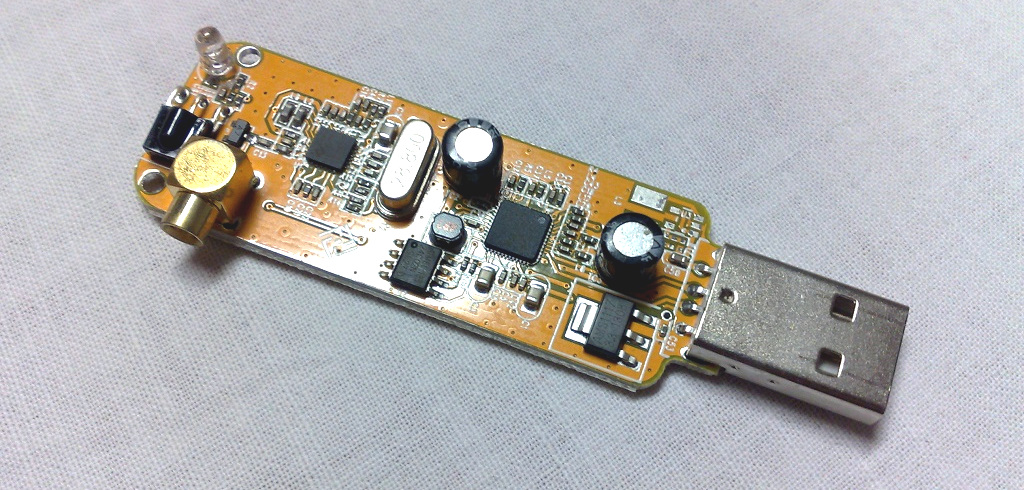
The RTL-SDR became famous because certain DVB-T TV tuner USB dongles based on the Realtek RTL2832U chipset could expose raw I/Q samples to a computer. That discovery turned inexpensive consumer hardware into a wideband receive-only SDR platform. It is not laboratory-grade equipment, but it is affordable, widely supported, and good enough to teach thousands of people that the air is full of signals.
Typical RTL-SDR projects include listening to broadcast FM, monitoring local public weather broadcasts where legal, receiving ADS-B aircraft beacons at 1090 MHz, exploring amateur radio bands, decoding simple digital signals, and learning waterfall displays. Its biggest advantages are price and community support. Its limitations include modest dynamic range, receive-only operation, and performance that depends heavily on gain settings, antenna choice, filtering, and local RF noise.
HackRF One: The Experimenter’s Pocket Lab
HackRF One is a well-known open-source hardware SDR capable of receiving and transmitting across a wide frequency range. Unlike the RTL-SDR, it can transmit, which makes it useful for testing and development when used legally and responsibly. That “responsibly” part is not decorative. Transmitting RF energy without understanding the rules can interfere with real services, and the FCC is not known for giving out gold stars for accidental chaos.
HackRF is popular for learning modulation, replaying controlled lab signals, prototyping waveforms, and exploring RF concepts. It is not full duplex, and it is not a substitute for every professional instrument, but it gives curious people a flexible platform for serious experimentation.
USRP, Airspy, SDRplay, PlutoSDR, and Friends
Above the entry-level tier, the SDR world gets richer. Ettus Research USRP devices are widely used in universities, research labs, wireless prototyping, and industry. Airspy receivers focus on high-performance reception. Analog Devices’ ADALM-Pluto is popular in education because it combines SDR learning with a compact, programmable platform. SDRplay receivers cover broad tuning ranges and appeal to shortwave and general-coverage listeners. Each platform has trade-offs in bandwidth, frequency range, transmit capability, ADC resolution, driver support, clock stability, and cost.
The practical lesson is simple: do not buy the most expensive SDR first. Buy the SDR that matches the signals you want to explore. A beginner interested in aircraft tracking does not need the same setup as someone researching 5G waveforms, satellite telemetry, or coherent multi-channel direction finding.
SDR Software: Where the Radio Gets Its Brain
SDR software turns samples into insight. A graphical receiver such as SDR# or SDR++ is often the easiest starting point because it shows a spectrum display and waterfall, lets you tune with a mouse, and supports common demodulation modes. GQRX is common on Linux and macOS. SDRangel supports many devices and more advanced receive/transmit workflows. GNU Radio is the big toolbox: a free, open-source signal processing framework where users connect blocks into flowgraphs to create receivers, transmitters, decoders, filters, and research prototypes.
GNU Radio deserves special mention because it teaches the real SDR concept. Instead of treating the radio like a black box, it shows how signals move through filters, frequency translators, demodulators, resamplers, and sinks. At first, a GNU Radio flowgraph can look like someone spilled spaghetti across a circuit diagram. After a while, you begin to see the logic. Then you start adding blocks “just to test something,” which is the SDR equivalent of opening one browser tab and waking up with forty-seven.
What Can You Do With SDR?
Listen to Broadcast Signals
One of the simplest SDR projects is receiving local FM broadcast radio. It teaches tuning, demodulation, gain control, bandwidth, and waterfall reading. It is also forgiving: strong local FM stations are easy to find, and the results are instantly understandable. If you hear music, your chain is working. If you hear only noise, welcome to RF troubleshooting, where every cable is a suspect.
Track Aircraft With ADS-B
Aircraft commonly transmit ADS-B messages at 1090 MHz. With an SDR, a suitable antenna, and decoder software, hobbyists can receive aircraft position messages and display planes on a map. This project is popular because the results are visual, practical, and oddly satisfying. There is something delightful about seeing a passing aircraft on your screen and realizing your little antenna caught its signal from miles away.
Receive Weather Satellite Images
Weather satellite reception is a classic SDR adventure. With the right antenna and timing, hobbyists can receive signals from passing satellites and decode images. This project teaches orbital passes, Doppler shift, antenna polarization, signal strength, and patience. It also teaches humility, usually when your first satellite image looks like a fax machine had a nightmare.
Explore Amateur Radio
SDR is useful for amateur radio operators because it provides panoramic spectrum views, digital mode experimentation, remote receivers, and flexible filtering. Licensed operators can pair SDR with transmit-capable systems for legal communications and experimentation. Unlicensed users can still learn a great deal by receiving permitted signals and studying public, non-private transmissions.
Learn Digital Signal Processing
SDR makes DSP tangible. Concepts like sampling rate, aliasing, filtering, FFTs, frequency offset, modulation, demodulation, noise floor, signal-to-noise ratio, and decimation stop being textbook creatures and become things you can see on the screen. That is one reason SDR is valuable in education: it connects abstract math to visible behavior.
Important SDR Terms
I/Q Samples
I/Q samples are pairs of values that describe a signal’s phase and amplitude relationship. They allow software to represent complex signals and process frequency shifts, modulation, and demodulation flexibly.
Bandwidth
Bandwidth is the width of spectrum your SDR can capture at once. A wider bandwidth lets you observe more spectrum but requires more data throughput and processing power.
Sample Rate
The sample rate is how many samples per second the SDR sends to the computer. Higher sample rates capture wider slices of spectrum, but they can also overload USB ports, CPUs, or poorly configured software.
Gain
Gain controls amplification. Too little gain and weak signals disappear. Too much gain and strong signals overload the receiver. Beginners often treat gain like volume. It is not volume. It is more like seasoning: a little helps, too much ruins dinner.
Waterfall Display
A waterfall display shows frequency across one axis and time across another, with signal strength represented visually. It is one of the most useful SDR tools because it lets users see signals appear, vanish, drift, hop, pulse, or spread.
SDR and the Law: Receive Carefully, Transmit Responsibly
SDR makes radio experimentation easier, but it does not erase radio regulations. Receiving public broadcasts and many amateur signals is generally part of normal radio hobby activity, but privacy laws and communications rules still apply. Do not decode, publish, or misuse private communications. Do not transmit unless you are licensed or operating under a legal unlicensed rule for the device, band, power level, and modulation involved.
The FCC treats software defined radios seriously because software can change how a device operates. Certified SDR equipment must prevent unauthorized software changes that could make the radio operate outside approved parameters. That matters because radio spectrum is shared infrastructure. Interference is not just rude; it can affect aviation, emergency services, navigation, cellular networks, satellites, and other systems that should not be treated as your personal test bench.
Common Beginner Mistakes
Using the Wrong Antenna
The antenna included in a cheap kit may work for strong signals, but it is rarely ideal for everything. Match the antenna to the frequency. A small whip might receive nearby FM broadcast stations but perform poorly on lower HF bands without extra hardware.
Cranking the Gain Too High
More gain does not always mean more signal. It can mean more overload, more images, more distortion, and more mysterious spikes. Adjust gain slowly and watch the noise floor.
Ignoring Filters
Strong local FM broadcast stations, cellular towers, paging transmitters, and other high-power signals can overload an SDR. External filters can dramatically improve reception for specific projects.
Expecting One Device to Do Everything
Every SDR has compromises. Some are receive-only. Some transmit. Some have better dynamic range. Some have wider bandwidth. Some cover HF well; others need upconverters or direct sampling tricks. Read specifications carefully before buying.
Why SDR Matters Beyond Hobby Projects
SDR is not only for hobbyists watching waterfalls at midnight. It is used in wireless research, spectrum monitoring, aerospace systems, defense, education, cellular prototyping, satellite communications, Internet of Things experimentation, and test equipment. NASA’s Space Telecommunications Radio System work, for example, reflects a broader need for reconfigurable radio architectures that can adapt across missions and hardware platforms.
The deeper value of SDR is flexibility. Wireless standards change. Frequencies vary. Protocols evolve. A software-centered radio can be updated, reused, and repurposed more easily than a fixed-function design. That does not mean analog hardware is obsolete. RF front ends, clocks, amplifiers, converters, and filters remain crucial. SDR is not “software instead of hardware.” It is software and hardware negotiating a smarter division of labor.
How to Start With SDR
For beginners, the easiest path is simple: start with a receive-only RTL-SDR, install beginner-friendly software, connect a basic antenna, and tune to a strong local FM broadcast station. Once that works, try ADS-B reception, NOAA weather radio, or amateur radio signals that are legal to receive in your location. Keep notes. Change one setting at a time. Label your adapters, because SDR has a way of multiplying SMA, BNC, MCX, and random coax connectors like electronic rabbits.
After learning the basics, explore GNU Radio. Build a simple FM receiver flowgraph. Learn what filters do. Record I/Q samples and replay them for analysis. Add a band-pass filter. Try resampling. Watch what happens when the sample rate changes. The goal is not just to “hear stuff.” The goal is to understand how signals become data and how data becomes meaning.
Experience Notes: What SDR Teaches You After the First Weekend
The first real lesson of SDR is that radio is everywhere, but clarity is earned. You plug in a dongle, install software, and expect the spectrum to politely organize itself like a spreadsheet. Instead, you get noise, spikes, humps, ghosts, and signals that appear only when you are not looking directly at them. It feels messy at first, but that mess is the classroom.
One of the most useful experiences is learning to identify strong local signals. A beginner may see huge peaks and assume they have discovered something exotic. Usually, it is broadcast FM, a paging transmitter, a nearby device, or overload from too much gain. This is where SDR teaches discipline. Lower the gain. Add a filter. Move the antenna. Change the sample rate. Try a different USB cable. Suddenly the chaos becomes readable.
Another memorable experience is building or modifying antennas. A simple quarter-wave ground-plane antenna for ADS-B can outperform a random included whip when placed properly. A V-dipole cut for weather satellite reception can turn a weak pass into a recognizable image. These projects are cheap, physical, and satisfying. They remind you that software defined radio is not software-only radio. The antenna still gets the first vote.
SDR also teaches respect for the spectrum. It is tempting to chase every mystery signal, but responsible operators learn boundaries. Public signals, amateur transmissions, broadcast services, and educational lab setups are fair learning territory. Private communications are not a toy. Transmitting requires even more care. A transmit-capable SDR can be an excellent learning platform, but only when paired with proper licensing, shielding, dummy loads, filters, and legal frequencies.
The best SDR experience is the moment when an invisible system becomes visible. You see an aircraft beacon draw a plane on a map. You decode a weather satellite pass. You watch a digital signal occupy a neat slice of bandwidth. You tune across a band and realize that the waterfall is a living map of human technology. Radios stop being boxes with knobs and become software-controlled windows into the electromagnetic world.
That is why SDR remains a favorite Hackaday topic. It rewards curiosity. It tolerates improvisation. It exposes bad assumptions quickly. It lets a beginner start with a cheap receiver and gives experts room to explore advanced wireless research. SDR is not just a gadget category; it is a way of thinking about radio as something flexible, inspectable, programmable, and wonderfully hackable.
Conclusion
Software Defined Radio is one of the most powerful ideas in modern radio technology: move as much radio behavior as practical into software, keep the necessary RF hardware, and let users experiment with signals in ways that fixed-purpose radios cannot match. For beginners, SDR opens the door to broadcast listening, aircraft tracking, satellite reception, amateur radio exploration, and DSP education. For engineers and researchers, it supports rapid prototyping, reconfigurable systems, wireless testing, and advanced communications work.
The Hackaday-style takeaway is simple: SDR lets you see the invisible. Add an antenna, a small receiver, and a curious mind, and the empty air around you becomes a busy, buzzing, beautifully weird data landscape. Just remember the two golden rules: listen responsibly, and do not transmit unless you know exactly what you are doing and are legally allowed to do it. The spectrum is shared, and nobody wants their garage-door opener accidentally joining your science project.