Note: This article is based on real TV manufacturer and consumer cleaning guidance, rewritten in an original, web-ready style for publication.
Few things ruin movie night faster than realizing the “mysterious fog” over your favorite show is not cinematic atmosphereit is fingerprints, dust, snack mist, and one suspicious streak that has apparently been living rent-free on your screen since last football season. Learning how to clean a TV screen the right way is simple, but it is also one of those household tasks where the wrong move can cause expensive regret.
Modern flat-screen TVs are not old-school glass boxes that could survive a paper towel attack and a heroic blast of blue window cleaner. OLED, QLED, LED, LCD, plasma, and smart TV screens often have delicate coatings designed to reduce glare, improve contrast, and protect the display surface. Scrub too hard or use the wrong cleaner, and you may trade one fingerprint for permanent cloudiness, streaks, or coating damage. That is not cleaning. That is a plot twist.
The good news? You do not need a laboratory, a luxury cleaning kit, or a dramatic soundtrack. In most cases, the safest way to clean a TV screen is with a clean microfiber cloth, a gentle hand, andonly when necessarya tiny amount of distilled water. Let’s walk through the best method for a streak-free TV screen, what not to use, how to clean stubborn smudges, and how to keep your screen looking sharp without turning cleaning day into a warranty claim.
Why TV Screens Need Special Care
Your TV screen may look tough, especially when it is mounted on the wall like a glowing rectangle of authority, but the surface is more delicate than it appears. Many modern screens have anti-glare or anti-reflective coatings. These coatings help reduce reflections and improve picture quality, especially in bright rooms. They can also be sensitive to strong chemicals, abrasive materials, and too much pressure.
That is why cleaning a TV screen is different from cleaning a window, mirror, countertop, or coffee table. A paper towel might feel soft in your hand, but under pressure it can act like fine sandpaper on a screen. Regular household cleaners may contain ammonia, alcohol, acetone, or other ingredients that can strip coatings or leave cloudy patches. Even tap water can sometimes leave mineral spots behind, especially in areas with hard water.
The goal is not to “scrub the screen clean.” The goal is to lift dust and oils gently without soaking the display, scratching the surface, or pushing liquid into the edges of the panel.
What You Need to Clean a TV Screen
You only need a few basic supplies. In fact, the best TV screen cleaning kit is usually much simpler than people expect.
Recommended supplies
- Two clean microfiber cloths
- Distilled water for stubborn smudges
- A small spray bottle, used only to dampen the clothnot the TV
- A soft brush or dry cloth for vents and frame dust
- Cotton swabs for remote-control crevices, if needed
Use one microfiber cloth for dry dusting and another for drying or final buffing. Make sure both cloths are clean. A microfiber cloth that has been sitting in a junk drawer with crumbs, coins, and mystery grit is not a cleaning toolit is a tiny scratch lottery.
What to avoid
- Paper towels
- Tissues or napkins
- Glass cleaner or window spray
- Ammonia-based cleaners
- Alcohol-based cleaners unless your TV manufacturer specifically allows them
- Bleach, acetone, vinegar-heavy mixtures, or all-purpose sprays
- Rough towels, sponges, or abrasive pads
- Spraying liquid directly onto the TV screen
Some cleaning guides mention diluted vinegar or specialized screen cleaners, but the safest general recommendation is to check your TV manual first. When in doubt, use a dry microfiber cloth first and distilled water only when needed.
How to Clean a TV Screen Step by Step
Here is the safest, easiest method for most flat-screen TVs, including OLED, QLED, LED, LCD, and smart TVs.
Step 1: Turn off and unplug the TV
Turn the TV off before cleaning. If you can safely reach the plug, unplug it too. A dark screen makes dust, fingerprints, and streaks easier to see. It also gives the screen time to cool, which can reduce streaking and help you clean more evenly.
Do not clean the screen while the TV is hot. Warm surfaces can make moisture dry too quickly, leaving streaks behind. Besides, your TV deserves a small spa break before you start wiping its face.
Step 2: Dust with a dry microfiber cloth
Start dry. This is important. If you add moisture too soon, dry dust can turn into gray smears that travel across the screen like tiny storm clouds.
Use a clean, dry microfiber cloth and gently wipe the screen from top to bottom or side to side. Use light pressure. Let the cloth do the work. If you see loose dust near the frame, wipe that away too so it does not drag back onto the display.
For best results, fold the cloth into quarters. This gives you multiple clean surfaces to use. When one side gets dusty, flip to a fresh section instead of redepositing dust across the screen.
Step 3: Treat fingerprints and smudges with distilled water
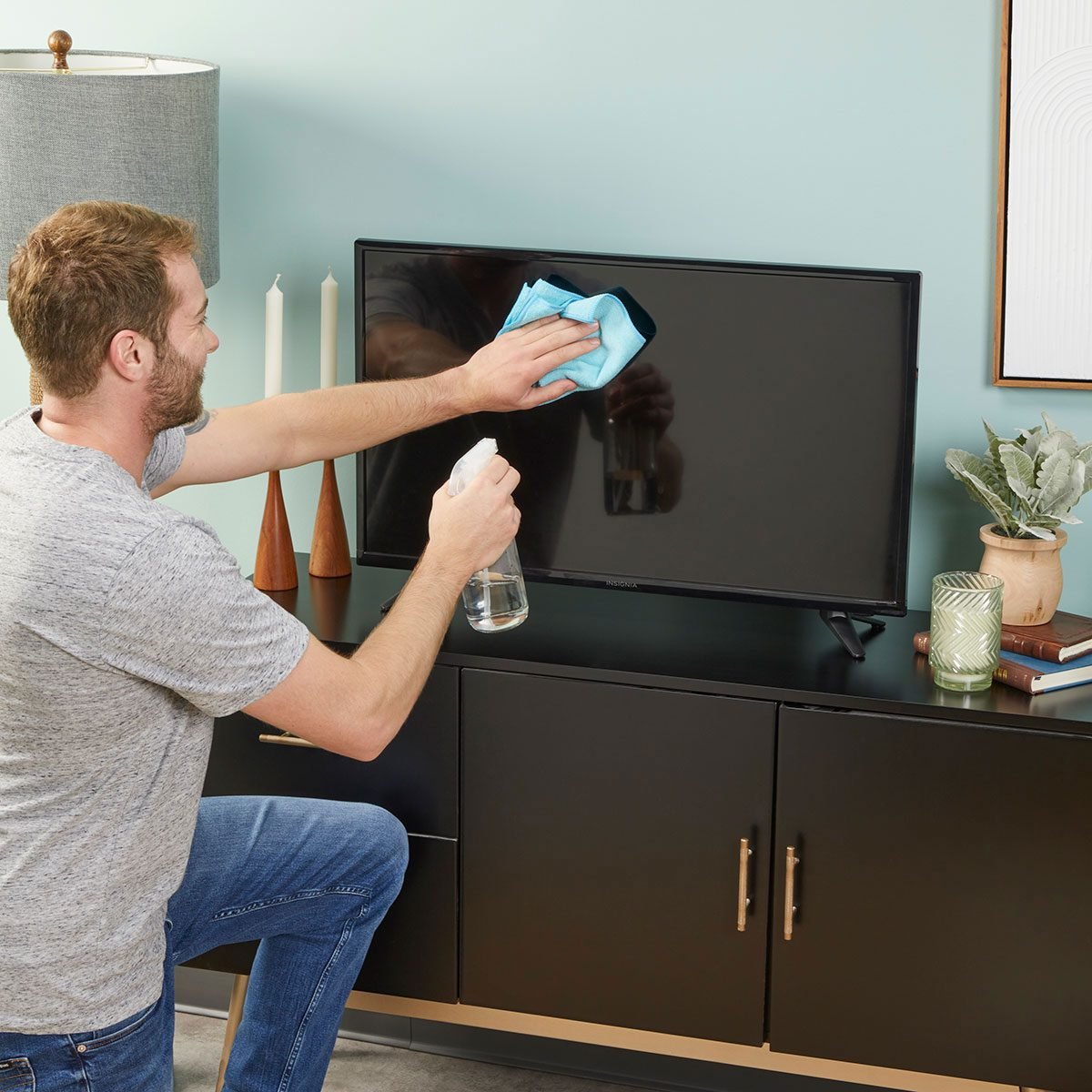
If the screen still has fingerprints, oily marks, or stubborn smudges, lightly dampen a corner of a microfiber cloth with distilled water. The key word is lightly. The cloth should be barely damp, not wet, dripping, or auditioning for a role as a sponge.
Never spray water directly onto the screen. Liquid can run into the bezel, seep into the edges, and damage internal components. Instead, spray or dab a tiny amount of distilled water onto the cloth, then gently wipe the smudged area.
Use soft circular motions or slow straight passes. Both can work, but avoid aggressive rubbing. If a fingerprint does not disappear immediately, pause and repeat gently rather than pressing harder.
Step 4: Dry and buff with a second cloth
After using a damp cloth, immediately follow with a dry microfiber cloth. This helps remove remaining moisture and prevents streaks. Buff gently until the screen looks even and clean.
If you still see streaks, do not panic. Streaks usually mean there is leftover moisture, oil, or dust. Use a clean, dry cloth and make a few gentle passes. If the cloth is dirty or too damp, switch to another clean one.
Step 5: Clean the frame, stand, and vents
The screen gets the attention, but the frame and vents collect dust too. Wipe the TV frame and stand with a dry microfiber cloth. For vents, use a soft brush or dry cloth to remove dust buildup. Do not push dust deeper into openings, and do not use wet cloths around ports, speakers, or ventilation slots.
Keeping vents clear helps the TV release heat properly. A clean screen is nice; a TV that does not overheat is nicer.
How to Clean an OLED TV Screen
OLED screens are famous for deep blacks, rich contrast, and making every dark movie scene look like it was personally approved by a cinematographer. They also deserve careful cleaning. Use the same basic method: turn off the TV, let it cool, dust with a dry microfiber cloth, and use a barely damp cloth with distilled water only for stubborn marks.
Avoid pressing on an OLED screen. The panel is thin and sensitive. If you have a large OLED mounted on the wall, support your cleaning hand lightly and work slowly. Do not lean into the screen. This is not a whiteboard, and your TV is not asking for a deep tissue massage.
How to Clean a QLED, LED, or LCD TV Screen
QLED, LED, and LCD TV screens should also be cleaned gently. These screens may not have the same panel structure as OLED, but they can still have sensitive coatings and flexible surfaces. The safest method remains dry microfiber first, distilled water only when necessary, and no direct spraying.
If your TV has a matte or anti-glare finish, be especially cautious with cleaning products. Matte coatings can show streaks and damage more easily than glossy surfaces. A dry cloth often solves most dust problems without any liquid at all.
How Often Should You Clean a TV Screen?
For most homes, a light dusting once a week or every other week is enough. If your TV is in a high-traffic room, near a kitchen, beside a fireplace, or within reach of children and pets, you may need to clean it more often.
Deep cleaning should be occasional. If you are wet-cleaning your TV every day, something else is happening. Maybe the screen is too close to sticky fingers. Maybe the popcorn bowl needs a lid. Maybe your dog has discovered prestige television. Either way, frequent damp cleaning increases the chance of streaks and accidental damage, so prevention is better.
How to Remove Fingerprints from a TV Screen
Fingerprints are the classic TV screen problem. They are oily, visible, and somehow always located right in the middle of the most dramatic scene. Start with a dry microfiber cloth. If the fingerprint remains, use a lightly dampened microfiber cloth with distilled water and wipe gently.
Do not use your fingernail to scrape at the spot. Do not attack the mark with a paper towel. Do not breathe heavily on the screen and polish it with your sleeve like you are cleaning sunglasses at a gas station. That may work on some surfaces, but a TV screen deserves better manners.
How to Clean Streaks off a TV Screen
Streaks usually come from too much liquid, a dirty cloth, mineral-heavy water, or cleaning products that leave residue. To fix streaks, turn the TV off and inspect the surface under natural light. Use a clean, dry microfiber cloth and wipe gently in one direction. If the streaks remain, lightly dampen a fresh cloth with distilled water, wipe the area, then dry immediately with another cloth.
If you used a cleaner that caused streaking, stop using it. Repeated applications may make the problem worse. When possible, check the TV manual for approved cleaning methods before trying another product.
Can You Use Windex on a TV Screen?
For modern flat-screen TVs, the safe answer is no. Traditional glass cleaners are designed for glass windows and mirrors, not delicate electronic displays. Many contain ammonia or other ingredients that may damage screen coatings. Even if the screen looks like glass, it may have a treated surface that reacts badly to household cleaners.
If you want a simple rule, use this one: do not put anything on your TV screen that you would not trust on a delicate camera lens or expensive eyeglasses. Even then, read the label and your TV manual.
Can You Use Alcohol Wipes on a TV Screen?
Alcohol wipes are common for phones, counters, and some electronics, but they are not automatically safe for every TV. Some manufacturers allow specific diluted solutions for certain screens or certain types of marks, while others warn against alcohol entirely. Because TV coatings vary, avoid alcohol unless your specific TV manufacturer says it is safe.
If your goal is simply to remove dust or fingerprints, microfiber and distilled water are usually enough. Save stronger products for situations where the manual clearly approves them.
How to Clean a TV Remote
While you are cleaning the screen, do not ignore the remote. It may be the most-touched object in the room, which is a polite way of saying it has seen things.
Remove the batteries first. Wipe the remote with a slightly damp microfiber cloth, making sure no liquid gets into the buttons. Use a dry cotton swab or soft brush around button edges. Let the remote dry completely before replacing the batteries.
Do not soak the remote. Do not spray cleaner directly into the buttons. A remote is small, but it is still an electronic device, not a dish in the sink.
Common TV Screen Cleaning Mistakes
Using too much pressure
Pressing hard can damage pixels or the panel surface. Gentle wiping is safer and usually more effective.
Spraying cleaner directly on the screen
Liquid can drip into edges, ports, and internal components. Always apply moisture to the cloth first.
Using paper towels
Paper towels can scratch delicate coatings and leave lint behind. Microfiber is the better choice.
Cleaning with tap water
Tap water may contain minerals that leave spots or streaks. Distilled water is safer for occasional damp cleaning.
Using a dirty cloth
A cloth with dust, crumbs, or grit can scratch the screen. Wash microfiber cloths regularly and store them somewhere clean.
How to Keep Your TV Screen Cleaner Longer
The easiest screen to clean is the one that does not get dirty quickly. Keep hands away from the display, especially when adjusting a wall-mounted TV. Teach kids that pointing at the screen is fine, but poking it like a touchscreen is not. Keep food and drinks at a reasonable distance, particularly during sports, gaming, and any movie involving jump scares.
Dust the entertainment area regularly. If shelves, speakers, consoles, and media cabinets are dusty, that dust eventually lands on the TV. Also consider room placement. A screen facing direct sunlight may show every speck and streak more clearly, while a TV near a kitchen may collect cooking residue faster.
Experience-Based Tips for Cleaning a TV Screen
After cleaning plenty of TV screens in real homes, one lesson becomes obvious: the best results come from patience, not power. The people who get streak-free screens are usually not using a secret cleaner. They are using less liquid, cleaner cloths, and a slower hand.
One practical trick is to clean the TV when the room has soft daylight but not harsh direct sun. Bright sunlight can make you chase every tiny streak until you start over-cleaning the screen. A dark room hides smudges too well. Soft daylight gives you enough visibility without turning the screen into a crime scene investigation.
Another useful habit is keeping two microfiber cloths near the TV, stored in a small clean pouch or drawer. One cloth is for dry dusting, and the other is for final buffing. This sounds almost too simple, but it prevents the classic mistake of grabbing a random towel from the laundry pile. Microfiber only works well when it is clean. If it has been washed with fabric softener, it may leave residue. If it has been dropped on the floor, it may pick up grit. A dedicated cloth saves you from all of that drama.
For families with children, the “fingerprint zone” is usually the lower center of the screen. Instead of cleaning the entire TV every time, spot-clean only the marked area with a barely damp microfiber cloth, then dry immediately. This reduces unnecessary contact with the rest of the screen. It also keeps cleaning from becoming a daily performance art piece.
Gamers and sports fans may notice dust more often because fast motion and bright scenes make streaks stand out. A weekly dry wipe is usually enough. Avoid cleaning right after a long gaming session when the TV is warm. Let the screen cool first. Warm screens can make moisture evaporate unevenly, which creates those annoying streaks that only appear once you sit back down.
If your TV is wall-mounted, use a stable step stool rather than reaching awkwardly from the side. Uneven pressure is risky, especially on large thin panels. Hold the cloth flat against your fingers and move slowly across the surface. Do not press with fingertips, because that concentrates pressure in small spots. Think of it like dusting a soap bubble with manners.
Finally, do not overcomplicate the process. Many people damage screens because they assume a more expensive TV needs a stronger cleaning solution. Usually, the opposite is true. The fancier the display, the gentler the cleaning should be. A clean microfiber cloth and distilled water are humble tools, but they are exactly what most screens need. Your TV does not want a chemical facial. It wants a soft cloth, a little patience, and fewer people touching it during movie night.
Conclusion
Cleaning a TV screen is not difficult, but it does require a gentle approach. Turn the TV off, unplug it if possible, dust with a dry microfiber cloth, and use a barely damp cloth with distilled water only for stubborn smudges. Avoid paper towels, window cleaners, ammonia, alcohol-based sprays, and direct spraying. Dry the screen immediately with a second microfiber cloth for a clear, streak-free finish.
The best method is simple: less pressure, less liquid, and more patience. Treat your screen like the delicate display it is, and it will reward you with sharper movies, cleaner sports, better gaming, and fewer moments where you wonder whether that blurry patch is part of the show or evidence of nachos past.