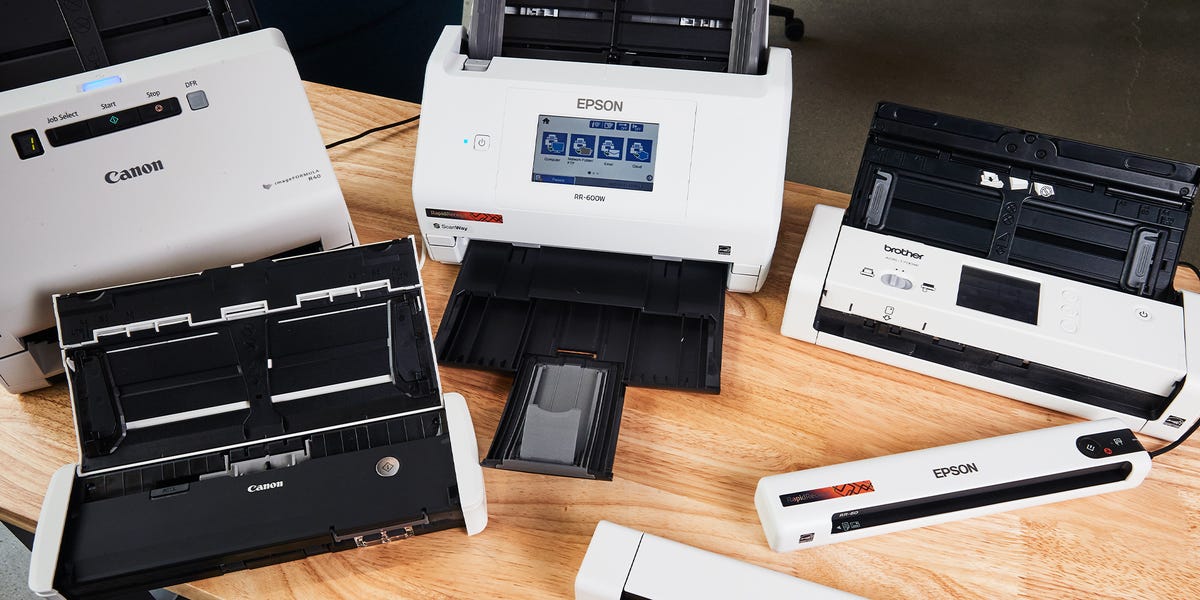
Paper has a remarkable survival instinct. No matter how many apps, cloud drives, and “paperless office” promises we adopt, receipts still multiply in drawers, contracts hide beneath coffee mugs, and tax records form small geological layers on our desks.
A reliable document scanner turns that clutter into organized, searchable files before the paperwork establishes its own government. The best document scanners of 2024 offer fast duplex scanning, accurate optical character recognition, dependable automatic document feeders, and software that does not require an advanced degree to operate.
This guide compares seven standout models for different jobs, including high-volume office scanning, wireless home-office use, receipt management, photo preservation, flatbed scanning, and mobile business travel. The selections are based on professional testing, manufacturer specifications, software capabilities, paper handling, scan quality, and practical usability.
Quick Comparison of the Best Document Scanners of 2024
| Scanner | Best For | Rated Speed | Feeder | Connectivity |
|---|---|---|---|---|
| Canon imageFORMULA R40 | Best overall | Up to 40 ppm | 60 sheets | USB |
| Ricoh ScanSnap iX1600 | Wireless workflows | Up to 40 ppm | 50 sheets | Wi-Fi and USB |
| Brother ADS-1700W | Best value | Up to 25 ppm | 20 sheets | Wi-Fi and USB |
| Epson RapidReceipt RR-60 | Receipts and portability | Up to 10 ppm | Single sheet | USB |
| Canon CanoScan LiDE 400 | Books and fragile originals | About 8 seconds per letter page | Flatbed | USB |
| Epson FastFoto FF-680W | Photos and mixed archives | Up to 80 photos per minute | 36 photos or 100 documents | Wi-Fi and USB |
| Brother DS-940DW | Mobile business | Up to 16 ppm | Single sheet | Wi-Fi and USB |
1. Canon imageFORMULA R40: Best Document Scanner Overall
The Canon imageFORMULA R40 is the practical workhorse of this group. It combines brisk performance, a generous automatic document feeder, accurate paper alignment, and straightforward software without covering the control panel in enough buttons to launch a satellite.
Canon rates the R40 at up to 40 pages per minute for black-and-white or grayscale scanning and up to 80 images per minute in duplex mode. Its 60-sheet automatic document feeder is large enough for contracts, financial statements, medical records, and other multi-page jobs. It supports an optical resolution of 600 dpi and scans both sides of a page during one pass.
The R40 performs particularly well when a batch contains different paper weights or slightly crooked sheets. Automatic deskew, blank-page removal, page-size detection, and text-orientation correction help create clean files without demanding extensive manual editing afterward.
What We Like
- Fast scanning with a 60-sheet automatic document feeder
- Single-pass duplex operation
- Sharp text and strong color reproduction
- Useful correction and document-cleanup tools
- Simple software for searchable PDFs and editable files
What to Consider
The R40 does not include Wi-Fi or a touchscreen. It must be connected to a Windows PC or Mac through USB. That is hardly tragic for a permanent workstation, but it limits flexibility in shared offices and cable-free setups. Canon lists a suggested daily volume of up to 4,000 scans, making this model better suited to routine office work than occasional receipt duty.
2. Ricoh ScanSnap iX1600: Best for Wireless Workflows
The ScanSnap iX1600 is an excellent choice for households, small businesses, and shared offices in which several people need different scanning destinations. Its 4.3-inch touchscreen supports customizable profiles, allowing one user to send invoices to a business folder while another sends household documents to cloud storage.
The scanner processes as many as 40 pages per minute and holds 50 sheets in its automatic feeder. Wi-Fi and USB connectivity provide more placement freedom than a wired-only scanner, while one-touch controls make recurring jobs pleasantly uneventful. Uneventful is a compliment when the alternative is spending Tuesday afternoon troubleshooting a PDF.
ScanSnap Home software can recognize documents, receipts, business cards, and photos. It can also create searchable PDFs and export information into applications such as Word, Excel, and PowerPoint. The combination of automatic file naming, cloud integration, OCR, and user profiles is the iX1600’s biggest advantage.
What We Like
- Fast duplex scanning
- Responsive 4.3-inch touchscreen
- Wi-Fi and USB connections
- Customizable profiles for multiple users
- Excellent document-management software
What to Consider
The iX1600 usually costs more than basic USB scanners, and its initial software setup may require patience. Once configured, however, the profiles reduce repetitive work and make it one of the friendliest document scanners for nontechnical users.
3. Brother ADS-1700W: Best Value Wireless Scanner
The Brother ADS-1700W delivers a useful mixture of wireless connectivity, touchscreen control, compact dimensions, and respectable speed. It is especially attractive for a home office that needs more than a portable scanner but does not generate skyscrapers of paperwork every day.
It scans color or monochrome documents at up to 25 pages per minute and captures both sides in one pass. The 20-sheet automatic document feeder handles standard pages, receipts, photos, plastic cards, and documents measuring up to 34 inches long.
Wireless support lets users send scans to computers, mobile devices, network locations, and compatible cloud services. The touchscreen also permits common jobs to begin directly from the scanner, reducing the familiar ritual of opening three applications merely to digitize one invoice.
What We Like
- Good performance for its compact size
- Wireless connectivity and mobile support
- Color touchscreen
- Single-pass duplex scanning
- Handles receipts, cards, photos, and long documents
What to Consider
The 20-sheet feeder is smaller than those on full-size office models. Automatic straightening can also be less consistent when documents enter at awkward angles. Nevertheless, the ADS-1700W remains a practical value for light and moderate workloads.
4. Epson RapidReceipt RR-60: Best Portable Receipt Scanner
Receipts are small, flimsy, frequently wrinkled, and somehow always capable of disappearing two days before tax preparation. The Epson RapidReceipt RR-60 is designed specifically to bring those unruly scraps under control.
Weighing less than 10 ounces, the RR-60 fits easily inside a laptop bag and draws power through its USB connection. It scans at up to 10 pages per minute in automatic feeding mode and can process receipts, invoices, business cards, and documents as long as 72 inches.
Epson’s receipt software can extract transaction information and organize it into useful fields. Data can then be exported to compatible financial applications, including QuickBooks, TurboTax, Excel, and CSV-based workflows. The scanner can also create editable and searchable PDFs, making it far more useful than simply photographing receipts with a phone.
What We Like
- Extremely compact and lightweight
- Powered through USB
- Useful receipt and invoice software
- Creates searchable and editable PDFs
- Handles unusually long documents
What to Consider
The RR-60 scans one side of one sheet at a time. It has no conventional automatic document feeder, no duplex scanning, and no Wi-Fi. It is therefore ideal for traveling professionals and receipt management, not for digitizing a 200-page legal file unless you have canceled your weekend plans.
5. Canon CanoScan LiDE 400: Best Flatbed Scanner
Sheet-fed scanners are efficient, but not everything should be pulled through rollers. Books, certificates, delicate photographs, bound reports, artwork, and fragile originals are safer on a flatbed. For those jobs, the Canon CanoScan LiDE 400 offers high resolution at an approachable price.
The LiDE 400 provides optical resolution up to 4,800 by 4,800 dpi and can scan a letter-size color document at 300 dpi in approximately eight seconds. Its five front-panel buttons provide shortcuts for automatic scanning, copying, creating PDFs, and sending files.
A built-in kickstand allows the scanner to operate vertically, which is helpful on crowded desks. Power and data travel through the USB connection, so there is no separate power brick waiting beneath the desk to join the local cable jungle.
What We Like
- High optical resolution
- Suitable for books, photos, artwork, and delicate pages
- Compact, USB-powered design
- Can stand vertically to save space
- Convenient one-touch controls
What to Consider
Every page must be placed on the glass manually, so the LiDE 400 is not intended for high-volume document processing. It also lacks Wi-Fi. Its strengths are image detail, affordability, and safe handling rather than conveyor-belt speed.
6. Epson FastFoto FF-680W: Best for Photos and Family Archives
Digitizing a shoebox full of old photographs usually sounds charming until photo number 47, when the project begins to feel like an unpaid internship at a museum. The Epson FastFoto FF-680W dramatically accelerates the process.
Epson rates the scanner at up to 80 4-by-6-inch photos per minute at 300 dpi. Its feeder accepts batches of up to 36 prints, and the software can automatically crop, rotate, restore faded colors, reduce red-eye, and save both the original scan and an enhanced version.
The FF-680W is not limited to photographs. It scans letter-size documents at up to 45 pages per minute, supports duplex capture, connects through Wi-Fi or USB, and holds as many as 100 standard document sheets. That flexibility makes it useful for families combining tax records, correspondence, recipes, postcards, and decades of photographs into one digital archive.
What We Like
- Exceptionally fast batch photo scanning
- Automatic photo enhancement and restoration
- Wi-Fi and USB connectivity
- Fast duplex document scanning
- Handles mixed photo sizes and long originals
What to Consider
The FF-680W is expensive if documents are your only concern. Its premium makes sense when photo preservation is a major part of the assignment. Very fragile, curled, sticky, or damaged photographs should still be scanned individually or on a flatbed rather than fed through rollers.
7. Brother DS-940DW: Best for Mobile Business
The Brother DS-940DW is built for professionals who scan documents in client offices, hotel rooms, vehicles, temporary workspaces, or any location where a full-size scanner would look slightly ridiculous.
It scans one- and two-sided documents at up to 16 pages per minute. Unlike many compact competitors, it includes an internal rechargeable battery, Wi-Fi, and microSD card compatibility. That means it can operate as a standalone scanner without remaining tethered to a computer.
Brother’s desk-saving paper path redirects scanned pages upward, reducing the amount of clear space needed behind the unit. It is a thoughtful detail for cramped counters and temporary desks. OCR and mobile scanning tools also help convert paper into searchable files while working away from the office.
What We Like
- Built-in rechargeable battery
- Single-pass duplex scanning
- Wi-Fi, USB, and microSD support
- Compact paper path saves desk space
- Can scan without a computer
What to Consider
The DS-940DW requires users to insert pages individually because it has no multi-sheet feeder. It costs more than basic USB-only portable scanners, but the battery, wireless connection, duplex capability, and standalone operation justify the difference for frequent travelers.
How to Choose the Best Document Scanner
Match the Feeder to Your Workload
An automatic document feeder is essential when scanning contracts, reports, applications, or financial records. A 50- or 60-sheet feeder allows the scanner to work while you rename files or tackle another task. A single-sheet portable scanner is better when mobility matters more than batch speed.
Understand PPM and IPM
Pages per minute, or PPM, describes how many physical sheets the scanner processes. Images per minute, or IPM, counts each scanned side as one image. A duplex scanner processing 40 double-sided pages per minute may therefore be rated at 80 IPM.
Do Not Buy Resolution You Will Never Use
For ordinary text, 300 dpi generally provides a strong balance between readability, OCR accuracy, file size, and speed. Scanning at 600 dpi is useful for fine print, detailed graphics, and documents that may be enlarged. Extremely high resolutions are most relevant to photos and artwork, not routine invoices.
Look Beyond Hardware
Software determines whether a scan becomes an organized searchable document or merely another mysteriously named file. Strong applications can recognize text, remove blank pages, detect page sizes, correct skew, suggest file names, extract receipt data, and route documents automatically.
Consider Wireless and Standalone Scanning
Wi-Fi is valuable in shared workspaces or when scanning to mobile devices and cloud services. A wired USB scanner may still be faster to configure and perfectly adequate at a dedicated workstation. Choose connectivity based on the actual workflow rather than the number of logos printed on the box.
Real-World Experiences With Document Scanners
Product specifications tell you how quickly a scanner can move paper under ideal conditions. Daily use reveals what actually matters: feeder reliability, software behavior, document preparation, naming habits, and whether the resulting files can be found six months later.
The First Large Scanning Project Is Always Educational
A common first project is digitizing several years of household records. The initial temptation is to place the entire stack into the feeder and press one enormous, emotionally significant button. A better method is to create smaller groups by subject and year: taxes, insurance, medical records, warranties, and receipts.
Removing staples is obvious. Finding every staple is not. One overlooked piece of metal can stop a feeder, scratch glass, or pull several pages together. Sticky notes, folded corners, adhesive labels, and wrinkled receipts create similar problems. Spending ten minutes preparing a stack can prevent half an hour of rescanning and muttering at office equipment.
Fast Hardware Cannot Rescue a Bad Filing System
A scanner capable of 40 pages per minute can produce digital chaos at breathtaking speed. Before scanning, it helps to choose a consistent structure such as Year > Category > Vendor. Files should receive descriptive names containing a date, organization, and subjectfor example, 2024-03-18_HomeInsurance_Renewal.pdf.
Searchable PDF creation is equally important. Without OCR, a folder may contain perfectly clear images that cannot be searched for names, invoice numbers, or account details. Good OCR turns a large archive into something useful rather than a virtual storage unit whose door you are afraid to open.
Automatic Feeders Prefer Reasonably Well-Behaved Paper
Modern feeders can handle mixed documents surprisingly well, but they still appreciate straight edges and dry, separated sheets. Fanning a stack before loading it reduces double feeds. Adjusting the paper guides snuglynot crushinglyhelps prevent crooked scans.
Receipts deserve special treatment. Thermal paper can be thin, curled, and faded. Feeding several receipts together may result in overlap or misalignment, so small batches are safer. Important fading receipts should be scanned promptly because thermal printing does not improve with age. It prefers a slow, dramatic disappearance.
Default Settings Are Usually Better Than Maximum Settings
New owners often select the highest available resolution because the largest number appears reassuring. For ordinary records, however, 300 dpi color or grayscale is usually sufficient. Raising every scan to 1,200 or 4,800 dpi dramatically increases file size and processing time without making a utility bill meaningfully more majestic.
Reserve high-resolution settings for photographs, artwork, damaged originals, or small details that may need enlargement. For text-heavy documents, test OCR accuracy at 300 dpi before increasing resolution.
The Best Scanner Is the One That Stays Ready
A scanner stored in a cabinet may keep the desk attractive, but it also adds enough friction for paper piles to return. A compact unit that remains connected and configured is more likely to become part of a weekly routine.
The most successful paperless systems use simple recurring habits: scan incoming documents, confirm that the file is readable, back it up, and then shred or recycle the original when legally appropriate. Once that rhythm becomes automatic, the scanner stops feeling like specialized equipment and starts functioning like an ordinary inbox for physical information.
Final Verdict
The Canon imageFORMULA R40 is the best document scanner of 2024 for most dedicated office workstations because it combines speed, a 60-sheet feeder, duplex scanning, and consistently clean output. The ScanSnap iX1600 is the stronger choice when wireless access, touchscreen profiles, and automated workflows matter more than the lowest purchase price.
For smaller budgets and lighter workloads, the Brother ADS-1700W offers excellent flexibility. Travelers can choose between the ultra-light Epson RapidReceipt RR-60 and the more capable battery-powered Brother DS-940DW. The Canon CanoScan LiDE 400 remains the sensible flatbed option, while the Epson FastFoto FF-680W is the clear specialist for quickly preserving family photo collections.
Note: This guide evaluates models and capabilities associated with the 2024 market. Product availability, bundled software, pricing, operating-system support, and replacement models may change over time.