Liberty City may be old enough to complain about its knees, but Grand Theft Auto IV online is not completely dead. Players can still race through crowded streets, chase criminals across Broker, organize chaotic shootouts, or spend an entire evening launching cars from airport ramps for no sensible reason.
The confusing part is that playing GTA IV online today is not as simple as clicking a multiplayer button on every available version. The standard PC Complete Edition lost its official multiplayer functionality when Games for Windows Live was removed. Meanwhile, the original console versions and community-created PC clients follow different rules.
This guide explains three practical ways to play Grand Theft Auto IV online: through backward compatibility on Xbox, on an original PlayStation 3, or with the GTA Connected multiplayer client on PC. Each option has different hardware requirements, setup difficulty, lobby availability, and advantages.
Can You Still Play GTA IV Online?
Yes, but the answer depends on your platform.
| Method | What You Need | Setup Difficulty | Best For |
|---|---|---|---|
| Xbox multiplayer | Xbox 360, Xbox One, or Xbox Series console | Easy | Native console multiplayer |
| PlayStation 3 multiplayer | PS3, PSN account, and GTA IV | Easy to moderate | Original PlayStation experience |
| GTA Connected on PC | Legitimate PC copy and third-party client | Moderate | Community servers and custom content |
The modern PC release deserves special attention. In March 2020, Grand Theft Auto IV and Episodes from Liberty City were consolidated into Grand Theft Auto IV: The Complete Edition. Games for Windows Live, native multiplayer, and leaderboards were removed from that package. Therefore, purchasing the current Steam or Rockstar Games Launcher edition does not automatically provide an official online mode.
Console editions are different because they retain the original in-game multiplayer system. Community tools can also restore a multiplayer-style experience on PC, although these programs are unofficial and require additional installation steps.
Way 1: Play GTA IV Online on Xbox
The Xbox route is generally the easiest way to experience the original GTA IV multiplayer without installing community modifications. The Xbox 360 release is backward compatible with Xbox One and Xbox Series X|S, allowing newer consoles to run the older game.
What You Need
- A compatible Xbox console
- A physical or digital copy of Grand Theft Auto IV
- An Xbox account
- An internet connection
- An Xbox Game Pass plan that includes online console multiplayer
A physical Xbox 360 disc can be used with a console that has a disc drive, such as an Xbox One, Xbox One X, or Xbox Series X. The Xbox Series S has no disc drive, so Series S owners need the digital version.
How to Install GTA IV on Xbox One or Xbox Series X|S
- Sign in to your Xbox account.
- Insert the Xbox 360 disc or locate GTA IV in your digital library.
- Allow the console to download the backward-compatible version.
- Install any available updates.
- Launch GTA IV while connected to Xbox services.
When running backward-compatible games, your modern console creates an Xbox 360-style environment. Do not be alarmed when the interface looks like it traveled through a time machine. That is normal.
How to Enter Multiplayer
- Load a GTA IV single-player save.
- Open Niko’s cellphone by pressing up on the directional pad.
- Select Multiplayer.
- Choose an available match type.
- Select a quick match, custom match, or private session.
Menu wording can differ slightly depending on the base game, downloadable episodes, and match type. Player Match is useful for casual sessions, while private or party-based options are usually better when organizing games with friends.
Which Modes Should You Try?
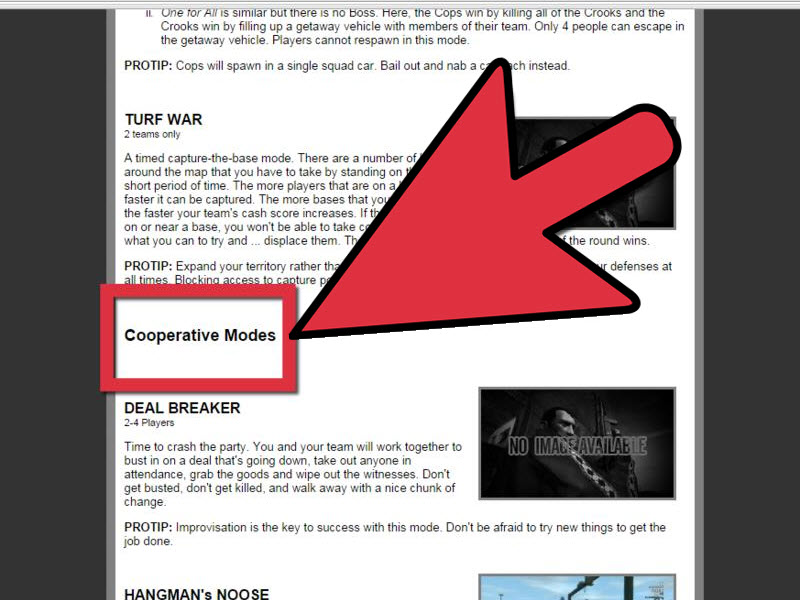
GTA IV launched with a surprisingly broad collection of competitive, cooperative, and open-world modes. Popular choices include:
- Free Mode: Explore Liberty City without a formal objective.
- GTA Race: Race while using weapons, stealing vehicles, and creating magnificent traffic disasters.
- Team Deathmatch: Compete in teams across customizable areas of the city.
- Cops ’n Crooks: One team plays criminals while the other attempts to stop their escape.
- Hangman’s NOOSE: Work together to escort a protected character away from pursuing police.
- Bomb da Base II: Complete a multi-stage cooperative assault.
Public matchmaking may be inconsistent because GTA IV is an older game. You may find several players during weekends and community events but an empty lobby at quieter hours. Inviting friends directly is more reliable than depending on random matchmaking.
Advantages of the Xbox Method
- No PC downgrade or third-party multiplayer software is required.
- Backward compatibility supports modern Xbox hardware.
- The original interface, physics, game modes, and progression remain familiar.
- Digital and physical purchasing options are available.
Potential Xbox Problems
First, make sure your subscription includes online console multiplayer. Second, check that your Xbox privacy settings permit multiplayer communication. Child accounts and highly restricted privacy profiles may block invitations or online sessions.
You should also use a stable connection. GTA IV’s original networking was designed during the late 2000s, when a respectable internet connection sometimes sounded like a robot arguing with a fax machine. Modern bandwidth helps, but the quality of the host and the connection between players still matters.
Way 2: Play GTA IV Online on PlayStation 3
The second option is to play the original PlayStation 3 version. This method preserves the classic console presentation and requires no unofficial PC client. However, it depends on aging hardware, a functioning PlayStation Network connection, and the continued availability of GTA IV’s legacy networking features.
What You Need
- A working PlayStation 3
- A legitimate GTA IV disc or installed digital copy
- A PlayStation Network account
- The latest available PS3 system software
- A reliable internet connection
Prepare Your PS3
- Connect the console to the internet.
- Open Settings.
- Select System Update.
- Choose Update via Internet.
- Install the latest available system software.
- Sign in to PlayStation Network.
Updating the console is important for security, network compatibility, and account access. If you have not signed in for years, you may need to update your password or complete additional account-security steps through Sony’s account system.
Launch GTA IV Multiplayer on PS3
- Start Grand Theft Auto IV.
- Load your single-player game.
- Open the in-game cellphone.
- Select Multiplayer.
- Choose your preferred match category.
- Create a lobby or search for an existing one.
The game uses the phone as its multiplayer gateway, which remains one of GTA IV’s most charming design decisions. Niko can arrange a bowling date, order a vehicle, contact a criminal, and enter an online war zone with the same device. Liberty City never understood healthy work-life boundaries.
How to Find Other PS3 Players
Finding random players may be the biggest challenge. Instead of repeatedly searching an empty quick-match screen, arrange a session through a GTA IV community, gaming forum, social group, or voice-chat server. Agree on the region, time, game mode, downloadable content, and host before launching the game.
Free Mode and basic competitive modes are usually the easiest activities to organize. Cooperative missions require more coordination because every player must understand the objective. One teammate ignoring the mission to steal a bus is funny once. On the sixth attempt, the comedy begins to age.
Advantages of Playing on PS3
- It delivers the original PlayStation version of GTA IV multiplayer.
- No downgrade utility or community client is necessary.
- Used discs and consoles may be relatively inexpensive.
- Private games can recreate the classic 2008 online experience.
Limitations of the PS3 Method
There is no PlayStation 4 or PlayStation 5 version of GTA IV that provides native PS3 backward compatibility. In practice, you need an actual PS3 for this method.
Hardware age is another consideration. Test the console’s storage drive, disc reader, controller, cooling system, Wi-Fi connection, and Ethernet port before planning a multiplayer night. A seventeen-year-old console deserves respect, but it may also deserve a careful dusting.
Because this is a legacy service, future availability cannot be guaranteed. A successful sign-in does not ensure that every match type, invitation feature, or lobby will work perfectly. Treat the PS3 option as a preservation-era gaming experience rather than a fully supported modern service.
Way 3: Play GTA IV Online on PC With GTA Connected
PC players cannot use native multiplayer in the standard Complete Edition. The most practical alternative is GTA Connected, an independent multiplayer modification that supports several older Grand Theft Auto games, including GTA IV.
GTA Connected provides online and offline multiplayer functionality, community servers, scripting support, synchronized traffic, synchronized pedestrians, custom objects, and server-created experiences. It is not affiliated with Rockstar Games.
What You Need
- A legitimate installation of GTA IV: The Complete Edition
- A Windows PC capable of running the game
- The GTA Connected client
- A clean game installation
- Access to the GTA IV installation directory
- Enough storage for a separate compatibility folder
Using a clean installation reduces conflicts. Graphics overhauls, script mods, replacement vehicles, custom executables, and experimental patches may prevent the multiplayer client from launching correctly.
Step 1: Install and Test GTA IV
Install GTA IV: The Complete Edition through Steam or the Rockstar Games Launcher. Launch the unmodified game once, confirm that Story Mode works, and then close it.
If the game crashes before reaching the main menu, repair the installation before adding multiplayer software. Verify local files through your store client, update graphics drivers, and make sure required Microsoft runtime components are installed.
Step 2: Back Up Your Game Files
Create a backup of your clean GTA IV folder or at least preserve important configuration files and save data. The current GTA Connected process is designed to leave the original Complete Edition installation intact, but backups remain sensible whenever additional executables or compatibility files are involved.
Step 3: Install GTA Connected From Its Official Website
Download the client only from the official GTA Connected website. Avoid repackaged installers, random file-hosting pages, or videos that direct you to unidentified executable downloads.
Install the launcher and open it once. GTA Connected supports multiple games, so you will need to configure GTA IV specifically.
Step 4: Create the Required GTA IV Compatibility Folder
The current GTA Connected instructions use a separate folder named Retail inside the game’s GTAIV directory. This folder contains a compatible version of the game files used by GTA Connected.
Follow the project’s official GTA IV patching instructions carefully. The correct structure should resemble:
Do not move the patched files directly over your main Complete Edition files. Keeping them inside the separate Retail folder allows the normal campaign and multiplayer client to coexist with fewer update conflicts.
Step 5: Configure the GTA Connected Launcher
- Open GTA Connected.
- Go to Tools and then Game Settings.
- Select Grand Theft Auto IV.
- Browse to the GTAIV.exe file inside the Retail folder.
- Open Launcher Settings and choose a player name.
- Return to the server browser.
Step 6: Join a Community Server
Use the server browser to view available GTA IV servers. Select one with an acceptable ping, active players, and a recognizable game mode. Double-click the server to connect.
After joining, servers may provide their own instructions. Some use the in-game phone for lobby selection, while others add chat commands, scoreboards, scripted missions, role-play systems, or custom objectives.
On servers that use the traditional phone interface, open the phone, select Multiplayer, choose Games, and inspect Custom Match or Quick Match. GTA Connected documentation also identifies the Y key as a common control for opening in-game chat.
Why GTA Connected Is Appealing
- It gives modern PC owners a workable GTA IV multiplayer route.
- Community servers can offer experiences beyond the original modes.
- Your normal Complete Edition campaign can remain untouched.
- Private and public server options may be available.
- PC performance, resolution, and controller choices can be more flexible.
Risks and Limitations
GTA Connected is community-developed software rather than an official Rockstar multiplayer service. Updates to GTA IV, Windows, graphics drivers, security tools, or the launcher can affect compatibility.
Server populations also vary. A long server list does not necessarily mean that every server is active, maintained, or suitable for beginners. Read server rules before joining, especially on role-playing servers with character, communication, or behavior requirements.
Never disable antivirus protection merely because an unidentified tutorial tells you to do so. Security software can produce false positives around modding tools, but the safer response is to verify the download source and consult the official project documentation.
Which GTA IV Online Method Is Best?
Choose Xbox when you want the simplest native experience on relatively modern hardware. It offers backward compatibility, familiar console controls, and convenient invitations, although an eligible online multiplayer subscription is required.
Choose PlayStation 3 when you already own the console or want the original Sony version. It is an interesting preservation option, but aging hardware and uncertain long-term service availability make it less convenient.
Choose GTA Connected when you play on PC and do not mind additional setup. It is the most flexible option and the only practical online route for most owners of the current PC Complete Edition.
Tips for a Better GTA IV Multiplayer Session
Organize Players Before Launching
GTA IV no longer has the population of a newly released competitive game. Schedule sessions instead of assuming a full public lobby will appear instantly. Even four committed players can create a memorable night in Free Mode or GTA Race.
Use Voice Chat Outside the Game
An external voice-chat app makes cooperative missions much easier. Decide who is driving, who is protecting the objective, and who is carrying heavy weapons. Without coordination, everyone may arrive in separate taxis while the mission target disappears into another borough.
Start With Free Mode
Free Mode allows everyone to test controls, connection quality, vehicle handling, and combat without immediately failing an objective. It is also the natural habitat of improvised stunts and very poor helicopter decisions.
Keep Modded and Clean PC Installations Separate
PC players should isolate visual mods, script mods, and multiplayer files. Mixing several major modifications in one installation can cause crashes that are difficult to diagnose.
Expect Smaller Communities
A small player base is not always a disadvantage. Regular players begin recognizing one another, scheduled events feel more personal, and private matches avoid much of the random disruption found in larger online games.
Experience Guide: What Playing GTA IV Online Feels Like Today
A modern GTA IV multiplayer session usually begins more quietly than a session in a current live-service game. You may open Quick Match and find nothing. You try another mode. Still nothing. For a moment, Liberty City feels like an abandoned amusement park where the rides are working but nobody remembered to unlock the front gate.
Then a friend joins, followed by two people from a community group. Suddenly, the city wakes up. Someone steals a sedan, another player appears in an ambulance, and a third decides that reaching the airport requires driving a motorcycle through a subway station. No battle pass is needed. No daily challenge tells anyone to cause this nonsense. It happens naturally.
The driving is one of the first things returning players notice. GTA IV’s vehicles lean, bounce, skid, and transfer weight more dramatically than cars in many newer open-world games. A simple race through Algonquin becomes unpredictable because a sharp turn can send one player into a hot-dog stand and another into oncoming traffic. Winning often depends less on maintaining the perfect racing line and more on remaining attached to something with four wheels.
Free Mode works especially well with a small group. You can meet at Star Junction, choose a destination, and attempt to travel there as a convoy. The plan normally survives for approximately forty seconds. One player attracts the police, another changes vehicles without warning, and somebody fires a rocket at a helicopter because restraint has never been Liberty City’s strongest civic value.
Cooperative missions feel different. Hangman’s NOOSE, Deal Breaker, and Bomb da Base II reward basic communication. A group that shares vehicles and covers multiple directions can complete objectives efficiently. A group that argues over who gets the fastest car will spend more time watching loading screens.
The smaller community also changes the atmosphere. In a busy modern game, players are disposable strangers who vanish after one match. In an older title, you may encounter the same names repeatedly. A dependable driver, skilled helicopter pilot, or entertaining lobby host becomes memorable. The experience feels closer to a neighborhood game night than a global matchmaking machine.
Technical problems remain part of the adventure. A host can disconnect, a community client may reject an incompatible file, or one player may suffer severe lag. The best approach is to troubleshoot methodically: verify versions, remove conflicting mods, restart the lobby, and test a private session before blaming the entire internet.
What makes GTA IV online worth revisiting is its simplicity. There are no businesses to manage, expensive futuristic vehicles to counter, or endless menus of purchasable upgrades. The city, vehicles, weapons, police, and other players provide nearly everything required. The fun comes from improvisation rather than progression.
That simplicity also gives every successful session a preservation-like quality. You are not merely loading an old game. You are briefly restoring a social space from another period of online gaming, complete with clumsy menus, unpredictable physics, and friends shouting because someone parked a burning bus across the finish line.
Conclusion
There are still three realistic ways to play Grand Theft Auto IV online. Xbox offers the easiest route through backward compatibility, PlayStation 3 preserves the original Sony console experience, and GTA Connected gives PC players access to community-hosted multiplayer.
The best option depends on your equipment and tolerance for technical setup. Xbox is the most convenient, PS3 is the most nostalgic, and PC provides the greatest flexibility. Whichever method you choose, organize a group in advance, start with Free Mode, and remember that every carefully planned GTA IV activity can be destroyed by one player arriving in a stolen helicopter.
Note: Online availability, console services, subscriptions, community clients, and installation procedures can change. GTA Connected is an unofficial project that is not affiliated with Rockstar Games. Use a legitimate copy of GTA IV, download third-party software only from its official project website, and review the latest documentation before installation.