Social distancing has always sounded simple on paper: keep enough space between people, avoid unnecessary crowding, and try not to breathe directly into someone’s personal airspace like a malfunctioning fog machine. In real life, though, humans are famously bad at estimating distance. Six feet can look like three feet in a grocery line, ten feet in an empty hallway, or “basically touching elbows” when someone behind you is trying to reach the avocados.
That is where a small ultrasonic sensor can become surprisingly useful. An ultrasonic distance sensor, such as the popular HC-SR04 module, measures how far away an object is by sending out high-frequency sound waves and listening for the echo. Pair it with a microcontroller, a buzzer, an LED, a servo gauge, or even a tiny display, and you can build a simple device that warns when someone or something gets too close. It is not magic. It is not a tiny robot bouncer wearing sunglasses. But it is a practical, low-cost example of how everyday electronics can encourage better spacing in shared environments.
The idea became especially popular during the COVID-19 pandemic, when makers, students, hobbyists, and engineers started building social distancing alarms, wearable distance detectors, and contact-free warning systems. The same basic concept is still useful today in classrooms, labs, retail spaces, queues, reception desks, workshops, elder-care environments, and anywhere people need a gentle reminder to respect personal space.
What Is an Ultrasonic Social Distancing Sensor?
An ultrasonic social distancing sensor is a distance-measuring device designed to alert a user when another person, object, or surface is closer than a chosen threshold. In many beginner-friendly builds, the threshold is set around six feet, because that distance became widely associated with public-health distancing guidance during the pandemic. However, the exact setting can be adjusted depending on the use case. A workshop machine guard might use a shorter warning range. A queue-management device might use a longer one. A wearable project might focus on the area directly in front of the user.
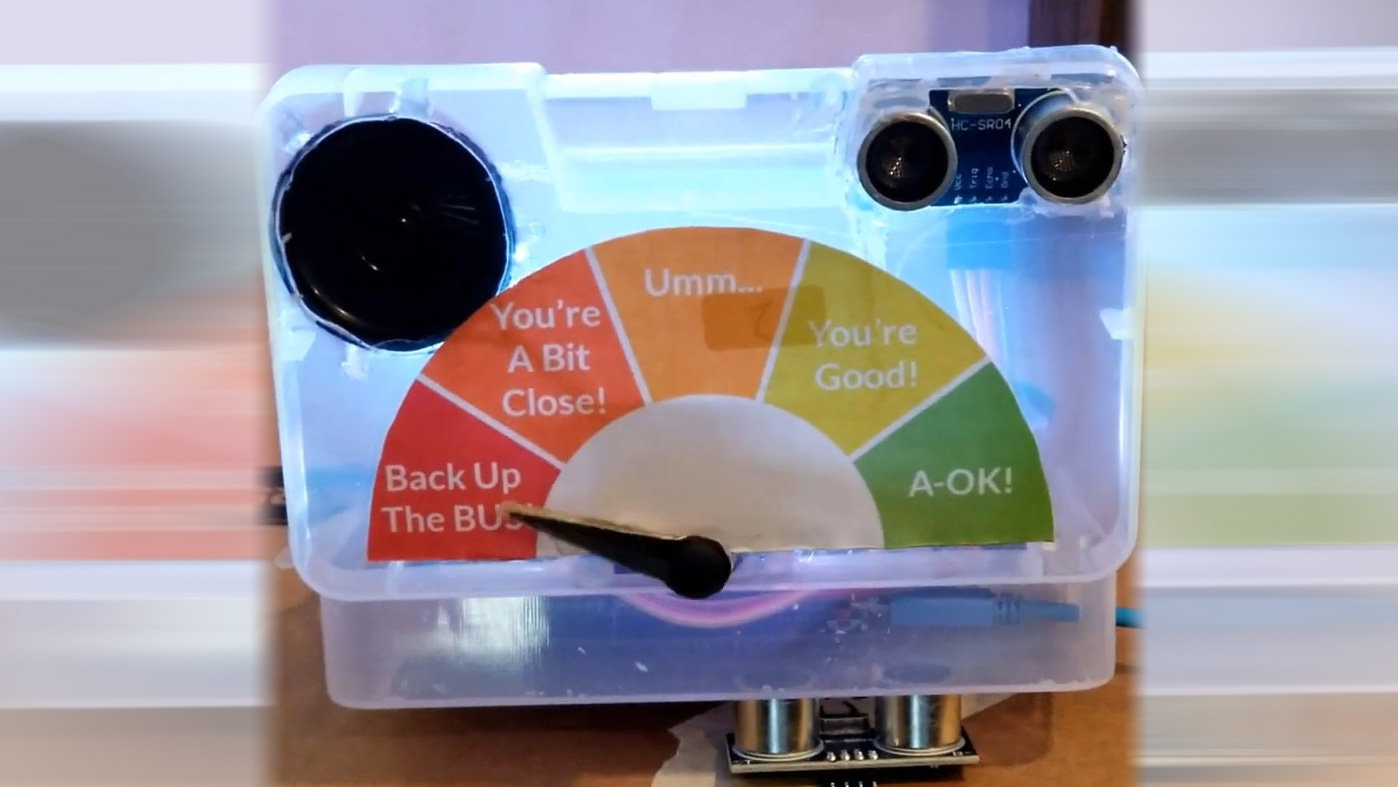
The hardware usually includes four main parts: an ultrasonic distance sensor, a microcontroller such as an Arduino Uno or Arduino Nano, an output device such as a buzzer or LED, and a power source. Some projects add a servo motor to move a gauge needle, an LCD screen to show distance in centimeters or inches, or a vibration motor for a quieter wearable alert. The result is a compact reminder system that says, in electronic language, “Kindly back up before things get awkward.”
How Ultrasonic Sensors Measure Distance
Ultrasonic sensors work using time-of-flight measurement. The sensor emits a burst of ultrasonic sound, usually above the range of human hearing. That sound travels through the air, bounces off an object, and returns to the receiver. The microcontroller measures how long the round trip took. Because the speed of sound in air is known, the device can calculate the distance.
In simplified form, the calculation looks like this: distance equals travel time multiplied by the speed of sound, divided by two. The division by two is necessary because the sound travels to the object and back. Without that step, your sensor would think everyone is twice as far away, which might be flattering for personal space but terrible for accuracy.
The HC-SR04 is popular because it is inexpensive, easy to wire, and widely supported by tutorials. It usually has four pins: VCC, GND, Trig, and Echo. The microcontroller sends a signal to the Trig pin, the sensor emits a pulse, and the Echo pin reports how long it took for the sound to return. With a few lines of code, the Arduino can convert that pulse duration into distance.
Why Use Ultrasonic Sensors for Social Distancing?
Ultrasonic sensors are attractive for social distancing projects because they are non-contact, affordable, simple to program, and visible enough to make a good teaching tool. Unlike camera-based systems, they do not capture faces or personal images. Unlike Bluetooth-based proximity systems, they do not require every person nearby to carry a matching device. Unlike a human reminder, they do not get tired, embarrassed, distracted, or tempted to say, “Excuse me, your backpack is breathing on me.”
They are also great for learning. A student can build a working prototype with a breadboard, jumper wires, an Arduino board, a buzzer, and a sensor. The project introduces electronics, programming, sound physics, measurement error, thresholds, conditionals, and user-interface design. In other words, one tiny sensor can sneak a lot of STEM education into a project that looks like a practical gadget.
Common Components in a DIY Social Distancing Device
1. HC-SR04 Ultrasonic Sensor
The HC-SR04 is the star of many beginner distance-measuring projects. It is small, recognizable by its two circular transducers, and often described as looking like a tiny surprised face. One side transmits ultrasonic sound; the other listens for the echo. It is commonly used in robotics, obstacle avoidance, parking-assist models, liquid-level experiments, and distance alarms.
2. Arduino or Compatible Microcontroller
An Arduino Uno, Nano, or similar board reads the sensor data and decides what happens next. If the measured distance is greater than the safe threshold, nothing may happen. If the distance drops below the threshold, the Arduino can activate a buzzer, flash an LED, move a servo, or display a warning. This simple logic makes the project beginner-friendly while still feeling satisfyingly “real.”
3. Buzzer, LED, Servo, or Display
The alert system is where the project gets personality. A buzzer is direct and hard to ignore. An LED is less annoying and works well for quiet environments. A servo-driven needle can create a physical gauge showing safe, caution, and too-close zones. A small LCD or OLED screen can show exact distance values. A vibration motor can make a wearable version more discreet, although it may still make the wearer look like they just received a very dramatic text message.
4. Battery or USB Power
For desktop or classroom prototypes, USB power is easy. For wearable or portable projects, a battery pack is more practical. Battery life depends on the microcontroller, sensor polling rate, alert device, and whether the system sleeps between readings. A buzzer that screams every three seconds will drain power faster and friendships even faster.
Example: A Simple Social Distancing Alarm
Imagine a simple device placed near a checkout counter. The ultrasonic sensor points toward the customer side of the counter. The Arduino reads distance several times per second. If someone stands farther than six feet away, a green LED stays on. If the person moves into the caution zone, a yellow LED lights up. If the person gets too close, a red LED flashes and a soft buzzer sounds.
This setup does not physically enforce distancing. It encourages it. That distinction matters. Good design should guide behavior without turning every interaction into a sci-fi checkpoint. A friendly visual cue can be more effective than a loud alarm, especially in customer-facing spaces where nobody wants to be publicly scolded by a breadboard.
Where This Technology Can Be Useful
Retail Lines and Service Counters
Stores, pharmacies, banks, clinics, and reception areas can use distance reminders to reduce crowding near counters. Floor stickers help, but people often ignore them or cover them with carts. A small electronic reminder adds real-time feedback.
Classrooms and STEM Labs
As a classroom project, an ultrasonic social distancing device is excellent. Students can build it, test it, calibrate it, modify the code, and discuss its limitations. They can compare readings from different surfaces, angles, and distances. They can also learn why engineering is rarely as simple as “plug in sensor, save humanity.”
Workshops and Maker Spaces
In workshops, distance sensing can help remind users to stay clear of certain zones. The same principles apply to machine safety, robot navigation, automated doors, and object detection. Social distancing may be the headline, but proximity detection has a much wider family tree.
Wearable Reminders
A wearable version can be attached to a badge, belt, backpack, face shield, or vest. It can alert the wearer when someone is in front of them within a set distance. Wearables are more complex because they move constantly, face different angles, and must be comfortable. Still, they make a fun and memorable prototype.
Accuracy, Calibration, and Real-World Limitations
Ultrasonic sensors are useful, but they are not perfect. Their readings can be affected by target shape, angle, surface material, temperature, humidity, air movement, and background noise. A flat wall usually reflects sound well. A soft coat, curved shoulder, or angled backpack may reflect sound less predictably. People are not perfect test objects because, despite our best efforts, we are lumpy, moving, fabric-covered acoustic puzzles.
Sensor placement also matters. If the sensor points too high, it may miss shorter people or children. If it points too low, it may detect bags, carts, chairs, or pets. If it is mounted at an angle, the sound may bounce away from the receiver instead of returning. In busy areas, multiple ultrasonic devices can interfere with one another unless their timing is managed carefully.
Calibration is essential. A good project should test the sensor at known distances, compare the measured values, and adjust thresholds accordingly. Developers should average several readings, reject obvious outliers, and avoid triggering alerts from a single noisy measurement. This makes the device calmer, more accurate, and less likely to beep at a passing shadow like a nervous toaster.
Design Tips for a Better Social Distancing Sensor
Use Zones Instead of One Hard Cutoff
A single threshold can make alerts feel jumpy. Instead, use distance zones. For example, green can mean safe, yellow can mean getting close, and red can mean too close. This gives users time to react before the alarm becomes dramatic.
Make the Alert Human-Friendly
A harsh buzzer may work technically but fail socially. In many settings, a soft tone, visual indicator, or vibration is better. The goal is not to embarrass people. The goal is to remind them gently, like a polite robot with good manners.
Average Multiple Readings
Taking several readings and averaging them can reduce noise. Many builds use a short rolling average so the device responds quickly without reacting to every random echo. This is especially helpful in moving crowds.
Protect Privacy
One advantage of ultrasonic sensing is that it can detect distance without identifying people. For public-facing projects, avoid collecting personal data unless absolutely necessary. A device that simply measures proximity and triggers a local alert is usually easier to explain and more privacy-friendly.
Design for the Environment
Indoor spaces are usually easier for ultrasonic sensors than windy outdoor environments. Enclosures should not block the sensor’s transducers. If the device will be used around dust, moisture, or physical contact, choose parts and housings that can handle those conditions.
Is This Really “Enforcement”?
The word “enforce” sounds powerful, but in most DIY ultrasonic projects, the device is better understood as a reminder or prompt. It cannot know whether two people are family members, coworkers, patients, customers, or strangers. It cannot judge medical context. It cannot replace workplace policy, public-health planning, ventilation, masks when appropriate, or common sense. It can, however, make invisible distance visible.
That is valuable. People often violate spacing rules accidentally. A simple light or tone can correct behavior without confrontation. In that sense, the sensor does not enforce social distancing like a guard. It enforces awareness, which is often the first step toward better habits.
Beyond COVID: Why Distance Awareness Still Matters
Social distancing became a household phrase during the pandemic, but distance awareness remains useful beyond one disease. Respiratory viruses still spread more easily in crowded indoor environments. Personal space still matters in customer service, healthcare, elder care, and accessibility. Distance sensors still help with robotics, automation, parking systems, touchless controls, smart doors, and safety boundaries.
A social distancing sensor is therefore more than a pandemic gadget. It is a gateway project into proximity sensing. Once you understand how to measure distance, you can build an obstacle-avoiding robot, a smart trash can, a parking assistant, a hand-washing timer trigger, a contactless doorbell, or a museum exhibit that reacts when visitors approach. The humble ultrasonic sensor has rangeliterally and creatively.
Practical Build Concept
A practical build might use an Arduino Nano, an HC-SR04 ultrasonic sensor, three LEDs, a piezo buzzer, a small switch, and a USB battery pack. Mount the sensor at chest height in a small enclosure. Program it to read distance every 100 milliseconds. If the distance is greater than 200 centimeters, show green. Between 150 and 200 centimeters, show yellow. Below 150 centimeters, show red and play a short beep. Adjust the numbers for your actual environment and health-safety goal.
For a wearable version, reduce alert noise and use vibration instead. For a counter-mounted version, use a larger LED indicator or display. For a classroom project, keep the wiring visible so students can trace the logic. For a polished prototype, add a 3D-printed case, a power switch, labels, and a calibration mode. The difference between “science fair spaghetti wires” and “product prototype” is often enclosure design, cable management, and the courage to use fewer zip ties.
Experience Notes: What It Feels Like to Build and Use One
Building an ultrasonic social distancing sensor is one of those projects that looks tiny on the desk but teaches big lessons very quickly. At first, the wiring feels almost too easy: VCC to 5V, GND to ground, Trig to a digital pin, Echo to another digital pin. Then you upload the first sketch, open the serial monitor, wave your hand in front of the sensor, and suddenly the numbers change. That moment is oddly satisfying. It feels like you gave the circuit a pair of invisible measuring eyes.
The next lesson arrives when the readings are not as perfect as expected. A notebook gives one value, a hoodie gives another, and a person walking by at an angle may briefly disappear from the sensor’s attention. This is where the project becomes more than a recipe. You begin thinking like an engineer. Should the sensor be higher? Should the threshold be wider? Should the code average five readings? Should the buzzer wait until the distance is too close for half a second before sounding? Every small change makes the device more usable.
Testing it with people is even more revealing. Most users do not want a device that screams at them. They prefer a warning that feels helpful rather than accusatory. A red LED is often enough. A short beep works better than a continuous alarm. A gauge needle can be charming because it turns distance into something visible without making the user feel monitored. The best experience is not “gotcha, you are too close.” It is “here is a friendly cue before anyone feels uncomfortable.”
In a classroom or maker-space setting, the project becomes a conversation starter. Students ask why sound can measure distance, why temperature matters, why soft materials absorb echoes, and why the sensor sometimes detects a chair instead of a person. Those questions are the real win. The device may begin as a social distancing reminder, but it quickly becomes a hands-on lesson in physics, electronics, coding, design ethics, and human behavior.
In practical use, the biggest takeaway is that technology works best when it supports people rather than bossing them around. An ultrasonic sensor can help enforce social distancing only if the alert is clear, the placement is sensible, and the design respects the environment. It should not be treated as a public-health solution by itself. It is a reminder tool, a prototype, and a teaching platform. Used thoughtfully, it can reduce crowding, encourage awareness, and make invisible space easier to understand. Used carelessly, it becomes another beeping gadget that everyone wants to unplug by lunchtime.
That balance is what makes the project interesting. It is simple enough for beginners, but real enough to expose the challenges of designing for humans. People move, ignore signs, carry bags, stand at odd angles, and occasionally behave like cats near a laser pointer. A good ultrasonic distancing device accepts that messy reality and responds with calm, useful feedback. That is the difference between a clever circuit and a genuinely helpful tool.
Conclusion
An ultrasonic sensor can help enforce social distancing by turning physical space into real-time feedback. With a low-cost sensor, a microcontroller, and a clear alert system, makers can build a device that warns when someone gets too close. The project is affordable, educational, privacy-conscious, and flexible enough for counters, classrooms, workshops, and wearable experiments.
Still, the best version of this idea is not a bossy machine that polices people. It is a helpful nudge. Ultrasonic sensors have limitations, and any distancing device should be tested, calibrated, and designed with human comfort in mind. When done well, this little piece of hardware becomes more than a pandemic-era gadget. It becomes a lesson in engineering, empathy, and the surprisingly difficult art of giving people enough room to breathe.
SEO Metadata
Note: This article is for educational and informational purposes. Ultrasonic distancing devices can support awareness, but they should not replace public-health guidance, workplace safety policies, ventilation planning, or professional risk assessment.