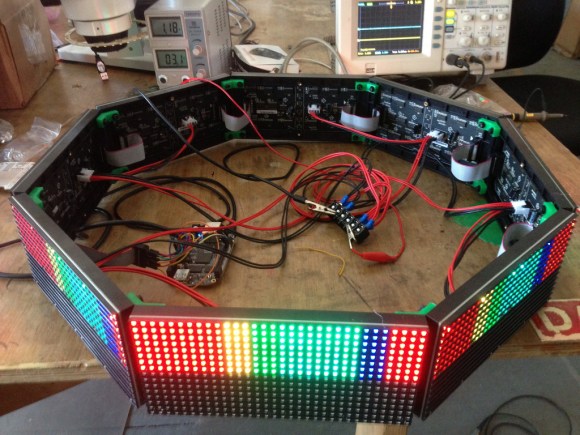
Every great hackerspace needs a ridiculous glowing object. A soldering iron is useful. A laser cutter is impressive. But a giant polygonal LED display that shouts alerts, scrolls messages, and looks like it might summon a friendly robot octopus? That is culture.
The Octoscroller is exactly that kind of project. Built as an upgrade to NYC Resistor’s earlier Hexascroller, it takes a beloved six-sided LED message display and turns the idea into a brighter, more colorful, more technically ambitious octagonal RGB matrix installation. In plain English: the Hexascroller was cool; the Octoscroller showed up wearing sunglasses indoors.
This project is not merely about adding two extra sides. It is about solving real maker problems: driving multiple RGB LED matrix panels, keeping refresh rates smooth, handling power safely, building a lightweight frame, and using the BeagleBone Black’s programmable real-time units to do the kind of timing-sensitive work that makes smaller microcontrollers sweat through their headers.
What Was The Hexascroller?
Before the Octoscroller, there was the Hexascroller, a large hexagonal LED display used at NYC Resistor as a clock, message board, and general alert system. It was the kind of object that becomes part of a room’s personality. People stop seeing it as “a project” and start treating it like a slightly eccentric roommate that happens to communicate in red LEDs.
The Hexascroller’s job was straightforward but charming: show useful information in a visible, playful way. It could display the current time, announcements, and messages. Earlier descriptions of the system also mention it listening for SMS and tweets, which is wonderfully early-2010s maker culture: half practical, half internet gremlin.
Its hexagonal design made it more interesting than a flat sign. Instead of being one rectangular screen mounted on a wall, it occupied space. It was architectural. It could be seen from several angles. That alone made it memorable inside a hackerspace, where projects compete for attention with 3D printers, half-finished robots, mysterious cables, and at least one drawer labeled “DO NOT THROW AWAY” containing parts nobody can identify.
Enter The Octoscroller: More Sides, More Color, More Ambition
The Octoscroller was conceived as the natural successor to the Hexascroller. The simple pitch: keep the beloved polygonal message-alert concept, but upgrade the hardware dramatically. Instead of six sides, use eight. Instead of a primarily single-color display, go full RGB. Instead of asking a modest controller to perform heroic LED-refresh gymnastics, use a BeagleBone Black with custom LEDscape firmware running on its PRU subsystem.
The result is a classic maker upgrade: part engineering, part art object, part “we can absolutely make this more complicated, and that is why we are here.”
The Octoscroller uses eight 16×32 RGB LED matrix panels. Each panel contains 512 RGB pixels, so the full installation has 4,096 RGB pixels. Since each pixel has red, green, and blue channels, that means the system is managing 12,288 individual color elements. That is a lot of tiny lights demanding attention, like a kindergarten class made entirely of photons.
Why RGB LED Matrix Panels Are Powerful But Demanding
RGB LED matrix panels are inexpensive, bright, and widely loved in maker projects. They can become clocks, signs, game displays, mini-jumbotrons, interactive art pieces, and “I definitely meant to spend my whole weekend debugging this” installations.
But these panels are not magic. Many common HUB75-style RGB matrix panels do not include built-in PWM control for every pixel the way individually addressable LED strips do. Instead, an external controller must constantly refresh the display. Even a static image is not truly static from the electronics point of view. The controller repeatedly redraws rows at high speed so your eyes see a stable picture.
That is where things get spicy. Refreshing one panel is manageable. Refreshing eight panels with color depth, brightness control, smooth animation, and video-like input becomes a serious timing problem. If the controller hesitates, the display may flicker. If the software is inefficient, the CPU becomes trapped in LED duty forever, unable to do higher-level work. If the power supply is underbuilt, the project stops being “interactive art” and starts becoming “why does it smell warm?”
The BeagleBone Black: The Brain Behind The Glow
The Octoscroller’s brain is a BeagleBone Black, a small Linux-capable single-board computer. What makes the BeagleBone Black especially interesting for this project is not just that it can run user applications. It also includes programmable real-time units, commonly called PRUs.
PRUs are tiny real-time microcontrollers built into the processor. They can handle timing-sensitive tasks with far more predictability than a normal Linux userspace program. That matters because Linux is excellent at many things, but “toggle these GPIO pins with perfect timing forever while also not getting distracted” is not always one of them.
In the Octoscroller, the userspace application can render graphics into a shared memory frame buffer. Then the PRU-driven LEDscape firmware handles the repetitive, precisely timed job of pushing that frame data to the LED panels. This separation is elegant: the main application gets to think about images, messages, and animations, while the PRU does the fast, unforgiving panel-refresh labor.
LEDscape: The Quiet Hero Of The Project
LEDscape is the software layer that makes the Octoscroller practical. Its job is to let the BeagleBone Black drive RGB LED matrix panels efficiently by offloading the refresh process to the PRU. Without that kind of architecture, the project would be much harder to scale.
The brilliance of this approach is that the Linux side can behave like a graphics system. Render into memory. Update frames. Send images. Receive video packets. Let the real-time firmware keep the LEDs alive. In a sense, LEDscape turns the LED panels into a display target rather than a constant software emergency.
For makers, that is a huge conceptual leap. Once the difficult refresh layer is handled, the creative layer becomes easier. You can think about typography, animation, alerts, network input, video mapping, and weird art ideas. The project stops being only about driving hardware and starts becoming a platform.
From Plywood Ring To 3D Printed Brackets
The physical build of the Octoscroller is another important upgrade. The Hexascroller relied on a plywood ring for structure. The Octoscroller benefits from the strength of the LED panels themselves, allowing the frame to be built with 3D printed angle brackets and hardware.
That may sound like a small detail, but it changes the character of the build. A lighter bracket-based design is easier to fabricate, easier to modify, and easier to reproduce. It also looks more like a modern maker object: panels, printed parts, screws, wires, and just enough geometric confidence to make everyone nearby say, “Nice. Also, where does the power go?”
The octagonal shape matters, too. Eight panels form a more rounded display than six panels, which makes the visual effect smoother from multiple angles. It moves the project closer to a wraparound information sculpture than a simple sign.
The Power Problem: Tiny LEDs, Big Appetite
One of the great lessons of LED projects is that efficiency does not mean “uses no current.” A single LED is modest. Thousands of LEDs are not modest. Thousands of RGB LEDs at high brightness are a tiny Times Square with wires.
The Octoscroller project documentation notes that each 16×32 RGB panel can draw several amps, especially when showing full white. Early high-brightness testing revealed that a 10-amp supply was not enough for the full installation, leading to a much larger power supply. This is the kind of lesson every LED builder eventually learns: the data line may be clever, but the power rails are the boss.
For anyone building a similar RGB LED matrix display, the takeaway is simple. Calculate worst-case current. Use a regulated 5V supply with enough headroom. Distribute power carefully. Use appropriately sized wires. Tie grounds together properly. Do not assume that because an animation looks gentle, the electronics agree. The LEDs know what they did.
Why Octoscroller Was More Than A Bigger Sign
It would be easy to describe the Octoscroller as “the Hexascroller, but larger and RGB.” That is true, but incomplete. The real leap was architectural. The Octoscroller combined affordable RGB matrix panels, a Linux-capable board, real-time PRU firmware, a shared frame buffer model, and a geometric physical enclosure.
That combination turned the display into a flexible platform. It could show text, images, animations, and video-like input. It could receive data from external systems. It could become part of events, workshops, and larger installations. Later related LEDscape-based projects expanded the same thinking into mini-jumbotron builds and other shaped displays.
In other words, the Octoscroller was not just an endpoint. It was a proof of concept for scalable, creative LED matrix control.
Lessons For Makers Building Their Own LED Matrix Display
1. Choose The Controller Around The Refresh Problem
Do not pick a microcontroller only because it is in your parts drawer. RGB matrix panels require fast, consistent refresh. Smaller boards can handle one panel or simpler graphics, but multi-panel installations need hardware support, DMA, PRUs, FPGAs, or other smart approaches. The Octoscroller’s BeagleBone Black plus LEDscape design is a textbook example of matching the controller to the job.
2. Respect Power From The Beginning
Power is not the boring part. Power is the part that decides whether your beautiful LED sculpture runs smoothly or becomes a cautionary tale. Estimate current draw at full brightness, not just during your favorite low-brightness animation. Use fusing, safe wiring, and enough supply capacity. A good power plan is invisible when it works and unforgettable when it does not.
3. Build The Frame Like It Will Be Moved
Many maker projects work perfectly on a bench and then immediately become fragile when carried across a room. The Octoscroller’s move from a heavy ring-style frame toward panel-supported construction with printed brackets shows the value of designing for handling, maintenance, and future modification.
4. Separate Creative Software From Hardware Timing
The shared frame buffer approach is powerful because it lets creative code focus on what to display. The low-level firmware focuses on how to display it. This separation is common in mature systems, and it is one reason the Octoscroller feels like more than a one-off LED hack.
Specific Examples Of What Octoscroller Makes Possible
Imagine a hackerspace alert system where build server warnings pulse red, doorbell events ripple around the octagon, and meeting reminders scroll in cheerful color. Imagine a party installation that receives UDP video packets and maps graphics around the room. Imagine a public workshop where participants wire panels, upload code, and see their drawings wrap around an eight-sided display in real time.
These are not distant ideas. They are exactly the kinds of uses that become practical once the hard work of panel driving is solved. The Octoscroller sits in that sweet spot between “functional sign” and “programmable light sculpture.” It is useful enough to justify itself and weird enough to be loved.
Why This Project Still Matters
Today, makers have more options than ever: Raspberry Pi matrix bonnets, ESP32 DMA libraries, Teensy shields, commercial LED controllers, and higher-resolution panels. Yet the Octoscroller remains relevant because it demonstrates timeless engineering habits.
First, it starts with a real need: improve a beloved shared display. Second, it uses available parts creatively. Third, it solves the bottleneck instead of pretending it does not exist. Fourth, it documents enough of the journey for others to learn from it. That is the difference between a flashy project and a useful contribution to maker culture.
The Octoscroller also captures a particular joy of hardware hacking: upgrades do not have to be boring. You can improve a tool and make it stranger, brighter, and more delightful at the same time. Two more sides? Yes. Two more colors? Also yes. A custom real-time LED driver? Obviously. A power supply with enough current to make the bench look serious? Welcome to the party.
Hands-On Experience: What Working With An Octoscroller-Style Project Feels Like
Building or even studying an Octoscroller-style display teaches lessons that are hard to absorb from a datasheet alone. The first experience is visual awe. When a single RGB matrix panel lights up, it feels satisfying. When eight panels light together in a polygon, the project suddenly becomes spatial. The display is no longer a rectangle on a desk. It occupies the room. People walk around it, point at it, and immediately ask whether it can show their name. It can, of course, but then everyone wants gradients, animations, and probably a tiny dancing banana.
The second experience is humility. LED matrix panels look simple from the front and mischievous from the back. Ribbon cables, power connectors, scan rates, address lines, latch signals, output enable timing, and row multiplexing all appear at once. A beginner may assume the panel behaves like a monitor. It does not. It behaves like a very fast chore list. The controller must keep feeding it data, again and again, with the discipline of a drummer who never misses a beat.
The third experience is debugging by symptoms. Flicker may mean refresh timing. Wrong colors may mean swapped data lines. Ghosting may point to output-enable timing or power issues. Random instability may be grounding, loose IDC cables, insufficient current, or the ancient electronics curse known as “it worked five minutes ago.” This is where the Octoscroller’s architecture becomes educational. By separating the display pipeline into rendering software and real-time refresh firmware, it gives builders a cleaner mental model. You can ask: is the image wrong before it reaches the frame buffer, or is the panel-driving layer misbehaving?
The fourth experience is learning that mechanical design is not optional. A polygon display needs angles to line up, panels to stay secure, cables to avoid strain, and brackets that can survive being handled by enthusiastic humans. 3D printed parts are wonderful, but they still need thoughtful tolerances, screw access, and serviceability. The best LED installation is one you can repair without performing a ritual under a desk with a flashlight in your mouth.
The final experience is community. Projects like Octoscroller make sense in shared spaces because they invite participation. One person writes firmware. Another designs brackets. Someone else tests power supplies. A fourth person makes the first ridiculous animation. Eventually, the display becomes a group artifact, carrying the fingerprints of everyone who improved it. That is why Octoscroller is more than an LED matrix build. It is a glowing reminder that hardware hacking is at its best when engineering, art, and community all scroll by together.
Conclusion
Octoscroller Takes The Hexascroller To The Next Level is more than a clever headline. It describes a meaningful evolution in maker display design. The original Hexascroller proved that a polygonal alert display could become a beloved fixture. The Octoscroller expanded the idea with eight sides, RGB color, BeagleBone Black control, LEDscape PRU firmware, improved structure, and enough brightness to make power planning a central character in the story.
For LED hackers, the project remains a useful case study in scaling up. For artists, it shows how a display can become an object in space rather than a flat screen. For hackerspaces, it is a reminder that the best shared tools are not always the quietest or most practical. Sometimes the best tool is the one that glows, scrolls, teaches, and makes visitors say, “Wait, what is that?”
And honestly, that is a pretty good reason to build anything.