Ever spotted someone on Snapchat and thought, “Wait… why does this person look suspiciously connected to my life?” Maybe they went to the same school, appear in a friend’s Story, or keep popping up in your suggested friends list like a digital raccoon rummaging through your social circle.
That is where Snapchat mutual friends come in. Mutual friends are people you and another Snapchatter both know on the app. Seeing them can help you decide whether a suggested account is someone you actually know, a friend of a friend, or simply a mysterious internet citizen with a very convincing Bitmoji.
Snapchat has changed some of its wording over time. What many users knew as Quick Add is now commonly called Find Friends. The feature still helps users discover people they may know through shared contacts, existing friends, location signals, and other connection clues. However, Snapchat places strong privacy limits on what you can see, so the exact mutual-friend details available may vary by account, device, app version, and privacy settings.
This guide explains how to see mutual friends on Snapchat in three easy steps, what to do when mutual friends do not appear, and how to use the feature without turning a casual friend request into an accidental detective documentary.
Can You See Mutual Friends on Snapchat?
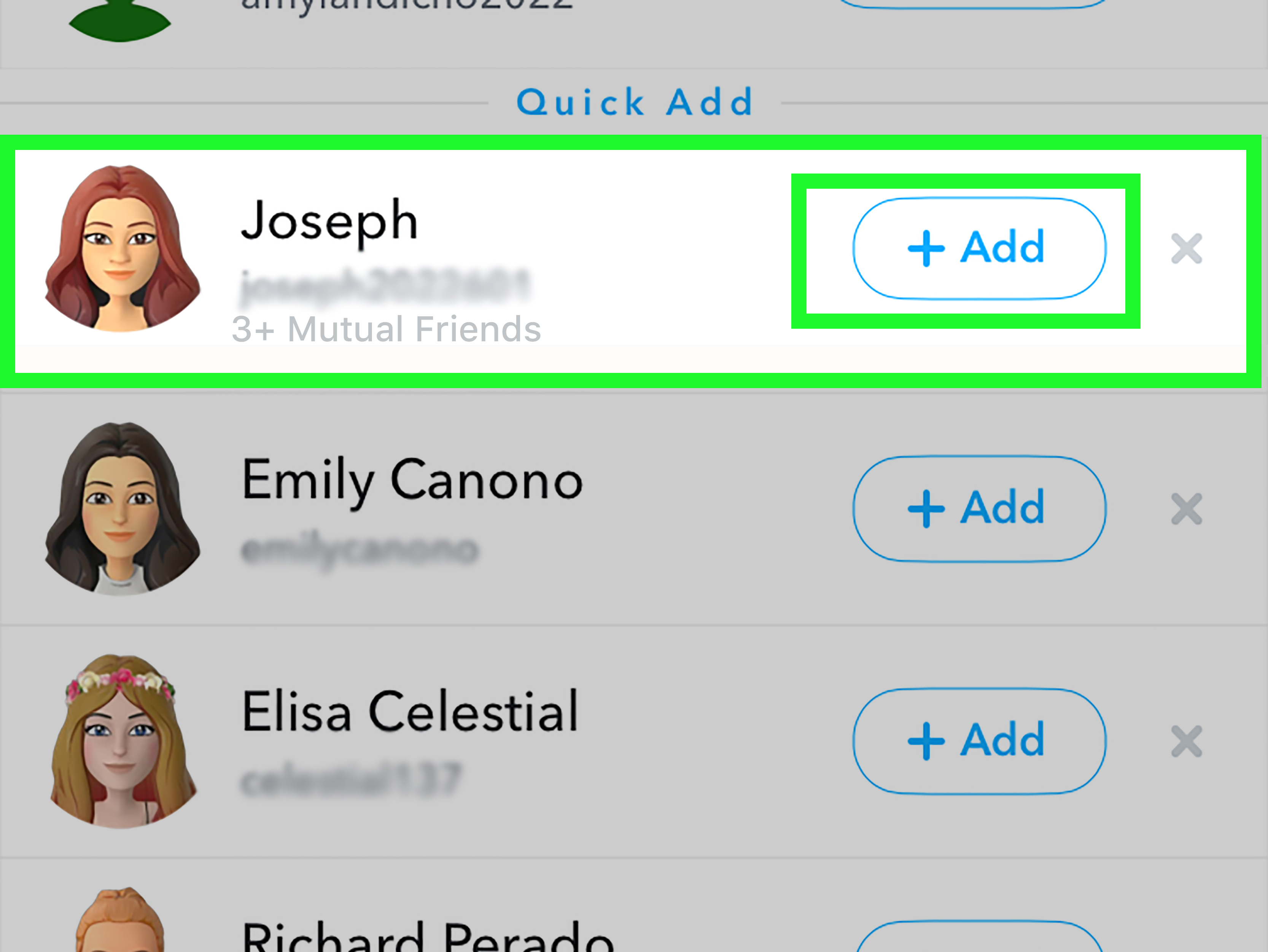
Yes, Snapchat can show mutual-friend information in certain situations. You may see a mutual-friends label or a list of shared connections when viewing a suggested account or a user profile. In some cases, Snapchat may only show a number, such as “2+ Mutual Friends,” rather than revealing every name.
The important detail is privacy. Snapchat accounts are private by default, and users can control whether mutual-friend information appears on their profiles or in their friends’ lists. So, while Snapchat may show that you and another person have connections in common, it may not always reveal exactly who those people are.
Think of it like seeing the trailer for a movie without getting the entire plot. You know something interesting is happening, but Snapchat may keep the supporting cast under wraps.
How to See Mutual Friends on Snapchat in 3 Easy Steps
Step 1: Open Snapchat and Find the Find Friends Section
Start by opening the Snapchat app on your iPhone or Android device. From the main Camera screen, tap your Bitmoji or Profile icon in the upper-left corner.
From your profile page, look for an option such as Add Friends, Find Friends on Snapchat, or a similar friend-discovery button. Depending on your version of the app, Find Friends may also appear in the Chat screen, the Add Friends screen, or when you use Snapchat Search.
Once you enter Find Friends, you should see a stream of suggested accounts. These suggestions are not random names picked out of a digital hat. Snapchat may recommend people based on shared friends, phone contacts, followers, location-related signals, schools or communities, and other information connected to your account.
If you do not immediately see the person you are looking for, use the Search icon at the top of Snapchat. Type the person’s display name or username, then open the profile that matches the account you want to check.
Step 2: Open the Suggested Profile and Look for Mutual Friend Details
Scroll through your Find Friends suggestions and look for an account that appears connected to your social circle. You may see a small label under or near the person’s name, such as:
- “2+ Mutual Friends”
- “Friends in Common”
- A mutual-friend section on the user’s profile
- A suggestion that indicates the person is connected through your network
Tap the person’s Bitmoji, avatar, or profile name to open their profile. Then scroll through the profile and look for a section labeled Mutual Friends or a similar shared-connections area.
When the feature is available, Snapchat may display people you both know. In other cases, it may only show a number of mutual connections instead of a complete list. This is normal. The amount of detail you can view depends on whether the other person has chosen to share mutual-friend information through their privacy settings.
For example, imagine you see a suggested account named Jordan. Snapchat may show “3+ Mutual Friends.” When you open Jordan’s profile, you might see a few shared connections, such as Taylor, Morgan, and Chris. Or you may only see the number without the names. Snapchat is basically saying, “Yes, there is social overlap here,” while politely refusing to hand you a full spreadsheet.
Step 3: Review the Mutual Connections Before Adding the Person
Once you can see the mutual-friend information, take a moment before hitting the Add button. Mutual friends can provide useful context, but they are not an automatic trust certificate with glitter on it.
Ask yourself a few simple questions:
- Do I recognize the shared friends?
- Does the account name, Bitmoji, and public content match a real person I know?
- Did this person appear because we share friends, contacts, school connections, or something else?
- Would I feel comfortable receiving Snaps or Chats from this account?
If everything looks familiar, tap Add to send a friend request. If the account feels unfamiliar, confusing, or suspicious, you can skip it. Snapchat also lets you hide suggestions by tapping the X next to a recommended user.
Remember: you do not need to add every person with mutual friends. A shared connection can simply mean you both know the same classmate, coworker, former teammate, cousin, or person who once attended the same birthday party and somehow still has everyone’s phone number.
Why Mutual Friends May Not Show Up on Snapchat
You may follow all three steps and still not see a mutual-friends section. Before you blame your phone, your Wi-Fi, or Mercury retrograde, consider the most common reasons.
The Other User Has Hidden Mutual Friends
Snapchat gives users privacy controls related to mutual friends. Someone may choose not to show their mutual-friend list or not to appear in other users’ lists. When that happens, you may see fewer details than you expected.
There is no legitimate workaround for another person’s privacy setting. If Snapchat does not show a mutual-friends list, respect that boundary. Avoid third-party apps, suspicious websites, or “secret Snapchat viewer” tools that claim to reveal hidden friends. Those services are often unreliable, unsafe, or designed to collect login information.
You Do Not Actually Share Snapchat Friends
A person can appear in Find Friends for many reasons besides direct mutual friends. Snapchat recommendations may be influenced by contacts, location-related patterns, existing followers, communities, or other network signals.
That means a suggested account is not always proof that the person is friends with one of your Snapchat contacts. They may simply be connected through your phone book, a school network, a shared community, or another piece of social overlap.
Your Snapchat App Needs an Update
Snapchat changes its layout often enough to keep users humble. A button that appears in one place today may move after an update, and a feature may roll out gradually across devices or regions.
If you cannot find Find Friends, mutual-friend labels, or profile sections described in this guide, update Snapchat through the App Store or Google Play Store. Then reopen the app and check your profile, Add Friends area, Chat screen, and Search results again.
The Profile Is Not Eligible to Show Details
Some accounts may have limited visibility because of age-related protections, privacy settings, account status, or the person’s relationship to your account. Snapchat applies extra safeguards to help younger users avoid unwanted connections, so not every account will surface in the same way.
How to Control Your Own Mutual Friends Privacy on Snapchat
You may be reading this guide because you want to see mutual friends. Five minutes later, you may realize that other people could potentially see mutual connections involving you. Welcome to the social media plot twist.
To review your own Snapchat privacy settings:
- Open Snapchat and tap your Bitmoji or Profile icon.
- Tap the Settings gear icon in the upper-right corner.
- Scroll to the App & Privacy or My Privacy & Data section.
- Look for a setting related to Mutual Friends.
- Choose whether you want to show your mutual-friend list or appear in other users’ mutual-friend lists.
The exact wording may differ slightly depending on your app version. If you do not see the setting right away, use the search function in Snapchat Settings if it is available, or update the app and check again.
It is also smart to review who can contact you, who can view your Story, who can see your location, and whether you appear in Find Friends. Privacy settings are not the most glamorous part of Snapchat, but neither is explaining to your aunt why a stranger sent you a blurry ceiling photo at 2:14 a.m.
Mutual Friends vs. Snapchat Best Friends: Do Not Mix Them Up
Snapchat has several friendship-related features, and they are easy to confuse. Mutual friends and Best Friends are not the same thing.
Mutual friends are people you and another account both know or share through your Snapchat network. They help explain how two accounts may be socially connected.
Best Friends are the people you Snap and Chat with most often. Snapchat updates this list automatically based on your activity. Your Best Friends list is designed to reflect your own interaction patterns, not your entire social network.
A person can be your mutual friend without being one of your Best Friends. Likewise, one of your Best Friends may not have any mutual connections with a new suggested account. Snapchat friendship features are more like a messy family reunion than a neatly labeled filing cabinet.
Safety Tips When Checking Mutual Friends on Snapchat
Seeing shared connections can make a new account feel more familiar, but it should not replace good judgment. A mutual-friend label is a clue, not a background check.
Verify Before You Add
If someone claims to know you, ask a simple question that a real connection could answer. For example, ask where you met, which friend you both know, or what event you attended together. Keep the question casual, but do not be afraid to verify.
Do Not Share Sensitive Information Too Quickly
Even if you share several mutual friends, avoid sending your address, school schedule, private photos, financial details, passwords, verification codes, or live location to a new account. Real friends do not need your login code. Scammers, however, are strangely enthusiastic about it.
Use Block, Hide, and Report Tools When Needed
If a suggested account makes you uncomfortable, you can hide the recommendation, remove the friend, block the account, or report suspicious behavior. Snapchat’s privacy tools exist for a reason. Use them without guilt and without composing a dramatic farewell speech.
Frequently Asked Questions About Snapchat Mutual Friends
Can I see the full list of mutual friends on Snapchat?
Sometimes. Snapchat may show a mutual-friend list or only a mutual-friend count, depending on the other person’s privacy preferences and the app experience available to you.
Why does Snapchat say I have mutual friends with someone I do not know?
Snapchat suggestions can be influenced by shared friends, phone contacts, communities, followers, location-related signals, and other connection factors. A mutual-friend label does not always mean the person is close friends with someone in your current Snapchat list.
Can someone see that I checked their mutual friends?
Simply viewing a profile or checking visible mutual-friend information does not normally send the other person a notification. Sending a friend request, viewing public content, or interacting with their account is different.
Can I use Snapchat mutual friends to find someone’s entire friend list?
No. Snapchat keeps friend lists private by default. You may see mutual connections when the feature is available, but you cannot use it to browse a person’s complete private friend list.
What happened to Quick Add on Snapchat?
Snapchat renamed Quick Add to Find Friends. The purpose remains similar: helping you discover real-life friends, family members, classmates, coworkers, and other people you may know.
Real-World Experiences and Practical Lessons From Using Snapchat Mutual Friends
Using mutual friends on Snapchat is usually less dramatic than people expect. Most of the time, it is a quick way to answer a simple question: “Do I actually know this person?” Still, the feature can create surprisingly useful, awkward, funny, and occasionally confusing moments.
One common situation happens after changing schools, starting college, moving to a new city, or joining a new workplace. Suddenly, Snapchat begins suggesting names you vaguely recognize from group chats, orientation events, sports teams, or awkward elevator conversations. Seeing mutual friends can make the difference between confidently adding someone and wondering whether you are about to send a friend request to a total stranger named “Mason” who just happens to own the same sunglasses as three other Masons.
Mutual friends can also help reconnect people who lost touch. Maybe you see a former classmate in Find Friends and notice that you both still know several people from your old friend group. That small bit of context can make a friend request feel less random. Instead of sending “Hey, do you remember me?” with the emotional energy of a forgotten password reset, you can say, “I saw we still know a few people from school. Hope you’ve been doing well.”
Another common experience involves meeting someone at a party, conference, concert, gym, or family event. You may not remember their username, but when they appear in Snapchat suggestions with mutual friends, the connection becomes clearer. This can be especially helpful when several people have similar display names or Bitmojis that look suspiciously like every other smiling cartoon person wearing a hoodie.
There are also moments when mutual-friend information causes unnecessary overthinking. You might see that a coworker has “2+ Mutual Friends” with you and immediately wonder which people from your personal life are somehow connected to your office. Before launching an investigation worthy of a streaming crime series, remember that Snapchat suggestions can be influenced by contacts and broader network signals. The explanation may be boringly normal.
For parents and guardians, mutual-friend labels can provide useful context when reviewing a teen’s new connections. A shared-friends signal may help explain how a new account fits into a teenager’s real-world social circle. However, it should be treated as one piece of information, not a complete safety guarantee. A familiar-looking connection can still be impersonated, and an unfamiliar connection is not automatically dangerous. Good conversations about online safety remain more useful than silent panic-scrolling.
People also learn quickly that mutual friends are a starting point, not a reason to trust someone blindly. A person can share friends with you and still send spam, scams, inappropriate messages, or requests that feel off. The best habit is simple: use mutual friends as context, then rely on your own judgment. If an account is real, respectful, and familiar, adding them may make sense. If the account immediately asks for money, private photos, verification codes, or your location, the mutual connection has officially lost its persuasive powers.
The most practical lesson is to keep your Snapchat network intentional. Add people you actually know or want to know. Review privacy settings occasionally. Remove accounts that no longer belong in your digital life. And do not feel obligated to accept every request just because you share a few friends. Snapchat is supposed to make staying connected easier, not turn your social circle into an open-door policy with confetti.
Final Thoughts
Learning how to see mutual friends on Snapchat is simple once you know where to look. Open Find Friends, check suggested profiles, and review any mutual-friend labels or lists Snapchat makes available. Just remember that the app’s privacy settings may limit what you can see, and that is by design.
Mutual friends can help you recognize real connections, reconnect with people from your past, and make smarter choices about friend requests. Use the feature as a helpful clue, not a crystal ball. The best Snapchat connections are still the ones built on real conversations, common sense, and a healthy refusal to add “CryptoKing_847” because he allegedly knows your cousin.