Every Sims 3 player has had that moment: you create what you think is the perfect Sim, send them into the world with a stylish haircut and heroic confidence, and then realize you gave them the wrong traits. Maybe your “future celebrity chef” is suddenly Absent-Minded, Unlucky, and Hates the Outdoors. Maybe your family-oriented parent keeps rolling wishes to avoid children like they’re unpaid bills. Or maybe your Evil Sim has become suspiciously nice, and frankly, the drama department is understaffed.
Good news: you do not have to delete your Sim, restart your household, or pretend that “Kleptomaniac Bookworm Hydrophobic Rock Star” was your plan all along. In The Sims 3, you can change a Sim’s traits in a few different ways, including a legitimate in-game lifetime reward, built-in cheats, Create-a-Sim editing, and mods such as NRaas MasterController.
This guide explains how to change your Sim’s traits in The Sims 3 in 5 steps, with practical examples, troubleshooting tips, and gameplay advice so your Sim’s personality finally matches the story you actually want to tell.
Why Traits Matter So Much in The Sims 3
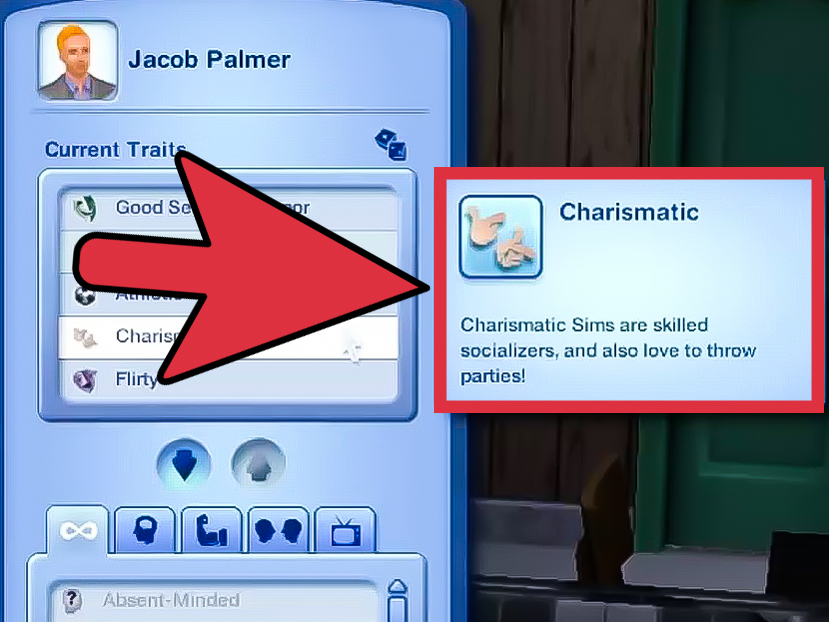
Traits are not just decorative labels sitting politely in your Sim panel. In The Sims 3, traits influence behavior, wishes, social interactions, moodlets, skill preferences, career direction, lifetime wish suggestions, and autonomous actions. A Natural Cook is more useful in the kitchen than a Sim who treats waffles like a science experiment. A Commitment Issues Sim may make romance more chaotic. A Genius Sim is better suited to chess, logic, science, and certain academic storylines.
Most young adult, adult, and elder Sims normally have five main traits. Younger Sims have fewer trait slots, gaining more as they age. Expansions and special systems may add extra possibilities, but for standard gameplay, five personality traits define the core of your Sim’s identity. That is why changing traits can completely refresh a household without forcing you to abandon the save file.
How to Change Your Sim’s Traits in The Sims 3: 5 Steps
Step 1: Decide Why You Want to Change the Traits
Before clicking buttons like a llama on espresso, take a moment to decide what kind of change you want. Are you correcting a mistake from Create-a-Sim? Are you adjusting your Sim after a major life event? Are you trying to match a lifetime wish, career, or story arc?
For example, a Sim who starts as Party Animal, Flirty, and Charismatic might make sense as a young adult living downtown. But after marriage, kids, and a peaceful suburban home, you might want to shift them toward Family-Oriented, Nurturing, or Handy. A Sim who becomes a full-time gardener may benefit from Green Thumb and Loves the Outdoors. A future author could use Bookworm, Artistic, or Perfectionist.
This step matters because traits should support gameplay. If your Sim’s traits work against your goals, every day can feel like pushing a shopping cart with one broken wheel. Funny? Yes. Efficient? Absolutely not.
Step 2: Use the Mid-Life Crisis Lifetime Reward for a No-Cheat Method
The most “official” gameplay-friendly method is the Mid-Life Crisis lifetime reward. This reward costs 20,000 lifetime happiness points and allows you to reselect your Sim’s traits without using cheats. It is a great option for players who prefer a realistic or challenge-friendly approach.
To use this method, open your Sim’s lifetime rewards panel, collect enough lifetime happiness points, purchase the Mid-Life Crisis reward, and then choose new traits when prompted. This lets your Sim keep their relationships, skills, career progress, household, and life history while getting a personality refresh.
This method is especially useful for legacy players. Instead of replacing a Sim you have played for weeks, you can let their personality evolve. Maybe your reckless young inventor becomes disciplined and family-focused. Maybe your workaholic CEO discovers gardening. Maybe your grumpy elder finally becomes Goodmiracles happen, even in Sunset Valley.
Step 3: Use Testing Cheats for the Fastest Trait Change
If you want the quick method, use the built-in cheat system. This is the most common way players change traits instantly in The Sims 3.
Here is the basic process:
- Press Ctrl + Shift + C to open the cheat console.
- Type testingcheatsenabled true and press Enter.
- Hold Shift and click your active Sim.
- Select the option to modify traits for the active Sim.
- Choose the new traits and confirm your changes.
This method is excellent when you made a mistake, need to fix a buggy trait setup, or want to adjust a Sim for storytelling. It is also useful for players who create custom households and realize five minutes into gameplay that the brave firefighter should probably not be Coward.
After you finish editing, you can turn cheats off by opening the cheat console again and typing testingcheatsenabled false. This is not always required, but it is a tidy habit if you do not want accidental cheat-click options popping up later.
Step 4: Edit Your Sim in Create-a-Sim When Available
Another option is using the game’s Edit in CAS functionality through testing cheats or certain mods. This sends your Sim back into a Create-a-Sim style editor where you can adjust appearance and, depending on the method used, personality details.
To access this with cheats, enable testingcheatsenabled true, Shift-click the Sim, and look for an option such as Edit in Create a Sim or related trait-editing options. The exact options can vary depending on patch level, expansion packs, and installed mods.
Use this method carefully. Create-a-Sim editing is powerful, but it is always smart to save your game before making major changes. A safe approach is to use “Save As” and create a backup save file. That way, if your Sim returns from CAS with weird clothing, missing details, or a haircut that looks like a raccoon made a life decision, you can roll back.
Step 5: Use Mods Like NRaas MasterController for Advanced Control
For players who use mods, NRaas MasterController is one of the most popular tools for editing Sims in The Sims 3. It gives deeper control over Sims, households, townies, and many hidden or advanced settings. With the right NRaas setup, players can access trait-changing options through menus such as NRaas > MasterController > Advanced > Traits.
This method is best for experienced players or anyone managing a long-running save. It can help fix townies, adjust inactive Sims, change story progression characters, or clean up trait combinations that do not make sense.
Mods can be powerful, but they also require care. Always download from reputable Sims modding communities, follow installation instructions, check compatibility with your patch level, and back up your save before changing major Sim data. Mods are like giving your game a toolbox. Helpful? Very. Something you should swing around randomly? Probably not.
Best Trait Changes for Popular Sims 3 Stories
Changing traits is more fun when you connect the change to a story. Below are a few practical examples.
For a Career-Focused Sim
If your Sim is chasing promotions, consider traits like Ambitious, Workaholic, Charismatic, Genius, or Perfectionist. These traits support career growth, skill-building, and professional storylines. A business Sim with Ambitious and Charismatic traits feels much more believable than a couch-loving Slob who accidentally became CEO because you clicked too fast.
For a Family Gameplay Sim
For family-centered saves, traits such as Family-Oriented, Nurturing, Good, Neat, and Natural Cook can make daily household life smoother. These traits are useful for parents, grandparents, daycare stories, and legacy founders.
For a Creative Sim
Writers, painters, musicians, sculptors, and inventors benefit from traits like Artistic, Virtuoso, Bookworm, Eccentric, and Perfectionist. These traits help your Sim feel more connected to creative hobbies and skill-based goals.
For a Chaotic Drama Sim
Sometimes you are not here for peace. You are here for drama with a loading screen. Traits like Flirty, Hot-Headed, Mean Spirited, Evil, Commitment Issues, and Kleptomaniac can create unpredictable stories. Just remember: if you give one Sim too many chaos traits, do not act surprised when the dinner party turns into a soap opera with burnt mac and cheese.
Important Tips Before Changing Traits
First, save your game before making changes. This is especially important if you are using cheats or mods. A backup save gives you a safety net in case something goes wrong.
Second, remember that traits can affect lifetime wishes. Some lifetime wishes are connected to personality traits, careers, or skills. If you dramatically change your Sim’s personality, their original lifetime wish may feel less natural. For example, a Sim with a lifetime wish centered on romance may feel odd after you change them into a shy, family-focused homebody.
Third, avoid changing traits too often unless that is part of your gameplay style. Constantly swapping traits can make your Sim feel less like a character and more like a spreadsheet wearing shoes. Trait changes are most satisfying when they reflect growth, mistakes, trauma-free drama, career shifts, or major milestones.
Finally, if you use mods, make sure your mod setup is stable. Many Sims 3 players use NRaas tools successfully, but every modded game is different. Patch level, expansion packs, custom content, and other installed mods can affect behavior.
Common Problems and Fixes
The Shift-Click Menu Does Not Show Trait Options
Make sure you typed the cheat correctly: testingcheatsenabled true. Then Shift-click the active Sim, not just the ground or another object. If the option still does not appear, try saving, exiting to the main menu, reloading the household, and enabling the cheat again.
The Mid-Life Crisis Reward Is Not Available
Check your Sim’s age and available lifetime happiness points. The reward costs 20,000 points, so a new Sim may not have enough yet. You may need to fulfill wishes, complete lifetime goals, or play longer before buying it.
My Sim’s New Traits Do Not Match Their Old Lifetime Wish
This can happen. You can either treat it as character development or use available in-game options, cheats, or mods to adjust the lifetime wish as well. In storytelling terms, this can actually be interesting: your Sim may outgrow an old dream and chase something new.
My Mod Menu Looks Different
NRaas and other mods may display different menu paths depending on installed modules and versions. If you do not see the trait option, check whether you installed the required base mod and any needed add-on modules.
of Player Experience: What Changing Traits Feels Like in Real Gameplay
Changing traits in The Sims 3 is one of those small actions that can completely revive a save file. After playing a household for a long time, Sims sometimes drift away from the personality you imagined for them. Maybe you created a Sim as a carefree young adult, but after several promotions, a marriage, three children, and one suspiciously expensive kitchen fire, their original traits no longer fit. That is when trait editing becomes less like cheating and more like storytelling maintenance.
One of the best uses of trait changes is during life transitions. A teenage Sim who was Rebellious and Hot-Headed might become more Ambitious after graduating. A young adult who spent their early days partying might become Family-Oriented after having their first child. An elder who has completed a career could trade Workaholic for Green Thumb and finally spend peaceful mornings in the garden instead of sprinting toward another carpool.
In long legacy saves, trait changes can also help prevent boredom. When every generation starts to feel the same, adjusting traits gives each Sim a fresh rhythm. A Neat Sim plays differently from a Slob. A Genius Sim pushes you toward logic and science, while a Virtuoso Sim naturally encourages music, concerts, and artistic goals. Even swapping one trait can change the way you plan a Sim’s day.
The Mid-Life Crisis reward feels especially satisfying because it gives the change a built-in story. Instead of opening a cheat menu instantly, your Sim earns the right to reinvent themselves. It feels like a character arc: “I used to be one person, now I want to become someone else.” That can be surprisingly meaningful in a game where someone can also die from trying to repair a dishwasher while standing in a puddle.
Cheats, on the other hand, are perfect for quick fixes. If you accidentally gave your athletic firefighter the Couch Potato trait, using testing cheats does not feel like breaking the game. It feels like correcting a typo. The same goes for townies. Sometimes an inactive Sim has a combination that makes no sense for your story, and a quick edit makes the whole neighborhood feel more believable.
Mods like NRaas MasterController are best for players who enjoy fine-tuning. Once you get comfortable with the menus, changing traits becomes part of managing the world. You can adjust inactive Sims, repair broken setups, or create more interesting personalities across town. It is especially helpful when you are building a custom world or maintaining a save that has been running for many Sim weeks.
The biggest lesson is simple: traits should serve the story. You do not need to optimize every Sim into a perfect success machine. Sometimes flawed combinations are the fun part. A cowardly ghost hunter, a clumsy surgeon, or a hot-headed politician can create memorable gameplay. Change traits when they block your fun, but keep a few imperfections when they make your Sims feel alive.
Conclusion
Learning how to change your Sim’s traits in The Sims 3 gives you more control over your stories, households, careers, and legacy gameplay. Whether you use the Mid-Life Crisis lifetime reward, testing cheats, Edit in CAS, or NRaas MasterController, the goal is the same: make your Sim’s personality fit the life they are living.
For challenge players, the lifetime reward keeps things fair. For storytellers, cheats make quick character adjustments easy. For modded-game fans, NRaas tools offer deeper control. No matter which method you choose, save your game first, choose traits with purpose, and remember that a little imperfection can make a Sim much more entertaining.
After all, The Sims 3 is not just about building perfect people. It is about building memorable oneseven if they occasionally steal lamps, insult guests, or set pancakes on fire before 8 a.m.