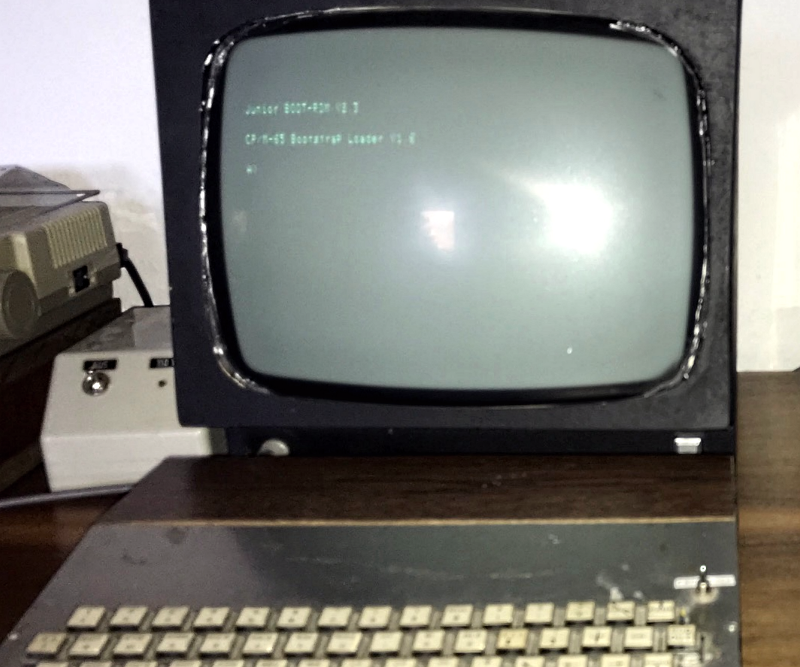
CP/M 6502-style sounds like a computer-history mashup made after midnight by someone surrounded by floppy disks, solder fumes, and too much coffee. Yet the idea is surprisingly practical: take the clean, portable, command-line spirit of CP/M and imagine how it can live on a MOS 6502-based machine. It is not “real” CP/M in the classic Intel 8080 or Zilog Z80 sense. Instead, it is CP/M as an operating-system philosophy: small, modular, disk-centered, text-driven, and wonderfully direct.
To understand why this is interesting, we need to visit two giants of early personal computing. On one side is CP/M, Gary Kildall’s landmark microcomputer operating system that helped turn floppy disks into everyday tools for programmers, hobbyists, and small businesses. On the other side is the MOS Technology 6502, the inexpensive 8-bit processor that powered the Apple II, Commodore PET, Commodore 64, Atari systems, BBC Micro, and plenty of machines that made beige plastic look heroic.
Put them together and you get a delicious technical puzzle: CP/M was designed around the 8080/Z80 world, while the 6502 has a completely different instruction set, memory personality, and programming style. So “CP/M 6502-style” is less about running original CP/M binaries and more about building a CP/M-like environment for 6502 hardware: a command processor, disk services, device abstraction, simple executable loading, and a consistent way for programs to talk to the machine without wrestling every wire by hand.
What CP/M Really Was
CP/M, short for Control Program for Microcomputers, became one of the defining operating systems of the late 1970s and early 1980s. Its great trick was not fancy graphics, multitasking, or animated icons. CP/M’s magic was portability. It offered a common software environment across many different computers, provided those systems used compatible processors and supplied the right hardware-specific layer.
Classic CP/M separated its world into a few important pieces. The Console Command Processor, or CCP, handled commands typed by the user. The Basic Disk Operating System, or BDOS, handled file and disk services. The Basic Input/Output System, or BIOS, was the machine-specific layer that knew how to talk to the console, disk drives, printer, and other hardware. That structure was elegant because most software could call standard CP/M services instead of knowing whether the disk drive was a fancy business machine, a stubborn hobbyist contraption, or a mechanical object with the personality of a toaster.
In practical terms, CP/M gave early microcomputer users a familiar rhythm: boot from disk, see a prompt, type commands, run programs, list files, copy data, and get work done. It supported a thriving software ecosystem that included editors, assemblers, database tools, compilers, and famous applications such as WordStar. Compared with the chaos of every computer needing its own custom software universe, CP/M felt like a town square.
Why the 6502 Was Different
The MOS 6502 arrived in 1975 and changed the cost equation for personal computing. It was cheap, fast for its price, and simple enough to inspire bold hardware designs. Steve Wozniak used it in the Apple I and Apple II. Commodore built machines around it and its close relatives. Atari, Acorn, Nintendo, and many others joined the party. If the Z80 was the business-suit processor of many CP/M systems, the 6502 was the scrappy garage-band chip that somehow sold out the stadium.
Technically, the 6502 is not compatible with the Intel 8080 or Zilog Z80. It cannot directly run standard CP/M programs because those programs are machine code written for another CPU family. The 6502 has different registers, different addressing modes, different flags, different stack behavior, and a very different style of assembly programming. It is elegant, but it is not bilingual.
That difference matters. Original CP/M software expected an 8080-compatible processor and a memory model where programs typically loaded at address 0100h. On a 6502 system, low memory has special importance: zero page is a prized high-speed workspace, and the hardware stack is fixed at page one. That makes a straight CP/M transplant awkward. It is not impossible to imitate the CP/M user experience, but it requires rethinking the internals.
So What Does “CP/M 6502-Style” Mean?
CP/M 6502-style means borrowing the CP/M model rather than pretending the 6502 is a Z80 wearing a fake mustache. A 6502 CP/M-like system can include a command prompt, disk directory commands, file naming conventions, program loading, and a BIOS/BDOS-style split. But its programs must be written or assembled for the 6502. A Z80 .COM file will not magically run unless the system includes emulation, translation, or extra hardware.
The Practical Definition
A CP/M-inspired 6502 operating system usually has five core goals:
- Provide a simple text command interface.
- Offer standardized file and disk operations.
- Hide hardware details behind a BIOS-like layer.
- Load and run small programs in a predictable memory area.
- Make software more portable across different 6502 machines.
That last point is the big prize. The 6502 world had brilliant computers, but they often behaved like neighboring kingdoms with incompatible road signs. Apple II software, Commodore software, Atari software, and BBC Micro software all lived in their own hardware cultures. A CP/M-style abstraction layer offers a way to reduce that fragmentation, even if it cannot erase it completely.
The Apple II, the SoftCard, and the Two-CPU Trick
The Apple II is one of the most famous 6502 computers, yet it became a major CP/M platform through a clever workaround: Microsoft’s Z-80 SoftCard. The SoftCard added a Z80 processor to the Apple II, allowing it to run CP/M software while using the Apple II’s memory, keyboard, display, and disk system. This was not 6502 CP/M. It was CP/M running on a Z80 inside a 6502-based computer, which is both ingenious and slightly like inviting a second chef into a tiny kitchen.
The SoftCard mattered because CP/M had an enormous business software library. Apple II users could suddenly access CP/M applications without buying a separate CP/M machine. The setup also illustrates the central problem: when people wanted true CP/M compatibility, they added an 8080-compatible processor. When people wanted a CP/M-like experience on the 6502 itself, they had to create a new operating system model inspired by CP/M rather than identical to it.
Apple DOS and the 6502 Way of Thinking
Apple II DOS is a helpful comparison. It was written for the 6502 and gave Apple II users disk storage, file management, and BASIC integration. It was not CP/M, and it did not aim to create a cross-manufacturer software standard in the same way. But it shows how disk operating systems had to fit the personality of their machines.
Apple II DOS leaned strongly into the Apple II environment. It worked beautifully with BASIC, the Disk II controller, and Apple’s hardware assumptions. That made it useful and approachable, but not broadly portable. A CP/M 6502-style system would aim for a different balance: still small and efficient, but with a stronger separation between machine-dependent routines and common services.
Modern 6502 CP/M-Like Projects
Retrocomputing communities have explored several CP/M-inspired systems for the 6502. Projects such as CPM-65 show how the CP/M architecture can be reimagined for 6502 microcomputers. These systems typically use CP/M-like names, commands, and layers, while loading native 6502 programs. Another preservation-minded example is OUP/M, a CP/M-like operating system designed for a 6502-based Ohio Scientific-style environment.
These projects are valuable because they treat old machines as living laboratories. They are not just museum labels behind glass. They show how software architecture travels. The idea of a command processor, disk service layer, and hardware abstraction layer remains understandable today because it solves a real problem: programs should not have to know every ugly detail of every machine they run on.
How a CP/M 6502-Style System Might Be Designed
1. A Command Processor
The command processor is the user’s front door. It reads typed commands, parses filenames, launches programs, and handles simple built-in commands such as directory listing, file copying, deletion, and drive selection. In a 6502 system, this must be compact. Memory is not a luxury hotel; it is a bunk bed with strict rules.
2. A BDOS-Like Kernel
A BDOS-style layer provides file services. Programs call it to open files, read records, write data, close files, and manage directories. This is the layer that gives programmers relief from hardware-specific disk chaos. Instead of manually stepping drive motors and counting sectors like a nervous librarian, applications request file operations through a consistent interface.
3. A BIOS-Like Hardware Layer
The BIOS-like layer is where machine-specific code lives. On one 6502 machine, console output might mean writing to memory-mapped video. On another, it might mean sending characters through a serial port. Disk access might involve floppy hardware, SD-card adapters, compact flash, or emulated disk images. The BIOS absorbs those differences so the upper layers can remain relatively stable.
4. Native 6502 Program Loading
Classic CP/M commonly loaded transient programs at 0100h. A 6502-style version needs a different convention because page zero and page one are special. Some systems choose a loading address such as 0200h or another practical location based on available RAM. The exact address matters less than the rule: programs need a predictable home, and the operating system needs enough memory to survive the visit.
5. A Sensible File Format
CP/M-style filenames, drive letters, and simple extensions are part of the charm. A 6502 version might use names such as A:EDITOR.COM or B:ASM.COM even when the executable format is not original CP/M machine code. This creates familiarity without claiming binary compatibility. In other words, it dresses like CP/M, speaks with a 6502 accent, and does not apologize.
Why Binary Compatibility Is the Hard Part
One of the most common misunderstandings is that a CP/M-style 6502 operating system should run classic CP/M software. That expectation is understandable, but it ignores the processor issue. A CP/M program written for the 8080 or Z80 contains instructions the 6502 simply cannot execute. The chips do not share an instruction set.
There are theoretical workarounds. A 6502 could emulate an 8080, but performance would be limited. A hardware add-on could provide a Z80, as the Apple II SoftCard did. A translator could attempt to convert binaries or source code, but real-world programs often rely on assumptions that complicate the process. The cleanest approach is usually to build a CP/M-like operating system and write native 6502 programs for it.
Why the Idea Still Matters
CP/M 6502-style is more than retrocomputing fan service. It teaches durable software lessons. First, abstraction matters. Second, small systems force clarity. Third, portability is easier when hardware-specific code is isolated. Fourth, a good command-line environment can remain useful for decades. Finally, old constraints often produce excellent design habits.
Modern developers work with containers, APIs, virtual machines, drivers, shells, and operating-system services. CP/M’s separation between common services and hardware-specific routines is an ancestor of many ideas still used today. The 6502 adds another lesson: efficient design is not about having endless resources; it is about knowing exactly what each byte is doing and making sure none of them are loitering.
Examples of CP/M 6502-Style Thinking
Imagine a 6502 single-board computer with 64 KB of RAM, a serial terminal, and an SD-card storage interface. A CP/M-style operating system could boot from a small ROM, load the main system from disk, initialize the console, and present a prompt. The user could type DIR to list files, ASM to run an assembler, EDIT to edit text, or BASIC to launch a language interpreter. Programs would call the operating system for character input, file access, and disk operations.
Now imagine porting that same environment to a different 6502 machine. The command processor and BDOS-like layer might stay mostly the same. The BIOS-like layer would change to match the new console and storage hardware. That is the CP/M dream translated into 6502 grammar: keep the software personality stable while swapping the machine-specific shoes.
Benefits of a CP/M-Style OS on 6502 Hardware
The biggest benefit is consistency. A familiar command structure lowers the learning curve. Programmers gain a standard target. Hobbyists get an environment that feels more like a complete development system than a monitor prompt and a prayer. File management becomes cleaner, and applications can become more portable.
Another benefit is historical education. Building or using a CP/M-inspired 6502 OS helps explain why operating systems evolved the way they did. You can see the relationship between hardware, storage, memory maps, system calls, and user experience. It is computer science with blinking cursors instead of slide decks, which is usually an improvement.
Limitations and Trade-Offs
The limits are real. A 6502 CP/M-like operating system must fit into restricted memory. It cannot rely on the massive software catalog of original CP/M unless it includes emulation or source-level ports. Hardware differences across 6502 machines remain challenging. Video, keyboard, disk, bank switching, and ROM layouts can vary wildly.
There is also a philosophical trade-off. The more a system imitates CP/M, the more it may ignore the special strengths of individual 6502 computers. The Apple II’s graphics, the Commodore 64’s sound chip, and Atari’s custom hardware are not generic text terminals. A portable CP/M-style layer may choose simplicity over machine-specific fireworks. That is not a flaw; it is a design decision. Sometimes you want fireworks. Sometimes you want your assembler to load without drama.
Experience Notes: Working With CP/M 6502-Style Systems
The experience of using a CP/M 6502-style environment begins with a different mindset. Modern computing often hides the machine under layers of polish. A retro command-line system does the opposite. It invites you to notice the memory map, the disk format, the boot process, and the cost of every feature. The first time a prompt appears after a successful boot, it feels less like launching software and more like convincing a tiny civilization to organize itself.
One of the most satisfying experiences is seeing a directory command work. That may sound humble, but on a small 6502 system it represents a chain of cooperation: the console accepts input, the command processor understands it, the disk layer reads directory sectors, and the output routine prints the results. A simple file list becomes a parade of successful abstractions. Nobody throws confetti, but they should.
Programming for this style of system also changes how you think about applications. You stop assuming that memory is endless. You become careful with buffers. You think about whether a routine belongs in the application, the BDOS-like layer, or the BIOS-like layer. You learn to respect page zero, avoid trampling the stack, and keep entry points documented. The machine rewards discipline and punishes wishful thinking with crashes that feel personally disappointed in you.
Debugging can be both charming and brutal. There may be no modern debugger, no friendly stack trace, and no helpful pop-up saying, “Would you like to report this problem?” Instead, you inspect memory, print diagnostic characters, compare sectors, and slowly narrow the mystery. When the bug is finally found, it is often something small: a register not preserved, an off-by-one sector count, a jump table address typed incorrectly, or a buffer placed where the operating system expected peace and quiet.
Storage is another memorable part of the experience. CP/M-style systems encourage you to think in files and records, but the underlying disk may still be strange. Floppy geometry, sector size, track layout, and directory structure all matter. On emulators, disk images make experimentation easier. On real hardware, every successful read feels like diplomacy with a spinning artifact from another century.
The greatest pleasure, however, is portability. When a small utility runs on one 6502 setup and then runs on another after only BIOS-level changes, the whole concept clicks. That is the CP/M idea doing its job. The application does not need to know whether characters come from a serial terminal or a keyboard matrix. It does not need to know whether storage is floppy, SD card, or an emulator file. It asks the system, and the system answers.
For hobbyists, CP/M 6502-style is a perfect middle ground between bare-metal programming and a full modern operating system. Bare metal gives control but can become repetitive. A large OS gives convenience but hides the interesting parts. A compact CP/M-like environment offers just enough structure to build real tools while keeping the machine understandable. It is small enough to study, modify, and break in educational ways.
There is also a creative joy in making old ideas feel new. Typing commands into a 6502 machine today is not nostalgia alone. It is a reminder that good architecture survives fashion. A prompt, a file system, a loader, and a clean hardware abstraction layer can still feel elegant. The screen may be monochrome, the CPU may be measured in megahertz with a straight face, and the disk image may fit inside a modern favicon, but the design lessons remain sharp.
In the end, the CP/M 6502-style experience is about conversation with constraints. The 6502 says, “I am fast, but be precise.” CP/M’s legacy says, “Separate the machine from the software.” The user says, “Please run my program.” Somewhere between those voices, a tiny operating system comes alive. And when it works, it is hard not to grin at the prompt like it just told a very nerdy joke.
Conclusion
CP/M 6502-style is not a contradiction. It is a reinterpretation. Original CP/M belonged to the 8080 and Z80 ecosystem, but its architecture inspired ideas that fit beautifully into the 6502 world: modular layers, command-driven workflows, disk-based software, and machine-independent services wherever possible.
The 6502 brought affordable computing to millions of homes, classrooms, and hobby benches. CP/M brought a portable operating-system model to early microcomputers. Combining their ideas gives today’s retrocomputing community a fascinating playground. It is historically informed, technically challenging, and surprisingly relevant. After all, every modern system still wrestles with the same old question: how do we let software do useful work without forcing it to know too much about the hardware underneath?