There are many warning signs that your computer setup is quietly plotting against you: a stiff wrist, a grumpy shoulder, a forearm that feels like it spent the afternoon arm-wrestling a vending machine. Most people ignore those signals until the pain becomes loud enough to file a formal complaint. That is why the idea behind “Avoid Repetitive Strain Injury With Machine Learning – And Pikachu” is so delightful: it turns a familiar workplace problem into a tiny, clever, sensor-packed gadget with a sense of humor.
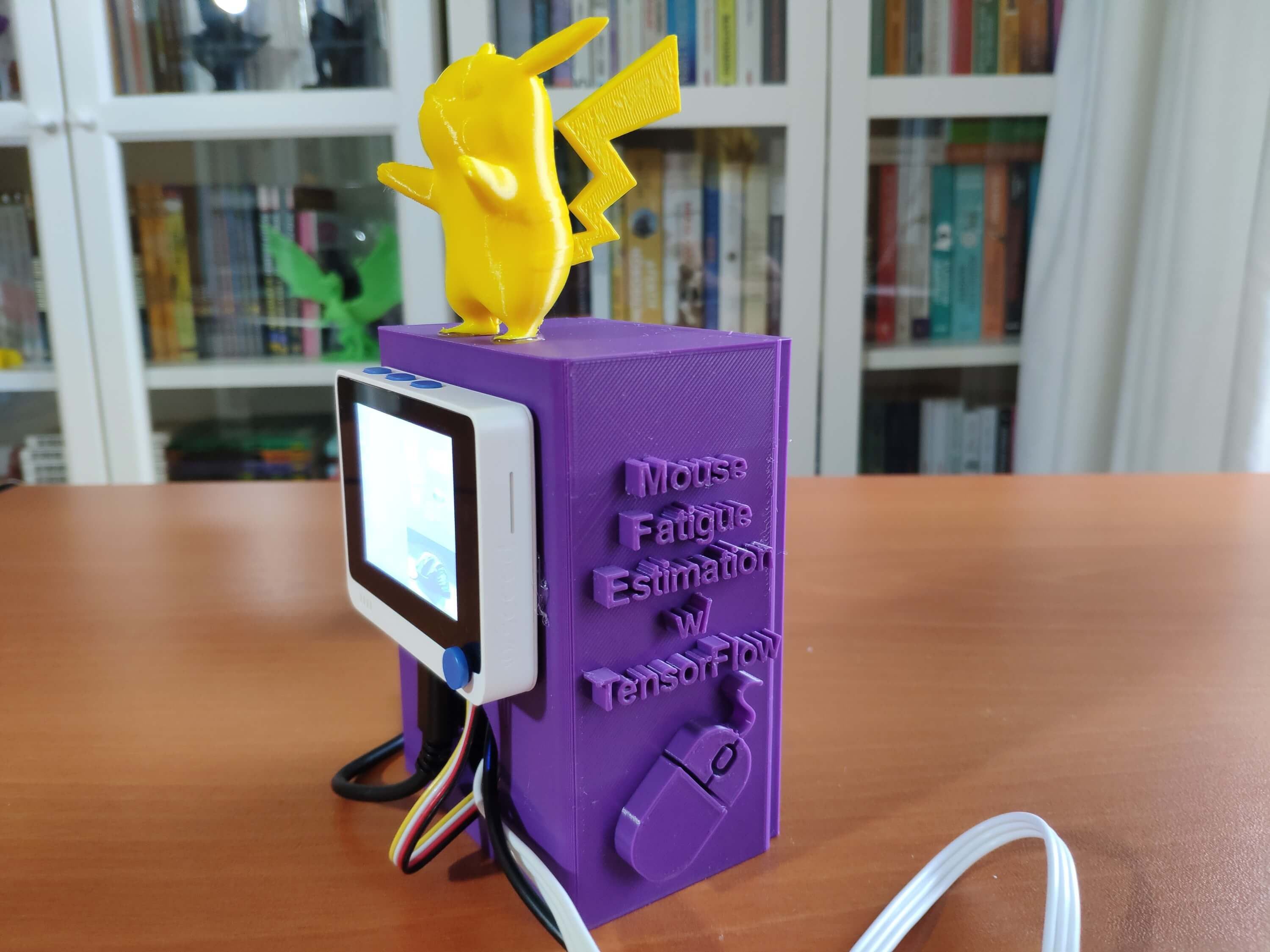
The project, originally built by maker Kutluhan Aktar and covered by Hackaday, uses a Wio Terminal, galvanic skin response readings, electromyography data, TensorFlow, and a 3D-printed Pikachu-inspired enclosure to estimate forearm muscle fatigue from mouse use. In plain English, it tries to notice when your arm is getting stressed before your body sends you a strongly worded email in the form of pain.
Repetitive strain injury, or RSI, is not just a problem for programmers, gamers, editors, designers, spreadsheet warriors, or people who believe “just one more tab” is a lifestyle. It can affect anyone who repeats the same movement for long periods. Typing, clicking, scrolling, drawing, gaming, sewing, playing instruments, and even gripping tools can all add up. The real trick is not merely buying a fancier mouse. It is learning how your body behaves, adjusting your habits, and using technology as a coach rather than a shiny excuse to keep doing the same thing until your wrist stages a mutiny.
What Is Repetitive Strain Injury?
Repetitive strain injury is an umbrella term for damage or irritation in muscles, tendons, nerves, and related soft tissues caused by repeated movement, awkward posture, forceful exertion, vibration, or prolonged static positions. It often develops gradually. That is part of the problem. RSI rarely arrives wearing a cape and shouting, “I am here!” It sneaks in as a mild ache, a little tingling, or a tight forearm after a long work session.
Common RSI symptoms include pain, stiffness, weakness, numbness, tingling, swelling, and sensitivity to cold or heat. In computer users, discomfort often appears in the fingers, wrists, forearms, elbows, shoulders, neck, or upper back. Left unchecked, repetitive stress can contribute to conditions such as tendinitis, carpal tunnel syndrome, trigger finger, tennis elbow, and nerve compression problems.
The good news is that many repetitive strain problems can be reduced with early attention. The less-good news is that “I will fix my posture tomorrow” is the ergonomic version of “I will start flossing next month.” Your body is keeping receipts.
Why Mouse Use Can Be Sneakier Than Typing
Typing gets most of the blame, but the computer mouse deserves its own villain origin story. A mouse can encourage tiny repeated movements, gripping, wrist deviation, shoulder reaching, and long periods of static tension. If the mouse sits too far away, your shoulder may drift forward. If it is too high, your wrist bends. If the pointer speed is too low, you may overwork your hand. If the mouse is shaped poorly for your hand, you may grip it like it owes you money.
That does not mean the mouse is evil. It is not Team Rocket. It simply means that small inefficiencies, repeated thousands of times, can become big problems. A single click is harmless. Ten thousand tense clicks performed with a raised shoulder and bent wrist are less adorable.
The Pikachu-Powered Idea: Measuring Fatigue Before Pain Takes Over
The “Mouse Fatigue Estimation” project is a maker-style attempt to spot forearm fatigue using two physiological signals: GSR and EMG. GSR, or galvanic skin response, measures changes in skin conductance that can be associated with stress or sweat gland activity. EMG, or electromyography, measures electrical activity related to muscle use. Together, these signals can provide clues about tension and fatigue.
The device uses a Seeed Studio Wio Terminal, a compact microcontroller development board with a screen, Grove connectors, and enough capability to collect data and run a small machine-learning model. The builder connected a Grove GSR sensor and a Grove EMG detector, logged measurements to an SD card, labeled forearm soreness states such as relaxed, tense, and exhausted, then trained a TensorFlow artificial neural network to classify fatigue levels.
After training, the model was converted so it could run directly on the Wio Terminal. That is important because it means the gadget does not need to stream every signal to a cloud server. It can make local predictions at the edge. In the Hackaday write-up, the trained network reportedly reached more than 80% accuracy, which is impressive for a homebrew health-adjacent prototype built around real-world self-collected data.
And then, because engineering is better when it has personality, the whole thing went into a 3D-printed Pikachu-inspired case. The joke writes itself: Pikachu is a mouse-like Pokémon famous for electric attacks, and this project monitors muscle signals from mouse use. Somewhere, an ergonomist and a Nintendo fan just high-fived.
Why Machine Learning Makes Sense for RSI Prevention
Human bodies are wonderfully complicated and mildly annoying to model. Muscle soreness does not map neatly to one sensor value. Stress, posture, hydration, grip force, workload, sleep, temperature, and individual physiology all affect the signals. A simple threshold such as “if EMG value is above X, warn user” may be too crude.
Machine learning helps because it can look for patterns across multiple inputs. Instead of assuming a single magic number defines fatigue, a model can learn combinations of GSR and EMG readings that tend to match relaxed, tense, or exhausted states. This is especially useful for personalized monitoring, because one person’s normal signal may be another person’s “please stop clicking and go touch grass” signal.
That said, this type of project should be understood as a wellness and awareness tool, not a medical diagnosis machine. It can encourage better habits, but it cannot tell you whether you have carpal tunnel syndrome, tendinitis, nerve compression, or another condition. If pain, numbness, weakness, or swelling interferes with daily life, a qualified healthcare provider should be your next stop.
TinyML: When Artificial Intelligence Moves Onto Small Devices
The project also shows why TinyML is exciting. TinyML refers to machine-learning models designed to run on low-power microcontrollers and embedded devices. Instead of sending raw data to a large computer, a small device can perform inference locally. That reduces latency, improves privacy, and allows gadgets to work without constant internet access.
For ergonomic monitoring, that matters. A wrist, desk, chair, keyboard, mouse, or wearable sensor does not need to be a supercomputer. It needs to notice patterns quickly and nudge the user at the right moment. A local model can say, “Your forearm looks tense,” without uploading your every twitch to the cloud. Your mouse hand has enough problems without becoming a data influencer.
What Real Ergonomics Still Gets Right
Machine learning is cool, but it does not cancel the basics. The best RSI prevention strategy still begins with ergonomics. Your workstation should fit your body, not the other way around. A good setup reduces awkward posture, excessive reaching, contact stress, and sustained tension.
Keep the Wrist Neutral
Your hands, wrists, and forearms should stay roughly in line while typing or using a mouse. Avoid bending the wrist upward, downward, or sideways. The mouse should be close to the keyboard and on the same level so you do not reach across the desk like you are trying to steal snacks from another dimension.
Relax the Shoulders
If your shoulders are creeping toward your ears, your workstation is not a workstation; it is a tiny stress gym. Adjust chair height, arm support, keyboard position, and mouse placement so your elbows remain close to your body and your shoulders stay relaxed.
Set the Monitor Properly
Your screen should sit directly in front of you, about an arm’s length away, with the top of the screen at or slightly below eye level. A low laptop screen can encourage neck bending, so a laptop stand plus an external keyboard and mouse can make a major difference.
Move Before Your Body Complains
No chair, keyboard, mouse, or AI-powered Pikachu can make sitting still for hours healthy. Microbreaks matter. Stand, stretch your fingers, roll your shoulders, walk briefly, change tasks, and let your muscles reset. Movement is not lost productivity. It is maintenance. Even race cars need pit stops, and they do not answer emails.
How a Smart RSI Warning System Could Work
A practical RSI prevention system could combine several signals. EMG can estimate muscle activation. GSR can reflect stress-related skin conductance changes. An accelerometer could detect wrist angle, hand movement, or posture shifts. Keyboard and mouse software could track clicking intensity, scroll bursts, and long uninterrupted sessions. A camera-based posture model could detect slouching, although privacy concerns would need careful handling.
The best version would not nag constantly. Nobody wants a robotic hall monitor screaming every time they click “send.” Instead, it would learn your normal patterns, notice meaningful changes, and offer timely suggestions: loosen your grip, move the mouse closer, take a two-minute break, increase pointer sensitivity, switch hands for low-precision tasks, or stretch your forearm.
Great ergonomic feedback is specific. “Be healthier” is useless. “Your mouse arm has been tense for 18 minutes, and your pointer movement has become choppy; take a short break” is far more actionable. That is where machine learning can shine: not as a doctor, but as a pattern-aware assistant.
Practical Ways to Avoid RSI Today
You do not need to build a Pikachu device to start protecting your hands. Begin with your current setup. Place your keyboard and mouse close enough that your elbows stay near your body. Keep the mouse sensitivity high enough to reduce excessive arm movement but not so high that you tense up trying to control it. Try keyboard shortcuts to reduce unnecessary mousing. Use a chair that supports your back, keep your feet supported, and avoid storing boxes, cables, or forgotten snack wrappers where your legs should go.
Alternate input methods when possible. A vertical mouse, trackball, pen tablet, split keyboard, compact keyboard, or voice dictation can reduce repetitive load for some users. The key phrase is “for some users.” Ergonomics is personal. A device that saves one person’s wrist may annoy another person’s shoulder. Test changes gradually and pay attention to how your body responds.
Also, do not ignore early symptoms. A mild ache that disappears after rest is a useful signal. Pain that returns every day, worsens, causes numbness, or affects grip strength deserves professional attention. The heroic “I will work through it” approach is how small problems buy real estate in your tendons.
What Makers Can Learn From This Project
The Mouse Fatigue Estimator is not perfect, and that is exactly why it is interesting. It is a prototype, not a polished medical device. Multiple sensors and wires may not be practical for daily office use. Labels based on personal soreness levels are subjective. A model trained on one person may not generalize to everyone. Sensor placement and noise can affect readings. But the concept is powerful: use accessible hardware, collect personal data, train a compact model, and create feedback that helps change behavior.
For makers, the project is a reminder that health technology does not always start in a laboratory with a million-dollar grant. Sometimes it starts with a sore forearm, a microcontroller, a few sensors, a 3D printer, and the decision that the enclosure should look like a beloved electric rodent.
The Future: Ergonomic Tech That Feels Less Like Homework
The future of RSI prevention may look less like boring posters and more like friendly, adaptive systems. Imagine a keyboard that detects heavy typing and suggests a break. A mouse that notices grip tension. A smartwatch that correlates hand activity with discomfort reports. A desk app that learns when your posture collapses during video calls. A chair that does not merely exist but politely asks why you have become a shrimp.
However, technology must be designed carefully. Users need control, privacy, transparency, and the ability to turn off annoying alerts. Health nudges should feel supportive, not judgmental. The goal is not to shame people for working at computers. The goal is to help them keep working, creating, gaming, studying, and building without sacrificing their hands in the process.
Experience Notes: What This Topic Feels Like in Real Life
Anyone who has spent long days at a computer knows that RSI does not usually begin dramatically. It starts quietly. Maybe your wrist feels tight after editing a long document. Maybe your shoulder aches after a gaming session. Maybe your forearm feels oddly tired after hours of design work, even though you technically “only sat there.” That is the strange thing about computer strain: the work looks gentle from the outside, but the body knows how many tiny movements it performed.
A common experience is the afternoon fade. The morning begins fine. Your posture is noble. Your chair is adjusted. Your coffee is doing its best. By 3 p.m., your shoulders have migrated north, your wrist is bent, your mouse is halfway across the desk, and your neck resembles a question mark with student loans. This is exactly when a smart fatigue monitor could help. Not by scolding you, but by catching the drift before discomfort becomes pain.
Another familiar pattern is “new gear optimism.” You buy an ergonomic mouse and expect instant salvation. For a few days, everything feels futuristic. Then the same ache returns because the mouse was only one part of the system. Your chair is still too low. Your keyboard is still too far away. You still work for three hours without standing. Ergonomic tools are helpful, but habits decide whether they actually work.
This is where the machine-learning angle becomes more than a novelty. A personalized system can reveal patterns you might miss. You may discover that soreness increases after long scrolling sessions, not typing. You may learn that your forearm tension spikes during gaming but not writing. You may notice that breaks help only when you take them before pain begins. In other words, data can turn vague discomfort into practical insight.
The Pikachu case matters too, even if it sounds silly. A playful design can make health tracking less depressing. People are more likely to use tools that feel approachable. A cute enclosure on the desk can become a reminder: relax your hand, check your posture, take the break, stop pretending your wrist is immortal. The best wellness technology is not always the most serious-looking. Sometimes the device that helps you listen to your body is the one that makes you smile first.
My biggest takeaway from this topic is simple: RSI prevention works best when it becomes part of daily rhythm. Do not wait for pain to become a project manager. Adjust the workstation, vary the workload, use shortcuts, take microbreaks, and let technology provide feedback when your attention is elsewhere. Machine learning can help, Pikachu can cheer from the enclosure, but the real victory is keeping your hands comfortable enough to keep making things tomorrow.
Conclusion
“Avoid Repetitive Strain Injury With Machine Learning – And Pikachu” is more than a charming maker headline. It captures an important shift in how we think about workplace health. Instead of waiting for pain, we can measure patterns. Instead of relying only on generic advice, we can build personalized feedback. Instead of treating ergonomics like a dusty HR pamphlet, we can make it interactive, local, playful, and surprisingly yellow.
RSI prevention still depends on fundamentals: neutral wrists, relaxed shoulders, proper screen height, close keyboard and mouse placement, regular movement, and early attention to symptoms. Machine learning adds a new layer by helping detect fatigue patterns that humans often ignore. And Pikachu? Pikachu reminds us that serious tools do not have to be boring. Sometimes the smartest way to protect your mouse hand is to let a tiny electric mouse tell you when enough clicking is enough.