Note: This article is written in original language for web publishing and is based on real information about e-paper displays, wall-mounted dashboards, DIY E Ink projects, digital signage trends, and smart home display design.
A wall mounted newspaper sounds like something your great-grandfather might have invented after losing a fight with the morning paper and a thumbtack. But in the age of e-paper displays, smart home dashboards, open APIs, and low-power microcontrollers, the idea has become surprisingly elegant. Imagine waking up, walking into the kitchen, and seeing a calm, newspaper-style front page on the wall: weather, headlines, calendar notes, maybe a quote, maybe a fake coffee stain for dramatic effect. No glowing rectangle screaming for attention. No endless scroll. No “one quick check” that somehow becomes forty-two minutes of reading comments from strangers named EagleDad1974.
That is the charm of a wall mounted newspaper that’s extra. It is not just a digital picture frame. It is not just a smart display. It is a handmade blend of old-school newspaper ritual and modern embedded technology. The “extra” part comes from the details: e-ink texture, custom typography, automated refreshes, weather feeds, headline summaries, decorative layout, and the delightful absurdity of making a computer pretend to be paper.
What Is a Wall Mounted Newspaper?
A wall mounted newspaper is a display installed like framed art that shows newspaper-style information. Instead of flipping through a physical paper, you glance at a clean digital layout mounted on the wall. The best versions use E Ink or e-paper display technology, the same broad family of display technology used in many e-readers. Unlike LCD or LED screens, e-paper does not need a glowing backlight to remain readable. It reflects ambient light, which gives it a printed, paper-like look.
In practical terms, this kind of display can show daily headlines, weather, calendar reminders, transit updates, household notes, smart home status, or even personalized messages. It can be serious, useful, decorative, or proudly ridiculous. A tiny “breaking news” section announcing that the dog has once again stolen a sock? Absolutely on brand.
The wall-mounted format matters because it changes how people interact with information. A phone demands your hands, your eyes, and eventually your soul. A wall newspaper simply sits there. It gives you the essentials at a glance and then lets you continue making coffee like a functioning adult.
Why E-Paper Makes the Idea Work
The reason this concept feels special is e-paper. Traditional screens are designed for movement: videos, animations, scrolling feeds, and bright interfaces. E-paper is designed for stillness. It shines when content changes occasionally and remains visible for long periods. Once an image is drawn on many e-paper panels, the display can hold that image without constantly powering every pixel. That makes it ideal for dashboards, signage, schedules, labels, and yes, a digital newspaper hanging on a wall like it owns the place.
Low Power Consumption
A wall mounted newspaper does not need to refresh sixty times per second. It might refresh once in the morning, once at lunch, and maybe once in the evening. That slow rhythm dramatically reduces power needs compared with a conventional tablet or monitor. Some projects use batteries, while others rely on a small power adapter. In either case, e-paper gives builders more flexibility because the display is not gulping electricity like a gaming monitor at a LAN party.
Readable in Bright Light
E-paper is also easier to read in bright rooms. Since it reflects light like paper, it can look better in daylight than many glossy screens. A kitchen wall, hallway, office nook, or breakfast area becomes a natural home for the device. It looks less like electronics and more like a framed print that happens to know tomorrow’s forecast.
A Calm Alternative to Screen Overload
The emotional benefit is just as important. E-paper does not glow aggressively. It does not beg you to tap it. It does not autoplay a video about a celebrity refrigerator tour. A well-designed wall newspaper offers a quieter information experience, which is exactly why many people are experimenting with e-paper dashboards for homes, offices, retail signs, menus, calendars, and status boards.
What Makes This Wall Mounted Newspaper “Extra”?
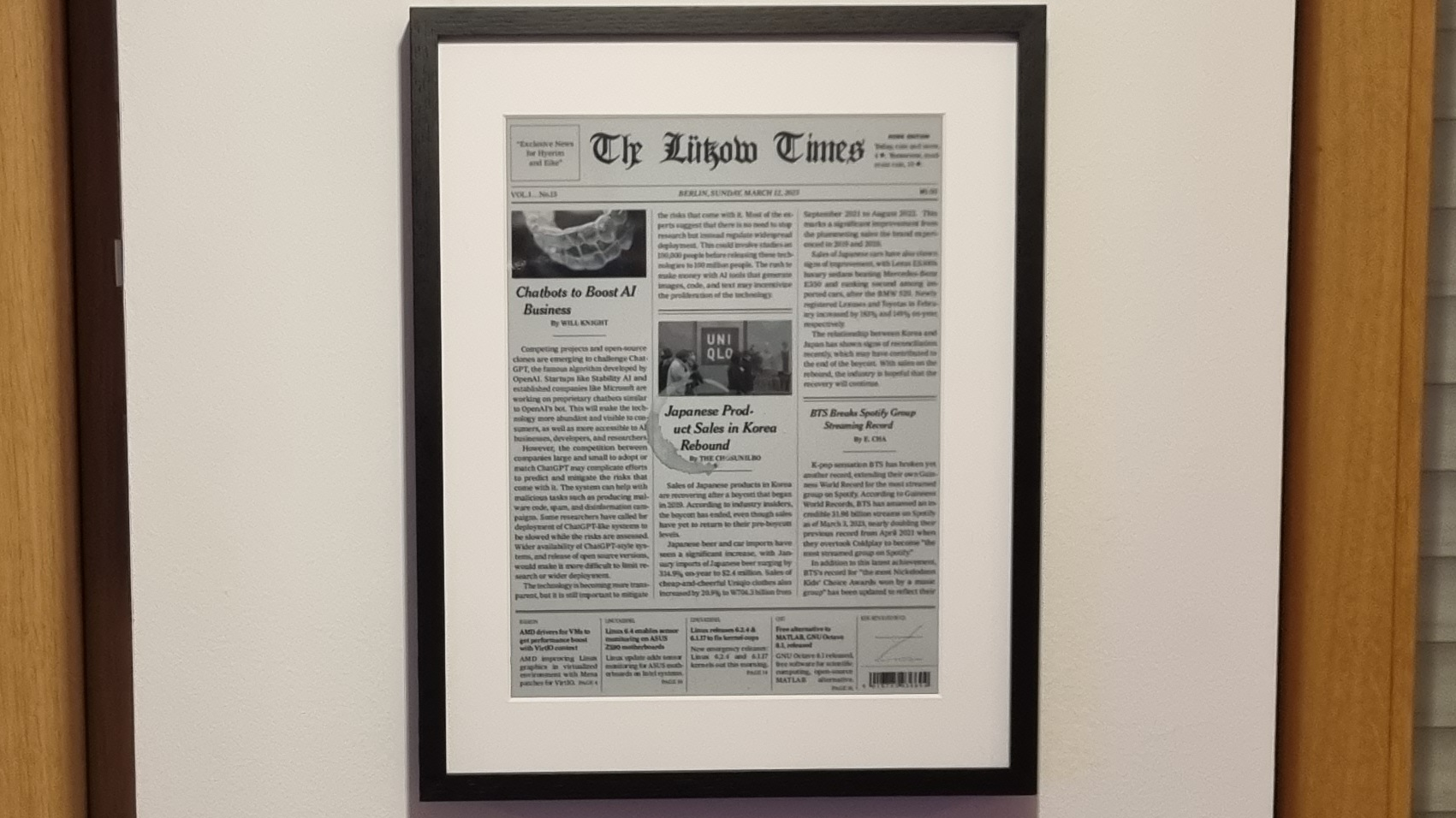
The most interesting DIY versions go far beyond simply showing headlines. A standout example uses a large 13.3-inch E Ink display with a high-resolution black-and-white panel, a display driver board, an ESP32 microcontroller, a real-time clock, a rechargeable battery, and software that gathers weather and news data. The system wakes itself, updates the screen, then goes quiet again. That is not a newspaper. That is a tiny newsroom with a sleep schedule.
The extra details are what turn a technical project into a conversation piece. For example, a newspaper-style layout can be generated with typesetting tools, converted into an image, and pushed to the e-paper screen. Weather data can be fetched from an API. News headlines can be collected from selected sources and summarized into readable briefs. The final layout can include columns, timestamps, section headers, classic serif fonts, grayscale photos, and decorative touches such as paper texture or even randomized coffee stains.
Yes, fake coffee stains. Because if you are going to build a wall mounted newspaper, you might as well make it look like it has survived a morning commute.
Key Features of a Smart Wall Mounted Newspaper
1. Daily News Summaries
The core feature is obvious: news. But the smartest approach is not to dump a full website onto the display. E-paper works best with concise, well-organized content. A good wall newspaper may show five to eight major headlines, each with a short summary. This creates a quick morning briefing without the chaos of a news feed.
2. Weather at a Glance
Weather belongs on this kind of display because it is useful every day. Current temperature, high and low, rain chance, wind, humidity, and a short forecast can fit neatly into a sidebar. The result feels like the weather box in a traditional newspaper, except it updates itself and never gets soggy on the porch.
3. Calendar and Household Reminders
A wall mounted newspaper can also become a family command center. Appointments, school pickup times, trash day, package reminders, birthdays, dinner plans, and “buy more coffee before society collapses” can all appear in a tidy section. Unlike a phone calendar, the information is visible to everyone who walks by.
4. Smart Home Status
For smart home users, the display can show indoor temperature, air quality, door lock status, energy usage, solar output, or whether the garage door is open. The trick is restraint. A wall newspaper should not become an aircraft cockpit. If the display needs a training manual, it has gone too far.
5. Artful Design
The best designs borrow from newspapers: strong hierarchy, readable type, generous spacing, clear sections, and a front-page rhythm. A large headline at the top sets the tone. Smaller modules support it. A weather box, quote, date, or tiny editorial joke can make the whole display feel alive.
How the Technology Works Behind the Frame
Behind the calm paper-like face, a wall mounted newspaper is a coordinated stack of hardware and software. The exact parts vary, but most projects follow a similar logic.
The Display
The e-paper panel is the star. Common DIY sizes range from small 7.5-inch panels to larger 13.3-inch panels and beyond. Larger panels create a stronger newspaper effect, but they also cost more and may require more careful driver support. Black-and-white panels are often easier to work with and look convincingly newspaper-like. Color e-paper exists and is improving, but it may refresh more slowly and display a more limited color range than LCD screens.
The Controller
A microcontroller such as an ESP32 can handle Wi-Fi, wake cycles, and communication with the display driver. More powerful boards, such as a Raspberry Pi, can also be used, especially when the layout generation happens locally. The trade-off is power consumption. A Raspberry Pi is more flexible, but a microcontroller is usually better for low-power operation.
The Real-Time Clock
A real-time clock module helps the system wake at scheduled times. Instead of leaving everything running all day, the clock can trigger the controller to power up, download new content, refresh the display, and go back to sleep. This is the engineering equivalent of doing your chores and immediately taking a nap.
The Software Pipeline
The software side may fetch weather data, retrieve news headlines, summarize or format text, generate a newspaper-style page, convert that page into an image, and send it to the display. Tools such as scripting languages, image processors, typesetting engines, and APIs can all play a role. The pipeline sounds complicated, but the concept is simple: collect information, design the page, render the page, show the page.
Why People Love This Idea
The appeal is not only technical. A wall mounted newspaper solves a modern problem: we have too much information, and most of it arrives through devices designed to distract us. A display like this gives information a physical home. It says, “Here are the important things. No need to fall into a scrolling swamp.”
It also revives a lost ritual. Newspapers once gave mornings a structure. You opened the paper, scanned headlines, checked weather, maybe read the comics, and moved into the day. A digital wall newspaper brings back that ritual without requiring stacks of paper, delivery logistics, or the heartbreaking discovery that the crossword has been completed by someone else in pen.
For makers, the project is appealing because it blends disciplines. Hardware, software, design, typography, automation, APIs, power management, and woodworking all meet in one frame. It is the rare smart home project that can be both technically impressive and genuinely beautiful.
Benefits for Homes, Offices, and Small Businesses
For Homes
At home, a wall mounted newspaper can become a morning briefing station. Place it near the coffee maker, entryway, breakfast table, or home office. It can show news, weather, appointments, chores, and family notes. Because e-paper looks gentle and decorative, it fits into spaces where a glowing screen would feel intrusive.
For Offices
In offices, the same idea can become a team dashboard. It might show meeting room schedules, company announcements, visitor information, project milestones, or daily priorities. E-paper is especially useful where content changes occasionally but needs to remain visible all day.
For Cafes, Libraries, and Retail Spaces
Small businesses can use e-paper displays for menus, event schedules, promotional boards, or community updates. A cafe could show daily specials in a newspaper layout. A library could display staff picks and local events. A boutique could show a minimalist product story without printing new signs every week.
Design Tips for a Better Wall Mounted Newspaper
Keep the Layout Simple
Do not overload the screen. The temptation to include everything is strong, especially once the system works. Resist it. A wall newspaper should be glanceable. Use a clear headline, a few short sections, and enough whitespace to let the content breathe.
Use Newspaper-Inspired Typography
Serif fonts can create a classic newspaper mood, while sans-serif fonts improve modern readability. Pair them carefully. A bold serif headline with clean sans-serif summaries can look polished without becoming a Victorian ransom note.
Refresh at Human-Friendly Times
Most people do not need headlines every three minutes. Refresh in the early morning, perhaps again in the afternoon, and once in the evening if needed. Fewer updates mean better battery life, less visual distraction, and a more intentional experience.
Prioritize Trustworthy Sources
If the display includes news, source quality matters. Choose reputable outlets, avoid sensational feeds, and consider summarizing headlines rather than reproducing full articles. A wall mounted newspaper should inform, not become a dramatic rumor machine in a picture frame.
Limitations to Know Before Building One
As charming as this project is, it has limits. Large e-paper panels can be expensive. Refresh rates are slower than normal screens. Color e-paper is improving but still not the same as a bright tablet or OLED display. Some panels require special drivers, careful voltage handling, and patience. Also, layout generation can become surprisingly complex if you want it to look like a real newspaper rather than a spreadsheet wearing a hat.
There are also practical issues. Wall mounting needs cable planning or battery access. Wi-Fi reliability matters. If you scrape websites, you must respect terms of service and copyright. If you use AI summaries, you should design the system to avoid misrepresenting stories. A beautiful display is not helpful if it confidently summarizes a weather report as “Tuesday will be partly dragon.”
The Future of Wall Mounted E-Paper Displays
The future looks promising. Commercial e-paper signage is expanding, with larger color displays aimed at retail, offices, transportation, and hospitality. Smart home enthusiasts are also exploring e-paper dashboards because they feel less invasive than tablets and LED screens. As prices fall and tools improve, wall mounted newspapers may become less of a niche maker project and more of a practical home information appliance.
Imagine a future where your wall display changes personality throughout the day. In the morning, it shows headlines and weather. During work hours, it becomes a calendar and focus board. In the evening, it turns into a quiet art print. On weekends, it displays recipes, local events, or a family newsletter. The device could be useful without being needy. That alone makes it rare in modern technology.
Practical Buying and Building Advice
If you want to build a wall mounted newspaper, start with the experience, not the parts list. Decide what you want to see every day. A good first version might include the date, weather, three headlines, calendar reminders, and one small personal note. Once that works, add features carefully.
For hardware, choose the display size based on viewing distance. A small display works for a desk or bedside table. A 13.3-inch display feels more like a framed page. Larger displays create a dramatic effect but increase cost and complexity. For power, decide whether you want a battery-powered build, a hidden cable, or a hybrid setup. For software, keep the pipeline modular so you can replace news sources, weather APIs, fonts, or layout templates later.
Most importantly, do not underestimate the frame. A great e-paper display in a messy enclosure looks like a lab experiment escaped containment. A clean wooden frame, slim shadow box, or repurposed picture frame can make the project look intentional. The difference between “cool prototype” and “I want that in my house” is often a miter joint and a little sanding.
Experience Notes: Living With a Wall Mounted Newspaper That’s Extra
The best way to understand a wall mounted newspaper is to imagine using one for a week. On the first morning, it feels like a novelty. You walk by, stop, and smile because the wall has produced a tiny front page just for you. There is the date. There is the weather. There are the top headlines. There is a reminder that the recycling bin needs to go out. It is both futuristic and oddly cozy, like a robot butler who studied journalism.
By the second or third day, the display becomes part of the household rhythm. Instead of reaching for your phone before breakfast, you glance at the wall. You know whether to bring an umbrella. You see that a meeting was moved. You catch the main news without being dragged into a feed. That small change matters. Phones are excellent tools, but they are terrible breakfast companions. They bring the whole internet to the table, including the loud parts.
A wall mounted newspaper also changes how shared information works. A calendar app is private unless someone opens it. A wall display is communal. Family members, roommates, or coworkers can see the same daily snapshot. This makes it useful for reminders that should not live inside one person’s pocket. “Dentist at 3:00,” “soccer practice,” “team lunch,” or “water the basil before it becomes botanical jerky” all become visible without sending another notification.
The visual calm is another pleasant surprise. Because e-paper does not glow like a tablet, the display can stay on the wall all day without making the room feel busier. It looks like a printed page. Guests may not notice it immediately, but when they do, they usually lean in. That is when the questions start: Is it a screen? Does it update? Did you make it? Why is there a coffee stain? Is the coffee stain real? This is the exact moment when the builder gets to say, with great dignity, “No, I programmed the stain.”
There are small frustrations, of course. Refreshes can be slow. Layouts may break when a headline is too long. Weather icons can look strange in black and white. Battery life depends heavily on update frequency and hardware choices. If the Wi-Fi fails, the newspaper may become yesterday’s news in the most literal way possible. But these flaws are part of the charm. Unlike a polished commercial tablet, a DIY wall newspaper feels personal. It has quirks, and those quirks make it memorable.
After the novelty fades, the most valuable feature is restraint. The display does not try to do everything. It does not replace a laptop, phone, or television. It simply gives you a thoughtful snapshot of the day. That is why the idea works. In a world full of screens competing for attention, a wall mounted newspaper that’s extra succeeds by being useful, stylish, quiet, and just a little bit ridiculous.
Conclusion
A wall mounted newspaper that’s extra is more than a clever DIY gadget. It is a thoughtful response to digital overload, a design exercise in calm information, and a practical use case for e-paper technology. By combining a paper-like display, automated data feeds, smart formatting, and a well-built frame, it turns everyday information into something you can live withnot just something you scroll past.
The best versions balance usefulness with personality. They show the weather, headlines, reminders, and household updates without becoming noisy. They look good on a wall. They save power. They invite curiosity. And if they include a fake coffee stain, well, that is not a bug. That is editorial flair.