Microcontrollers can feel mysterious when you first meet them. One tiny chip controls lights, reads sensors, talks over wireless networks, stores data, and somehow keeps a robot from driving straight into the houseplant. The good news is that learning embedded systems does not have to start with a 600-page datasheet and a haunted breadboard. A well-designed learning board can turn abstract concepts into something you can hold, wire, code, break, fix, and finally understand.
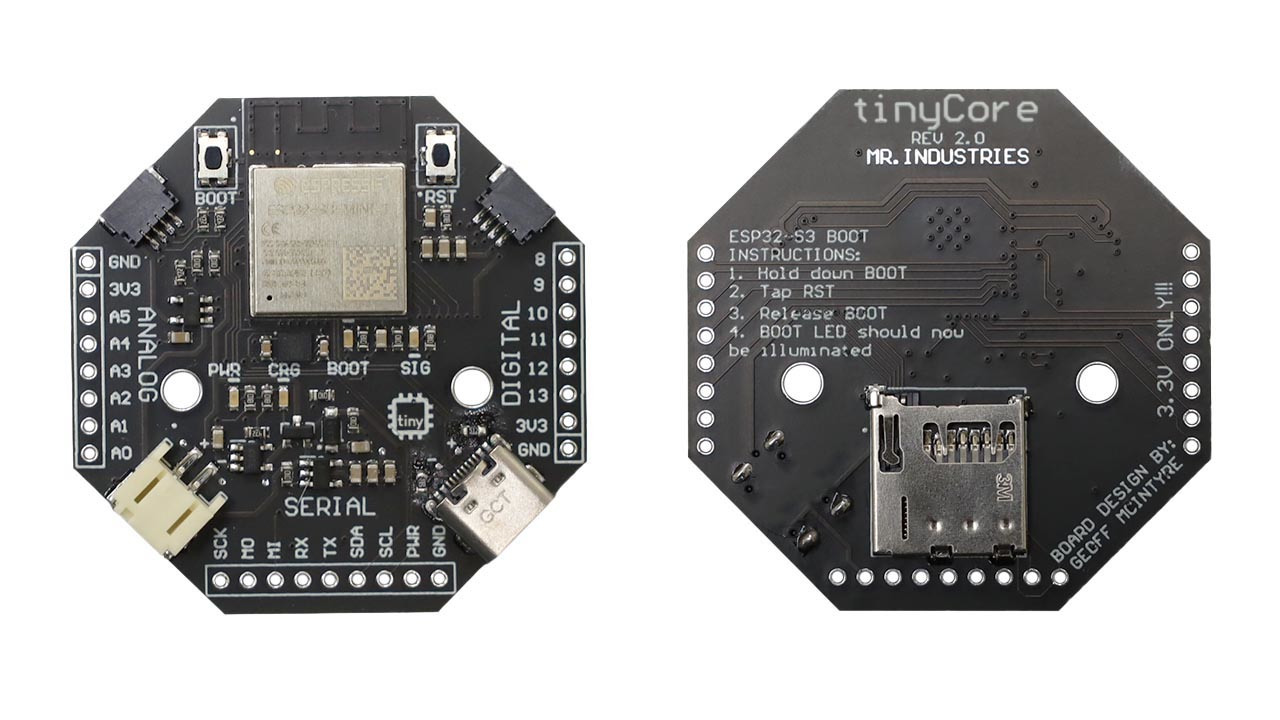
That is where the TinyCore board enters the conversation. Built around the ESP32-S3 family and designed as an open-knowledge learning platform, TinyCore focuses on helping students, makers, and early-career engineers understand the core ideas behind modern microcontroller development. It is small, visually approachable, and loaded with features that connect directly to real embedded systems work: GPIO, I2C, wireless communication, battery power, motion sensing, USB-C, microSD storage, and low-power design.
In plain English, TinyCore is not just another “blink an LED and call it a day” board. It is a compact classroom for microcontroller fundamentals. And yes, the LED still blinks. It is tradition. The LED union would complain otherwise.
What Is the TinyCore Board?
TinyCore is an educational microcontroller board created to make embedded systems easier to learn without watering the subject down into toy territory. The board is based on an ESP32-S3 Mini module, a dual-core microcontroller platform known for Wi-Fi, Bluetooth Low Energy, flexible input/output, and strong support in the maker and professional prototyping communities.
The board’s design is intentionally friendly. Its compact shape, USB-C connection, onboard battery support, sensor connectors, built-in motion sensor, and microSD card slot give learners a practical way to explore both beginner and intermediate embedded development. Instead of forcing newcomers to immediately fight loose jumper wires, mismatched voltage levels, or mysterious sensor pinouts, TinyCore gives them a cleaner starting point.
That matters because microcontroller education often falls into two awkward camps. One camp is too simple: blink, delay, repeat, congratulations, you are now “doing embedded systems.” The other camp is too intimidating: configure clocks, registers, linker scripts, and interrupt vectors before you even get a button to behave. TinyCore sits in the useful middle. It lets beginners build real projects while gradually exposing the deeper concepts that make those projects work.
Why Microcontroller Concepts Matter
A microcontroller is a tiny computer built to interact with the physical world. Unlike a laptop or phone, it usually runs one focused job: reading a temperature sensor, controlling a motor, logging motion, turning lights on and off, sending data to a network, or managing a battery-powered device. Microcontrollers are inside smart thermostats, wearables, drones, appliances, factory sensors, medical devices, toys, and countless Internet of Things products.
Learning microcontrollers is really learning how software meets hardware. A line of code does not just print text on a screen; it can turn on a relay, sample a voltage, wake from sleep when motion is detected, or send sensor data over Wi-Fi. That connection between code and reality is what makes embedded development exciting. It is also what makes it slightly humbling. Your program may compile perfectly, while your wiring quietly chooses chaos.
TinyCore helps teach this relationship by giving learners access to the major building blocks used across embedded systems: digital pins, analog sensing, serial communication, timers, interrupts, power management, data storage, and sensor integration. These are not random features. They are the alphabet of microcontroller design.
GPIO: The First Door Into Embedded Systems
GPIO stands for general-purpose input/output. It is the basic way a microcontroller interacts with the outside world. A GPIO pin can act as an output to turn something on, such as an LED, buzzer, transistor, or motor driver. It can also act as an input to read something, such as a button, switch, sensor signal, or external module.
On a board like TinyCore, GPIO teaches one of the most important beginner lessons: electricity has rules, and code has to respect them. When a learner writes a program to turn a pin high or low, they are controlling voltage. When they read a button, they discover pull-up and pull-down resistors. When the button behaves backward, randomly, or like it has consumed three energy drinks, they learn about floating inputs and debouncing.
GPIO is simple enough for a first lesson, but it is not shallow. Digital input and output form the foundation for everything from keypad scanning to relay control, status LEDs, address selection, trigger signals, and hardware debugging.
I2C and Qwiic Connectors: Learning to Talk to Sensors
One of TinyCore’s most helpful learning features is support for I2C sensor connections through STEMMA/Qwiic-style connectors. I2C is a two-wire communication protocol commonly used to connect microcontrollers with sensors, displays, real-time clocks, and other small peripheral chips. The two main lines are SDA for data and SCL for clock.
The beauty of Qwiic-style connectors is that they reduce wiring mistakes. A small keyed cable carries power, ground, SDA, and SCL. That means learners can plug in compatible sensors without manually matching every pin on a breadboard. This does not remove the need to understand I2C; it removes the boring part where one misplaced wire makes the sensor disappear like a magician with commitment issues.
Using I2C on TinyCore teaches device addresses, bus scanning, pull-up resistors, shared communication lines, and the difference between a controller and peripherals. A student can connect a temperature sensor, light sensor, OLED display, or environmental module and quickly see how one microcontroller can communicate with multiple devices on the same bus.
SPI and microSD: Storing Real Data
A microcontroller project becomes far more useful when it can store information. TinyCore’s microSD card slot introduces learners to data logging, file systems, and higher-speed peripheral communication. Many SD card interfaces use SPI or SD/MMC-style communication, giving students a practical reason to understand serial data transfer beyond theory.
For example, a motion-tracking project can read acceleration and gyroscope data, then write timestamped values to a microSD card. A weather station can record temperature and humidity over several days. A portable sensor can collect field data away from a computer. Suddenly, the board is not just reacting in the moment; it is building a record.
This teaches several professional habits. Learners discover that storage has limits, file writes take time, data formats matter, and power loss can corrupt files if the program is careless. They also learn the difference between printing values to a serial monitor and designing a reliable system that keeps useful records.
Wireless Communication: ESP32-S3 Makes Projects Connected
The ESP32-S3 platform gives TinyCore access to Wi-Fi and Bluetooth Low Energy. That instantly expands what learners can build. A basic sensor project can become a web dashboard. A button can control a networked device. A wearable can send status updates. A small robot can receive commands from a phone or browser.
Wireless communication introduces important microcontroller concepts such as network setup, connection handling, latency, security, data packets, power trade-offs, and event-driven programming. It also teaches a practical truth: wireless features are powerful, but they are not free. Wi-Fi can consume more energy than a simple sensor loop, and a battery-powered project must be designed with that in mind.
This is where TinyCore’s educational value becomes clear. Learners can start with local code, then gradually add connectivity. They see how the same board can move from beginner exercises to IoT prototypes without changing platforms every five minutes.
The Built-In IMU: Motion Sensing Without Extra Hardware
TinyCore includes a built-in LSM6DSO-family inertial measurement unit, often described as a 6-axis IMU because it combines a 3-axis accelerometer and a 3-axis gyroscope. This sensor helps learners explore motion, orientation, tilt, vibration, gestures, and movement patterns.
An accelerometer can detect acceleration along multiple axes, including the constant pull of gravity. A gyroscope measures rotational motion. Together, they open the door to projects such as a step counter, gesture controller, activity tracker, motion logger, game controller, balance monitor, or robot orientation system.
The IMU also teaches one of the most valuable lessons in sensor work: raw data is messy. Values drift. Noise exists. Sampling rate matters. Calibration matters. Filtering matters. The real world is not a spreadsheet; it wiggles. By experimenting with onboard motion sensing, learners discover why embedded engineers use averaging, thresholds, complementary filters, and careful testing.
USB-C, Bootloaders, and the Upload Loop
USB-C support gives TinyCore a modern connection for power and programming. For learners, this matters because the upload-test-debug loop is the heartbeat of microcontroller development. Write code, upload firmware, observe behavior, adjust, repeat. Then repeat again because you forgot a semicolon. Then again because the bug was not the semicolon.
Behind that simple workflow are important ideas: bootloaders, serial communication, firmware flashing, reset behavior, and board definitions in development environments. A beginner may not need to understand every boot process detail on day one, but they should eventually learn that the code running on a microcontroller is firmware stored in flash memory, not a script magically floating in the cloud.
TinyCore’s open documentation and learning-focused approach make this process less mysterious. Students can begin with friendly tools and later dive into more advanced workflows as their confidence grows.
Battery Power and Low-Power Thinking
Many real embedded systems are not plugged into a wall. They live in wearables, sensors, handheld tools, remote monitors, and portable devices. TinyCore’s LiPo battery support and charging circuit make power management part of the learning path rather than an afterthought.
Battery-powered design introduces questions that desktop programming rarely asks. How much current does the board draw while active? What happens during sleep mode? How often should the sensor wake up? Should Wi-Fi stay connected, or should it connect only when needed? What happens when the battery voltage drops?
These questions teach learners that embedded design is about trade-offs. A device can sample motion 100 times per second, but battery life may suffer. It can send data instantly over Wi-Fi, but that may use more power than storing data locally and uploading later. It can keep LEDs glowing beautifully, but every photon sends a tiny invoice to the battery.
Open-Source Hardware and the Value of Transparency
One of TinyCore’s strongest educational features is its open-knowledge philosophy. When a board is open, learners can study more than example code. They can inspect design files, understand component choices, examine pin mappings, and connect software behavior to hardware layout.
This is especially useful for students who want to move from using boards to designing their own. A schematic teaches why pull-up resistors exist. A PCB layout teaches routing, connectors, power rails, and mechanical constraints. A bill of materials teaches that engineering is also about availability, cost, packaging, and practical assembly.
In other words, TinyCore can serve as both a learning board and a reference design. It helps answer the question many beginners eventually ask: “How do people go from a breadboard prototype to a real product?” The answer is not magic. It is design, testing, documentation, iteration, and occasionally staring at a circuit until it apologizes.
Project Ideas That Teach Real Concepts
1. Motion Logger
Use the built-in IMU to record acceleration and gyroscope readings to the microSD card. This project teaches I2C sensor communication, sampling rates, file writing, timestamps, and data analysis. Learners can shake, tilt, rotate, or carry the board and later inspect the data.
2. Wi-Fi Environmental Dashboard
Add a Qwiic-compatible temperature, humidity, or air-quality sensor and publish readings to a local web page. This project teaches I2C, Wi-Fi networking, web servers, sensor polling, and user-facing data presentation.
3. Gesture-Controlled LED Project
Connect an RGB LED module or LED strip and use IMU gestures to change colors or patterns. This teaches motion thresholds, filtering, event detection, PWM, timing, and user interaction design.
4. Battery-Powered Data Beacon
Run the board from a LiPo battery, collect sensor data, sleep between readings, and occasionally transmit results. This project teaches low-power modes, wake intervals, battery trade-offs, and practical IoT behavior.
5. Mini Robot Controller
Use TinyCore as the brain of a small robot, controlling motors while reading motion data and communicating wirelessly. This teaches GPIO, PWM, power separation, motor drivers, sensor feedback, and real-time response.
Why TinyCore Works Well for Beginners and Growing Engineers
The best learning tools have a gentle first step and a long runway. TinyCore is beginner-friendly because it provides built-in features, modern connectors, and approachable documentation. But it also has enough depth for learners to keep growing. The same board can support basic LED experiments, sensor projects, wireless dashboards, battery-powered prototypes, and motion-aware devices.
That progression matters. Many students lose interest when learning tools feel disconnected from real applications. TinyCore helps avoid that problem by making each concept useful. GPIO is not just a pin lesson; it controls hardware. I2C is not just a protocol diagram; it reads sensors. microSD is not just storage; it preserves field data. Wi-Fi is not just a feature; it connects the project to people and systems.
This is how embedded knowledge sticks. Learners remember concepts better when they solve visible problems. A board that moves, senses, stores, and communicates gives them plenty of problems worth solving.
Common Mistakes TinyCore Can Help Learners Understand
Microcontroller learning comes with classic beginner mistakes, and TinyCore provides safe ways to encounter many of them. One common mistake is assuming every pin can do every job. In reality, pins often have special functions, boot requirements, voltage limits, or shared peripherals. Reading a pinout becomes a skill, not a decorative activity.
Another common mistake is ignoring power. A sensor may work over USB but fail on battery because the program draws too much current or keeps wireless active too long. Learners also discover that some devices need stable voltage, careful grounding, or proper startup timing.
Communication errors are also part of the journey. An I2C sensor may not respond because of a wrong address, loose cable, disabled power rail, missing library, or bus conflict. These problems are frustrating, but they teach systematic debugging: check power, check wiring, scan the bus, simplify the code, test one part at a time.
That debugging mindset is one of the most important skills TinyCore can teach. The goal is not to avoid every mistake. The goal is to learn how to find and fix mistakes without immediately blaming the moon, the compiler, or “bad electricity.”
Experience Section: Learning With a TinyCore-Style Board in the Real World
The experience of learning microcontrollers with a TinyCore-style board is different from starting with a bare chip and a pile of parts. A bare-chip approach is valuable, but it can bury beginners under too many problems at once. Is the code wrong? Is the oscillator configured? Is the programmer connected? Is the reset pin pulled correctly? Is the power rail stable? Did the breadboard retire early? A learning-focused board reduces that early confusion so students can build momentum.
The first satisfying moment usually comes from controlling something simple. You upload a program, an LED changes state, and suddenly the microcontroller is not an abstract component anymore. It is listening. That small success gives learners permission to try the next thing: reading a button, adjusting brightness with PWM, printing values to a serial monitor, or connecting a sensor.
With TinyCore, the onboard and plug-in sensor ecosystem makes the second stage more exciting. Reading motion data from an IMU feels immediately alive. Tilt the board and the numbers change. Shake it and the graph jumps. Rotate it and the gyroscope responds. This makes core concepts easier to understand because the feedback is physical. You are not just reading documentation about acceleration; you are watching the board describe its own movement.
Then comes the first debugging lesson. Maybe the values look noisy. Maybe the sensor seems too sensitive. Maybe a gesture trigger fires when the board barely moves. This is where learners discover thresholds, averaging, calibration, and filtering. The project stops being a demo and becomes engineering. That shift is important. It teaches that embedded systems are not only about making something work once; they are about making it work reliably.
Adding storage creates another useful learning moment. When students log readings to a microSD card, they begin thinking like system designers. What should each row contain? How often should data be saved? Should the file use CSV, JSON, or a custom format? What happens if the board loses power while writing? These are practical questions that appear in real products, not just classroom exercises.
Wireless projects bring a different kind of excitement. Seeing a sensor value appear on a phone or browser makes the project feel modern and connected. But Wi-Fi also introduces patience. Networks fail. Credentials change. Signal strength varies. Connections drop. A student who learns to handle these issues early gains a more realistic view of IoT development. The internet is useful, but it is not a fairy godmother with perfect uptime.
Battery-powered experiments may be the most eye-opening. A project that works beautifully over USB may drain a small battery faster than expected. Learners begin measuring current, reducing LED usage, sleeping between readings, and deciding when wireless communication is truly necessary. This teaches restraint, which is an underrated engineering skill. The best embedded design is often not the one that does everything all the time; it is the one that does the right thing at the right moment.
The most valuable experience, however, is confidence. A board like TinyCore lets learners move from “I followed a tutorial” to “I understand why this works.” That confidence encourages experimentation. Students start modifying examples, combining sensors, changing timing logic, writing cleaner code, and imagining products of their own. They begin to see a microcontroller board not as a mysterious green rectangle, but as a tool for turning ideas into working objects.
That is the real lesson TinyCore offers. It teaches GPIO, I2C, SPI, storage, wireless communication, motion sensing, and power management, yes. But it also teaches the mindset behind embedded systems: observe carefully, test in small steps, respect hardware limits, document what you learn, and keep going when the first attempt behaves like a squirrel on roller skates.
Conclusion
TinyCore Board Teaches Core Microcontroller Concepts is more than a catchy title. It describes exactly why a thoughtful learning board matters. By combining an ESP32-S3 foundation with practical features such as wireless connectivity, Qwiic-compatible I2C expansion, onboard motion sensing, microSD storage, USB-C, and battery support, TinyCore gives learners a realistic path into embedded systems.
For beginners, it lowers the barrier to entry. For students, it connects theory to working projects. For makers, it offers a compact platform for experimentation. For future engineers, it demonstrates how hardware, firmware, power, sensors, and documentation come together in real product thinking.
The best microcontroller boards do not simply hide complexity. They reveal it at the right pace. TinyCore does that well. It lets learners start with simple wins and grow toward deeper engineering skills, one sensor reading, one bug, and one gloriously blinking LED at a time.
Note: This article synthesizes publicly available technical information from reputable microcontroller, embedded systems, and maker education resources. Source links are intentionally not included in the body to keep the article ready for web publishing.