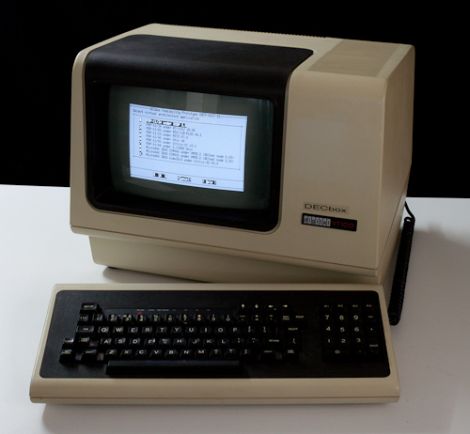
There is something wonderfully unreasonable about using a real DEC VT100 terminal in the age of ultrawide monitors, cloud IDEs, and laptops powerful enough to make old minicomputers blush. The VT100 is big, beige, heavy, monochrome, and deeply allergic to modern fashion. In other words, it is perfect.
Pair that classic terminal with a BeagleBone, and suddenly you have a project that feels like a tiny time machine with GPIO pins. A BeagleBone can run Linux, host serial connections, launch historical computer emulators, and hide neatly inside or behind vintage hardware. The VT100, meanwhile, provides the authentic keyboard, display, glow, and “I am definitely doing computer science” atmosphere that no terminal emulator window can fully imitate.
This article explores how vintage VT100 terminal computing with a BeagleBone works, why the combination is so appealing, what hardware and software pieces matter, and how hobbyists can build a practical retro-modern setup without turning a classic terminal into a decorative paperweight. No punch cards required. Probably.
What Is a VT100 Terminal?
The DEC VT100 is one of the most influential video terminals ever made. Introduced by Digital Equipment Corporation in 1978, it helped popularize ANSI escape sequences, cursor addressing, text attributes, and the 80-column terminal experience that still shapes command-line computing today. When people open a terminal emulator on Linux, macOS, or Windows, they are often using a digital descendant of the VT100 idea.
The VT100 was not a personal computer in the modern sense. It did not run your spreadsheet, compile your code, or store your embarrassing folder names. It was a “smart terminal,” meaning it displayed text from a host computer and sent keyboard input back over a serial connection. The intelligence lived partly in the terminal’s control logic and partly in the host system it talked to.
Its familiar 80-column by 24-line layout became a computing landmark. The terminal also supported a 132-column mode, character attributes such as reverse video and bold, cursor movement commands, and special graphics useful for drawing forms and simple interfaces. For anyone interested in retro computing, the VT100 is not just a device; it is the ancestor of the command-line environment still used by developers, system administrators, embedded engineers, and people who enjoy typing mysterious commands with confidence.
Why Add a BeagleBone?
The BeagleBone is a small single-board computer built for embedded Linux experimentation. Models such as the BeagleBone Black are popular among developers because they combine a capable ARM processor, onboard storage, USB, Ethernet, expansion headers, and multiple I/O options in a compact package. More importantly for this project, the BeagleBone is comfortable living in the physical world. It can talk to serial ports, GPIO pins, level shifters, power-control circuits, and custom interface boards.
That makes it a natural companion for a VT100. The terminal expects a serial host. The BeagleBone can become that host. Instead of connecting the VT100 to a room-sized PDP-11 or VAX system, you can connect it to a tiny Linux board and run shells, text editors, games, development tools, or historical computer emulators.
This is where the magic happens: the VT100 gives you the original user experience, while the BeagleBone provides modern reliability and flexibility. It is like giving a classic typewriter a secret Linux brain. The result is both useful and theatrical, which is exactly where the best retro computing projects live.
The DECbox Idea: Old Soul, New Brain
One of the most inspiring versions of this concept is the DECbox project, which used a BeagleBone with a VT100 terminal and SIMH-style historical emulation. The basic idea is delightfully clean: mount or connect a BeagleBone to the VT100, provide the proper serial interface, and run software that makes the terminal feel connected to classic DEC computing environments.
With the right emulator setup, the BeagleBone can simulate machines such as PDP and VAX systems. The VT100 then behaves the way it was born to behave: as a real serial terminal attached to a host. Instead of clicking into a retro-themed app, you sit at the actual keyboard and watch characters appear on a glowing screen. The nostalgia is not skin-deep; it is wired into the experience.
The project also highlights a practical truth about vintage hardware: preservation does not always mean keeping everything frozen in 1978. Sometimes preservation means building a bridge so old machines can remain interactive, educational, and fun. A silent VT100 on a shelf is a museum piece. A VT100 connected to a BeagleBone is a conversation starter, a teaching tool, and a weekend project that may steal your entire weekend with a smile.
How the Hardware Connection Works
The heart of a VT100-to-BeagleBone setup is the serial connection. The VT100 communicates through RS-232-style serial signaling, while BeagleBone UART pins use low-voltage logic levels. That distinction matters. Connecting the wrong voltage levels directly is a fast way to convert enthusiasm into smoke.
A safe setup normally requires a proper level-shifting circuit or adapter. RS-232 uses voltage levels that are not the same as 3.3V UART logic. A level shifter such as a MAX232 or MAX3232-style circuit translates signals between the terminal and the BeagleBone. The exact part depends on the voltage rails and board design, but the principle is simple: let each side speak in the electrical language it expects.
At minimum, the serial link needs transmit, receive, and ground. Depending on the configuration, hardware flow-control lines may or may not be used. Many hobby setups keep things simple with three wires and software flow control, but the VT100’s settings should match the host configuration. Baud rate, parity, data bits, stop bits, and flow control must agree. If they do not, the screen may display garbage characters that look like a robot sneezed into a crossword puzzle.
Common Serial Settings
A practical starting point is often 9600 baud, 8 data bits, no parity, and 1 stop bit, commonly written as 9600 8N1. Some vintage systems used different speeds and parity settings, so the best setup depends on the terminal configuration and the host software. The VT100 setup screens allow configuration from the keyboard, making it easier to tune the terminal without opening the case every five minutes.
On the BeagleBone side, Linux exposes serial devices under names such as /dev/ttyS*, /dev/ttyO*, or /dev/ttyUSB*, depending on the kernel, distribution, adapter, and board configuration. A login console can be enabled with a getty service, or the serial port can be assigned to an emulator, menu system, or custom application.
Software: Linux, Getty, and SIMH
Once the serial cable and level shifting are handled, the BeagleBone becomes the host. The simplest option is to provide a Linux login prompt on the VT100. That alone is satisfying: power on the terminal, boot the board, and log into Linux through a piece of hardware older than many programming languages still trending on social media.
For a more historically rich setup, SIMH is the star. SIMH is a family of simulators designed to preserve and run software from old computer systems. It can emulate many classic machines, including DEC systems that pair naturally with a VT100-style terminal. Running SIMH on a BeagleBone lets you create the illusion that the terminal is connected to a vintage minicomputer, while the actual computation happens quietly on a small ARM board.
A refined setup can boot into a menu that offers multiple environments: a Linux shell, a simulated PDP-11, a VAX environment, a text adventure collection, or a serial console for another device. The VT100 becomes a front door into several computing eras. It is a little like a museum exhibit, except you are allowed to touch the keyboard and occasionally break your own configuration files.
Building a Practical VT100 and BeagleBone Setup
1. Inspect the VT100 First
Before connecting anything, inspect the terminal. Vintage CRT hardware deserves respect. Check the power cable, case condition, connectors, keyboard, and signs of corrosion or previous repair work. If the unit has been stored for decades, consider having someone experienced with CRT electronics inspect it before regular use. There are high voltages inside CRT equipment, and bravery is not a substitute for safety.
2. Choose the BeagleBone Configuration
A BeagleBone Black or similar board is suitable because it runs Linux and exposes useful serial capabilities. Install a stable Linux image, confirm network access, update packages, and verify that the board boots reliably. A headless board is fine; the VT100 will eventually become the display and keyboard.
3. Add Level Shifting
Do not treat RS-232 and TTL UART as interchangeable. Use a proper level shifter between the VT100 serial port and the BeagleBone UART. If you build a custom cape or interface board, label the transmit and receive lines clearly. Many serial problems come from swapped TX/RX lines, mismatched grounds, or adapters that look innocent but are electrically wrong.
4. Match Terminal Settings
Set the VT100 and BeagleBone serial parameters to match. Start with a conservative baud rate and standard framing. If text appears but line endings behave strangely, adjust carriage return and line feed behavior. If nothing appears, check the serial device name, permissions, getty service, wiring, and whether another process is already using the port.
5. Enable a Login or Launch Menu
For a Linux console, configure a serial getty service. For a dedicated retro appliance, create a startup script that launches a menu or emulator. A menu can keep the experience friendly: “1” for Linux shell, “2” for PDP-11 emulator, “3” for VAX, “4” for text adventures, and “5” for the option labeled “I broke something, please help.”
What Can You Actually Do With It?
A VT100 with a BeagleBone is more than a novelty. It can be used for real command-line work, retro software exploration, serial device management, education, and demonstrations. You can edit files with classic terminal editors, run shell scripts, monitor logs, connect to other systems over SSH, or interact with simulated historical operating systems.
It is also a wonderful teaching platform. Modern computing hides layers behind glassy interfaces. A VT100 setup exposes the fundamentals: character input, serial communication, terminal control codes, host sessions, text interfaces, and the separation between terminal and computer. Students who have only used graphical desktops can quickly understand what a terminal truly is when they see one that is physically separate from the computer.
For retro enthusiasts, the appeal is obvious. The keyboard feel, display refresh, audible clicks, and monochrome glow create an experience that software alone cannot fully reproduce. Terminal emulators are convenient. Real terminals have presence. One is a window. The other is furniture with opinions.
SEO-Friendly Troubleshooting Guide
No Text Appears on the VT100
Check power, terminal brightness, serial cable wiring, BeagleBone UART configuration, and whether the getty or emulator process is running. Confirm that TX from one side goes to RX on the other, and that both devices share a ground reference.
Text Looks Like Gibberish
Gibberish usually means mismatched serial settings. Confirm baud rate, parity, data bits, and stop bits. A mismatch can turn a perfectly good login prompt into digital confetti.
Keys Work, But Screen Formatting Is Weird
Make sure the software knows it is talking to a VT100-compatible terminal. Set the terminal type appropriately, such as TERM=vt100, when needed. Some modern command-line applications assume color, Unicode, mouse support, or xterm-style features that a real VT100 does not provide.
Modern Programs Do Not Display Correctly
Use simpler tools. Classic editors, shells, log viewers, and text programs work best. Avoid software that expects advanced color palettes, wide characters, or modern terminal extensions. The VT100 is historically important, not magically 4K.
Why This Project Still Matters
Vintage terminal computing with a BeagleBone matters because it connects three worlds: historical hardware, modern embedded Linux, and the living command-line tradition. The VT100 reminds us that many “modern” terminal habits are older than we think. The BeagleBone proves that tiny boards can revive large machines. SIMH and related tools show that software preservation is not only about screenshots and archives; it is about interaction.
There is also a sustainability angle. Keeping vintage hardware functional gives it purpose beyond display. Instead of letting a terminal collect dust, a BeagleBone-based setup allows it to participate in modern computing in a careful, reversible, and educational way. The best retro projects do not merely worship old machines. They make them useful again.
Experience Notes: Living With a VT100 and BeagleBone Setup
Using a vintage VT100 terminal with a BeagleBone is not like opening a laptop. It is slower, louder, warmer, stranger, and somehow more satisfying. The first thing you notice is the ceremony. You do not casually “wake” a VT100. You power it on. The CRT comes alive. The keyboard waits with the seriousness of lab equipment. The whole machine seems to say, “Please type something worth displaying.”
The first successful login prompt is a tiny victory. After checking wiring, baud rate, terminal mode, serial services, and probably muttering at least once about TX and RX being swapped, seeing a clean prompt appear on the screen feels fantastic. It is not just text. It is proof that two generations of hardware have agreed to cooperate.
Daily use teaches patience. A real VT100 does not flatter sloppy software. Programs that assume 256 colors, Unicode symbols, and modern key mappings may behave like confused tourists. Simple tools shine. Shells, old-school editors, classic command-line games, logs, and menus feel natural. The limitations become part of the design. Instead of opening fifteen tabs, you focus on one task. Instead of dragging windows around, you think in lines, files, commands, and sessions.
The BeagleBone is a good partner because it disappears into the background. Once configured, it can boot into a menu, run a login shell, or start an emulator automatically. It is small enough to hide, efficient enough to run quietly, and flexible enough to manage serial connections without needing a full desktop computer nearby. In a clean build, the VT100 still looks like a vintage terminal, but it gains a modern embedded host behind the curtain.
There is also a social effect. Put a VT100 on a desk and people will ask about it. Some remember using similar terminals in labs, libraries, universities, or early office systems. Others have only seen terminal windows on laptops and are surprised that the metaphor came from real machines. The project becomes a physical explanation of computing history. You can point to the screen, the keyboard, the serial cable, and the BeagleBone and explain the host-terminal relationship in five minutes.
The biggest lesson is that retro computing is not only nostalgia. It is a way to understand why systems are shaped the way they are. Environment variables, terminal types, serial consoles, escape sequences, line endings, and text interfaces stop being abstract trivia. They become visible. The VT100 makes the command line feel mechanical and immediate. The BeagleBone makes it practical. Together, they create a project that is educational, charming, and just impractical enough to be irresistible.
Conclusion
Vintage VT100 terminal computing with a BeagleBone is the kind of project that makes technology feel tangible again. It combines a legendary terminal, a modern embedded Linux board, careful serial interfacing, and optional historical emulation into one deeply satisfying build. Whether you want a retro login console, a SIMH-powered DEC experience, or a conversation piece that actually does something, the VT100-and-BeagleBone pairing is a beautiful reminder that old hardware can still have new adventures.
The key is to respect both eras. Treat the VT100 as vintage equipment, handle CRT safety seriously, use proper RS-232 level shifting, configure the serial settings carefully, and choose software that fits the terminal’s capabilities. Do that, and the result is not merely a retro display. It is a working bridge between classic computing and modern embedded systems.
Note: This article is original, publish-ready HTML content written in standard American English and based on verified technical information about VT100 terminals, BeagleBone hardware, serial communication, level shifting, Linux consoles, and historical computer emulation.