Note: This article is written for web publication, based on real GPS timing concepts and practical microcontroller clock-building experience. No external source links are inserted in the body content.
Building a GPS time corrected clock sounds like the kind of project that should require a lab coat, a windowless room, and at least one person named “Dr. Voltage.” Surprisingly, it does not. With a small GPS module, a microcontroller, a display, and a little patience, you can build a clock that corrects itself using signals from satellites flying thousands of miles above Earth. That is delightfully ridiculous, and also very useful.
The idea is simple: GPS satellites broadcast extremely accurate time information. A GPS receiver listens, decodes the date and time, and sends that information to your Arduino, ESP32, Raspberry Pi Pico, or similar board. Your clock then displays the corrected time and, if you build it properly, keeps itself aligned even after power interruptions or small timing drifts. In other words, your homemade clock stops arguing with reality.
This tutorial explains how a GPS corrected clock works, which parts you need, how to wire the system, how to handle UTC and local time, and why the mysterious PPS pin is the secret sauce for serious accuracy. We will keep it friendly, practical, and only mildly nerdy. Okay, maybe medium nerdy.
What Is a GPS Time Corrected Clock?
A GPS time corrected clock is a clock that uses time data from the Global Positioning System to set or discipline its own internal time. Unlike a normal wall clock that slowly drifts because of its quartz oscillator, a GPS corrected clock regularly checks time from GPS satellites and adjusts itself.
GPS is best known for navigation, but positioning is only half the magic trick. GPS also provides precise timing. Satellites broadcast signals that include satellite time and orbital information. A GPS receiver uses those signals to calculate location and time. For a clock project, we mostly care about the time portion. The receiver outputs that information through serial data, usually as NMEA sentences such as GPRMC or GNRMC.
The simplest version of this project reads the UTC time from a GPS module and prints it on a screen. A better version uses a real-time clock module, such as a DS3231, to keep time when GPS reception is unavailable. The best hobbyist version combines GPS serial time with the PPS, or pulse-per-second, signal to align the displayed second cleanly and accurately.
Why Use GPS Instead of Manually Setting a Clock?
Because manually setting clocks is a tiny annual tax on human patience. Also, regular clocks drift. Some drift a few seconds per month, while cheap ones may wander around like they are sightseeing. A GPS corrected clock checks itself against a global timing system, so it can recover after reset, daylight saving confusion, battery replacement, or your cousin pressing every button because “it looked interactive.”
GPS correction is especially useful for data logging, radio projects, astronomy setups, network timing experiments, ham radio, sensor stations, and any project where timestamps matter. If you are recording temperature every minute, tracking events, logging sensor readings, or synchronizing devices, time accuracy becomes more than decoration. It becomes part of the data quality.
The Parts You Need
1. GPS Module
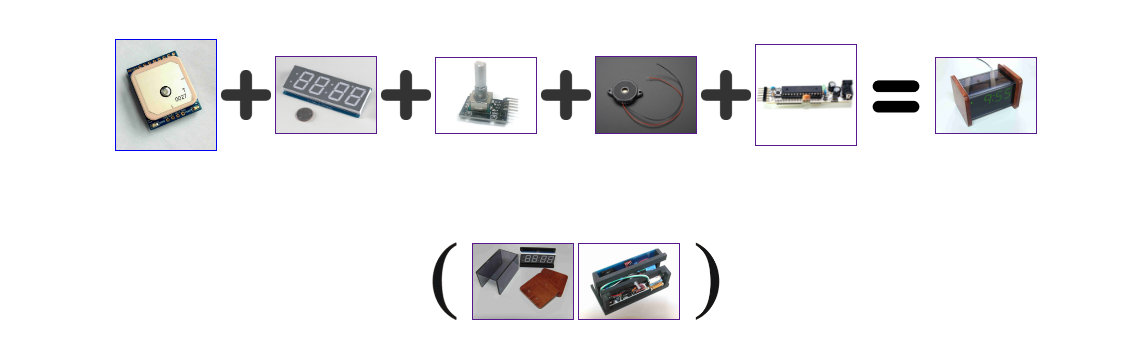
Choose a GPS or GNSS module that outputs serial NMEA data. Popular hobby modules include units based on MTK, u-blox, or similar chipsets. For a clock, look for three features: UART serial output, a backup battery option, and preferably a PPS output pin. The PPS pin is not mandatory for a basic clock, but it is strongly recommended if you want cleaner second alignment.
2. Microcontroller
An Arduino Uno, Nano, Mega, ESP32, Raspberry Pi Pico, or similar board can work. If you are using an Arduino Uno, SoftwareSerial can read the GPS module, although hardware serial is more reliable when available. ESP32 boards have multiple UARTs, which makes them comfortable for GPS projects.
3. Display
You can use a 16×2 LCD, OLED display, LED matrix, seven-segment display, or even a serial monitor while testing. An I2C OLED is compact and easy to wire. A large LED display is better for a wall clock because nobody wants to squint at a postage stamp to check lunchtime.
4. Optional DS3231 RTC Module
A DS3231 real-time clock module is helpful because it continues keeping time when GPS reception is weak or unavailable. It uses a temperature-compensated oscillator and usually includes battery backup. In a GPS corrected clock, the GPS module can periodically update the DS3231, and the DS3231 can carry the project through indoor signal dropouts.
5. Antenna and Power
Many GPS modules include a small ceramic patch antenna. For indoor use, an external active antenna near a window can make the difference between “instant time” and “why is this thing staring into space?” Always check whether your GPS board expects 3.3V or supports 5V. Some breakout boards include voltage regulation and level shifting; bare modules may not.
How GPS Time Actually Reaches Your Clock
Most hobby GPS modules send readable serial messages once per second. These messages are called NMEA sentences. A common sentence for timekeeping is RMC, which typically contains UTC time, date, status, latitude, longitude, speed, and course. For a clock, you parse the UTC time and date fields, then convert them to local time if desired.
Here is the important catch: serial data does not arrive exactly at the start of the second. It is transmitted after the receiver has processed the signal. That delay may be fine for a kitchen clock, but if you care about neat second transitions, serial data alone is a little sloppy. This is where PPS enters like a tiny punctual superhero.
What Is PPS and Why Should You Care?
PPS means pulse per second. Many GPS receivers output a short electrical pulse once every second. The rising edge of that pulse is closely aligned with the start of a GPS second. Your microcontroller can detect this pulse using an interrupt pin and use it to mark the exact second boundary.
Think of serial GPS data as the sentence, “The next second is 12:34:56.” Think of PPS as the conductor’s baton saying, “Now.” When you combine both, your clock knows what time it is and when the second actually begins. That combination is what turns a cute GPS clock into a genuinely time-corrected clock.
Basic Wiring Layout
The exact wiring depends on your hardware, but the general pattern is straightforward:
- GPS VCC to the correct power pin, usually 3.3V or 5V depending on the module.
- GPS GND to microcontroller GND.
- GPS TX to microcontroller RX.
- GPS RX to microcontroller TX if you need to configure the module.
- GPS PPS to an interrupt-capable digital pin.
- Display SDA and SCL to the microcontroller I2C pins.
- DS3231 SDA and SCL to the same I2C bus, if used.
On an Arduino Uno, I2C usually uses A4 for SDA and A5 for SCL. On many ESP32 boards, SDA and SCL are configurable, commonly GPIO 21 and GPIO 22. Always check your board pinout before wiring. Pinout diagrams exist for a reason, and that reason is smoke prevention.
Step-by-Step: Building the GPS Corrected Clock
Step 1: Test the GPS Module Alone
Before adding a display or RTC, connect the GPS module and open the serial monitor. You should see NMEA sentences scrolling by. They may look like robot poetry: commas, numbers, letters, checksums, and occasional signs of meaning. Wait until the receiver gets a fix or at least valid time data. Some modules can provide correct time before a full position lock, especially after they have previously downloaded satellite data.
Step 2: Parse the UTC Time
Use a GPS parsing library such as TinyGPS++ or a vendor-supported library. The library extracts time and date fields from NMEA sentences so you do not have to manually wrestle commas at midnight. Read UTC first. Do not jump directly into local time because UTC is the stable reference point.
Step 3: Convert UTC to Local Time
GPS and NMEA time are usually presented as UTC. Your display may need local time, so add or subtract your time zone offset. For example, Eastern Standard Time is UTC-5, while Eastern Daylight Time is UTC-4. If your project must handle daylight saving time automatically, you need rules for your region or a time library that supports them. Otherwise, a manual DST setting is simpler and less likely to make your code cry.
Step 4: Add PPS for Second Alignment
Connect PPS to an interrupt pin. In your interrupt routine, set a flag when the pulse arrives. Do not do heavy processing inside the interrupt. Let the main loop update the display when the flag is set. This keeps timing clean and prevents your program from turning into a traffic jam.
Step 5: Add the DS3231 Backup Clock
If using a DS3231, set it from GPS after valid GPS time is available. Then, if GPS reception disappears, read the time from the DS3231. When GPS returns, correct the RTC again. This hybrid design gives you the best of both worlds: satellite accuracy when available and steady local timekeeping when your antenna is having a bad day.
Step 6: Display the Time
Format the time as HH:MM:SS, add the date, and optionally show GPS lock status. A useful display might show “GPS LOCK,” “RTC HOLDOVER,” or “NO FIX” so you know where the clock is getting its confidence. A clock that admits uncertainty is more honest than many meetings.
Simple Logic Flow for the Project
This structure avoids a common beginner problem: updating the display whenever a serial sentence arrives. That works, but the visible second may appear late or uneven. PPS gives the project a crisp heartbeat.
Common Problems and Easy Fixes
No GPS Fix Indoors
GPS signals are weak by the time they reach Earth. Move the antenna near a window or use an external active antenna. Metal roofs, basements, thick walls, and workbenches full of mysterious electronics can all reduce signal quality.
Time Is Correct but Location Looks Wrong
Many GPS modules output latitude and longitude in degrees and minutes, not plain decimal degrees. This does not usually affect a clock, but it confuses many builders during testing. If the time is valid, your clock project may still be fine even while your location math is doing interpretive dance.
Clock Shows UTC Instead of Local Time
This is normal. GPS-derived NMEA time is generally UTC. Add your time zone offset in software. Remember that daylight saving time is a local rule, not a GPS feature.
Seconds Look Slightly Late
If you are updating the display only after parsing serial messages, the display may lag. Use PPS to trigger the second boundary, then use the most recently parsed time data to label that second correctly.
RTC Battery Confusion
Some DS3231 boards include charging circuits intended for rechargeable coin cells. If you use a non-rechargeable CR2032, check the board design carefully. Some modules require removing or disabling the charging resistor. This is a small detail with a large “please do not charge the wrong battery” energy.
Accuracy Expectations: Be Honest, Not Mythical
A GPS corrected clock can be very accurate, but the final result depends on the module, antenna, code, display refresh behavior, interrupt handling, and electrical design. The PPS signal can be extremely precise under good conditions, but your visible display may not show nanosecond-level accuracy because screens, code loops, and human eyeballs are not atomic clocks.
For a practical hobby clock, you can expect excellent day-to-day correctness. With PPS and careful programming, second changes can be aligned much better than a normal quartz clock. With a DS3231 backup, the clock can stay sensible during GPS dropouts. For most users, that is more than enough. Your microwave clock will feel personally attacked.
Example Use Cases
Workshop Master Clock
A large LED GPS corrected clock in a workshop gives everyone the same reference time. It is useful for testing, logging, and ending “just five more minutes” sessions with scientific authority.
Weather Station Logger
If your weather station records temperature, pressure, humidity, and rainfall, GPS time gives your logs reliable timestamps. That makes your data cleaner when comparing it with online weather records or other local stations.
Ham Radio and Electronics Projects
Radio projects often care about timing. A GPS corrected clock can support experiments where synchronized time is helpful, such as logging contacts, coordinating transmissions, or timestamping signal observations.
Astronomy and Sky Photography
Astronomy setups benefit from accurate time because sky positions depend on date, time, and location. Even if your telescope mount has its own clock, a GPS corrected reference display is a comforting backup.
Field Experience: What Building a GPS Time Corrected Clock Teaches You
The first thing you learn from building a GPS time corrected clock is humility. The second thing you learn is that antennas matter more than your confidence. You can write neat code, wire everything beautifully, and still watch the GPS module blink helplessly because it is sitting under a desk, behind a monitor, next to a metal lamp, beneath a roof that apparently moonlights as a satellite signal shield.
My favorite practical lesson is to test in layers. Start with the GPS module alone. Do not attach the display, the RTC, the buttons, the buzzer, the decorative enclosure, and the tiny status LED army all at once. If you do, troubleshooting becomes a detective story where every suspect has jumper wires. Confirm that the GPS module outputs readable serial data. Then confirm valid time. Then add the display. Then add PPS. Then add the RTC. Each layer should earn its place.
Another experience-based tip: show status messages. A clock that simply displays the wrong time is annoying. A clock that says “Waiting for GPS,” “Using RTC,” or “GPS locked” is understandable. That little bit of communication saves a lot of confusion. It also makes the project feel more polished, even if the back side is still a jungle of wires and optimism.
PPS is also one of those features that seems unnecessary until you see the difference. A serial-only GPS clock can be perfectly acceptable for casual use, but the second transition may look slightly delayed or inconsistent. Once PPS is connected to an interrupt and the display updates on that pulse, the clock feels sharper. It is like the project suddenly stands up straight and starts wearing a tie.
Power stability matters too. GPS modules can be sensitive during startup and acquisition. A weak USB port, poor breadboard contact, or long messy wires can create random problems that look like software bugs. Before rewriting your entire sketch at midnight, check power, grounding, and connections. Many “code problems” are actually electrical gremlins wearing fake mustaches.
Enclosure design is another sneaky challenge. A GPS clock wants to be visible, but the antenna wants sky access. If you put everything inside a metal box, congratulations, you have built a stylish signal prison. Plastic enclosures are friendlier. If you want a metal case, mount the antenna externally or use a short cable to place it near a window.
The biggest real-world lesson is that a GPS corrected clock is not just a clock. It is a small timing system. You start thinking about UTC, local time, daylight saving rules, serial latency, backup oscillators, and display refresh timing. That may sound like overkill, but it is exactly what makes the project satisfying. It begins as “I want a clock” and quietly becomes “I understand time distribution better than I expected.” That is a pretty good trade for a handful of modules and an afternoon of tinkering.
Conclusion
A GPS time corrected clock is puzzlingly simple because the concept is grand but the build is approachable. Satellites provide timing data, a GPS module decodes it, a microcontroller processes it, and a display shows it. Add PPS for crisp second alignment and a DS3231 RTC for backup, and you have a clock that is far more disciplined than the average kitchen appliance.
The key is to build patiently: verify GPS data first, handle UTC correctly, convert local time carefully, use PPS if accuracy matters, and let an RTC handle temporary signal loss. Once it is working, you will have a clock that does not just tell time. It listens to space, corrects itself, and quietly makes every ordinary wall clock look a little lazy.