Posting news articles on Facebook sounds easy enough: copy a link, paste it, hit “Post,” and watch the internet politely agree with your brilliant taste in headlines. Lovely dream. In real life, Facebook is part social network, part traffic machine, part dinner table argument simulator. A news article can inform, spark discussion, support a local publisher, orwhen handled carelesslyturn your comment section into a digital food fight with worse spelling.
The good news is that you do not need to be a newsroom editor, social media manager, or cousin who says “do your research” under every post to share news well. You simply need a clear purpose, a trustworthy source, a little context, and the right posting method. Whether you are sharing breaking news with friends, promoting a local story from your business Page, discussing an article in a Facebook Group, or scheduling content through Meta Business Suite, the way you post matters.
This guide explains 4 ways to post news articles on Facebook, with practical examples, ethical tips, and real-world publishing advice. The goal is simple: help you share news articles clearly, responsibly, and in a way people may actually want to read instead of scroll past while pretending they are “just checking one thing.”
Why Posting News Articles on Facebook Still Matters
Facebook remains one of the most widely used social platforms in the United States, and many people still discover, discuss, and react to news there. Even as short-form video, messaging apps, and AI-powered feeds reshape online media, Facebook continues to function as a public bulletin board for families, communities, brands, local groups, and publishers.
But the platform has changed. Facebook does not simply show posts in chronological order like a neat little library shelf. Its Feed ranking systems consider signals such as user interest, relationship strength, content type, engagement patterns, and predicted relevance. That means posting a news link without context is like tossing a newspaper into a windy parking lot and hoping someone catches page A1.
For better results, treat Facebook news sharing as a small act of publishing. Add context. Credit the source. Avoid misleading captions. Use a strong preview image when available. Ask a thoughtful question. Most importantly, do not turn every article into a megaphone blast. Facebook rewards content that feels useful, timely, and meaningful to the audience.
Method 1: Post a News Article Link on Your Personal Profile
The simplest way to post a news article on Facebook is through your personal profile. This is best for sharing articles with friends, family, classmates, neighbors, or your personal network. It works well for local news, major headlines, community alerts, human-interest stories, sports updates, science news, and opinion pieces you want to discuss.
How to Do It
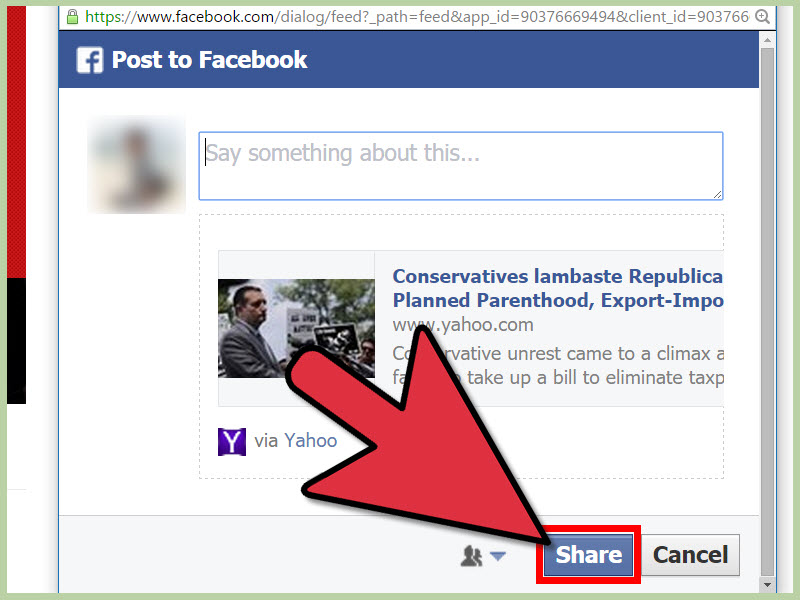
Open the news article in your browser or app. Copy the URL from the address bar or use the article’s share button if one is available. Then go to Facebook, click the post composer box, and paste the link. Facebook will usually generate a link preview that includes the article title, image, source name, and short description. Once the preview appears, write your own caption above it and publish the post.
A plain link can work, but a link with context works better. Instead of posting only “Interesting,” try something more specific:
“This article explains why several school districts are changing phone policies this year. The most useful part is the section on parent communication. What do you think?”
That kind of caption tells readers why the story matters. It also gives them something to respond to beyond the classic Facebook comment starter pack: “Wow,” “Fake,” and “I remember when gas was 89 cents.”
Best Practices for Personal News Sharing
Before posting, check the publication date. Old news often comes back online wearing a fake mustache and pretending to be breaking news. If the article is from three years ago, say so in your caption or skip it unless the history is relevant.
Next, verify the source. Reliable news organizations clearly identify authors, dates, corrections, sources, and editorial standards. If a website has twenty pop-ups, no author, and a headline that screams in all caps like it just stepped on a Lego, slow down.
Also be careful with your caption. Do not exaggerate what the article says. A headline may say “study suggests,” while your post says “scientists prove forever.” That is not sharing news; that is giving the article a fake superhero costume.
Method 2: Share a News Article on a Facebook Page
Posting a news article on a Facebook Page is ideal for businesses, nonprofits, creators, schools, media brands, clubs, churches, community organizations, and public figures. A Page is more public and professional than a personal profile, so your article posts should feel intentional.
For example, a local bookstore might share an article about reading habits. A health clinic might post a public health update from a trusted medical source. A real estate agency might share a housing market report. A restaurant might share local downtown development news. In each case, the article should connect naturally to the Page’s audience.
How to Do It
Go to your Facebook Page and open the post composer. Paste the news article URL and wait for the preview to load. Add a caption that explains why the article matters to your followers. Then publish immediately or schedule the post for later using Meta Business Suite if you manage content in advance.
A strong Page caption might look like this:
“New city parking rules begin next month, and they may affect weekend visitors downtown. We highlighted the key dates below so you can plan ahead before your coffee run turns into a cardio workout.”
This caption is useful, local, and lightly funny without making the news feel unserious. That is the sweet spot.
Use Link Previews Carefully
Facebook link previews are controlled largely by the article’s website metadata, including Open Graph tags. These tags help Facebook understand the title, image, and description to display when a link is shared. Most Page managers cannot freely rewrite link preview titles and descriptions inside Facebook, so the original article page needs to be set up properly.
If you own the website where the article is published, make sure every article has a clear title, meta description, featured image, and Open Graph image. Use Facebook’s Sharing Debugger to preview how the link may appear before posting. If the wrong image appears, the problem is usually on the website side, not because Facebook woke up and chose chaosalthough it can feel that way.
Page Posting Tips for Better Engagement
Do not post news articles only because you need “content.” Share stories that genuinely help your audience. Add a takeaway, a quote summary in your own words, or a question. Avoid engagement bait such as “Comment YES if you agree!” Facebook users have seen that trick so often it practically has its own retirement plan.
Good Page posts often include one of these angles:
- Useful summary: “Here are the three changes that matter most.”
- Local relevance: “This affects drivers on the west side starting Monday.”
- Professional insight: “Our team is watching this trend because it may change pricing this summer.”
- Audience question: “Would this change how you shop, commute, or plan?”
Method 3: Post a News Article in a Facebook Group
Facebook Groups can be excellent places to discuss news, especially when the article is highly relevant to the group topic. A neighborhood group may care about road closures. A parenting group may discuss school policy. A gardening group may welcome an article about drought-resistant plants. A business group may appreciate industry news.
Groups, however, have rules. Some allow news links freely. Others restrict outside links, political posts, promotional content, screenshots, or repetitive articles. Before posting, read the group rules. This is not just polite; it saves you from the mysterious vanishing-post experience, where your carefully crafted update disappears faster than snacks at a study session.
How to Do It
Open the Facebook Group and click the post composer. Paste the article link, wait for the preview, and write a short explanation. If the group requires approval, your post may not appear immediately. Some groups also allow posting as a Page if your Page is linked to or permitted in that group.
A good group post should be focused and respectful:
“This article covers the proposed changes to the bus routes near the high school. The public comment deadline is Friday. Has anyone here used Route 8 during afternoon pickup?”
This works because it is specific, relevant, and invites real discussion. It does not shout, accuse, or drop a link like a raccoon tossing a sandwich into traffic.
Group Posting Etiquette
When posting news in a group, avoid turning every article into a debate trap. If the topic is sensitive, summarize fairly and ask a clear question. Do not post misleading screenshots without the article link. Screenshots travel fast, but they often remove context, dates, corrections, and source details.
If you are sharing an article connected to your own business, website, campaign, or affiliate relationship, disclose that connection clearly. Transparency builds trust. Hidden motives turn comment sections into detective shows, and nobody enjoys being the final episode’s villain.
Also, do not spam the same article across multiple groups. Even when the article is useful, repetitive posting can look promotional or robotic. Tailor your caption to each group’s purpose. A local parent group, a city politics group, and a small business group may all care about the same news story for different reasons.
Method 4: Schedule and Manage News Posts with Meta Business Suite
If you manage a Facebook Page, publish regularly, or coordinate content for a brand, Meta Business Suite is often the most efficient way to post news articles. It lets Page managers create, schedule, and manage content across Facebook and Instagram from one dashboard. For news sharing, scheduling is especially useful because timing affects visibility.
For example, a morning news roundup may perform better before work. A local event update may need to go out two days before the event, not six minutes after it ends. A weekly industry summary may work best on Monday morning when professionals are pretending not to read Facebook during coffee.
How to Do It
Open Meta Business Suite and choose your Page. Create a new post, paste the article link, write your caption, and review the preview. Then choose whether to publish now or schedule for a future date and time. After publishing, review post insights to see how people responded.
Scheduling does not mean “set it and forget it forever.” News changes. A story may be corrected, updated, or overtaken by new information. If you schedule news content days ahead, check it again before it goes live. Nothing says “we are not paying attention” like posting a weather emergency update after the sun is shining and everyone has already grilled hamburgers.
How to Build a Smart News Posting Calendar
A good Facebook news calendar balances timeliness with usefulness. Try a simple weekly structure:
- Monday: Industry or community trend article
- Wednesday: Practical how-this-affects-you news post
- Friday: Weekend event, local update, or recap
- As needed: Breaking news, emergency updates, or major announcements
This structure helps your Page become a reliable filter instead of a noisy link dispenser. People follow Pages that save them time, explain what matters, and speak like humans. A steady posting rhythm also helps you avoid panic-posting five articles in one afternoon because “we have not posted since Tuesday.”
How to Write Better Facebook Captions for News Articles
The caption is where your post becomes more than a link. It frames the article, gives readers a reason to care, and sets the tone for discussion. The best Facebook captions for news articles are clear, accurate, and conversational.
Use the “Why This Matters” Formula
A simple formula works for most news posts:
What happened + why it matters + what readers can do or discuss.
Example:
“The city approved new bike lanes on three downtown streets. This matters for commuters, delivery drivers, and local shops because construction begins next month. Do you think the change will improve traffic flow?”
This caption does not oversell the story. It gives context and invites discussion. That is far more effective than “Thoughts???” which is less a caption and more a tiny cry for help.
Keep It Short, But Not Empty
Facebook users skim quickly. A caption does not need to be long, but it should not be blank. One to three short paragraphs usually works well. If the news is complicated, use bullets. If the article is emotional, stay calm and precise. If the story is technical, translate the main point into plain English.
Avoid Misleading Clickbait
Do not write captions that promise more than the article provides. “This changes everything” is rarely true. “Officials approved a new rule affecting rental applications” is less dramatic, but much more useful. Online trust is hard to earn and easy to lose. Treat every post as a small deposit in your credibility account.
Responsible News Sharing: Accuracy Before Speed
Facebook moves fast, but accuracy should move first. Before posting a news article, ask three questions:
- Is the source credible?
- Is the article current?
- Does my caption represent the story fairly?
This is especially important for breaking news. Early reports can change. Names, numbers, causes, and timelines may be updated as journalists confirm details. If you share breaking news, use careful language such as “early reports say,” “officials are investigating,” or “this story is developing.”
If the article involves sponsored content, affiliate links, paid promotion, or a business relationship, disclose that connection clearly. Readers deserve to know when a post is informational, promotional, or both. A simple line like “Disclosure: our company is mentioned in this article” can prevent confusion.
Common Mistakes When Posting News Articles on Facebook
Posting Without Reading the Article
Yes, we have all been tempted. The headline looks spicy, the thumbnail is dramatic, and your thumb is already hovering over “Share.” Resist. Headlines are designed to attract attention, but the actual article may be more nuanced. Read before posting. Your future self will thank you, especially if the headline turns out to be less “major scandal” and more “committee schedules meeting.”
Ignoring the Date
Old articles often resurface during new events. A five-year-old story can confuse readers if shared without context. Always check the publication date and update date.
Sharing Only Screenshots
Screenshots can be useful for quick reference, but they should not replace article links for serious news. Links provide source information, updates, corrections, and full context. Screenshots are like movie trailers: helpful, but not the whole plot.
Overposting Links
If every post is an external link, engagement may weaken. Mix news articles with original commentary, questions, short updates, images, videos, and community prompts. A healthy Facebook presence feels like a conversation, not a conveyor belt.
Experience-Based Tips for Posting News Articles on Facebook
After observing how news posts perform across personal profiles, Pages, and Groups, one lesson stands out: people respond to relevance more than volume. Posting ten articles a day does not make someone look informed. It often makes them look like they have been kidnapped by a browser tab. One thoughtful post with a clear explanation can outperform a dozen rushed shares.
The best results usually come from adding a human layer. When someone posts a local news article and says, “This affects the school pickup line starting Monday; here is the map from the article,” people pay attention. When a business Page shares an industry report and says, “Here is what this means for homeowners planning spring repairs,” the post becomes useful. When a Group member shares a community update and asks, “Has anyone attended the meeting about this?” the article becomes a conversation starter.
Another practical experience: timing matters, but timing cannot rescue weak context. A post at 8:00 a.m. may catch commuters and parents. A lunchtime post may reach office workers. An evening post may invite longer comments. But if the caption is vague, the link preview is broken, or the article has no clear connection to the audience, even perfect timing will not perform magic. Facebook is powerful, but it is not a wizard with Wi-Fi.
For Page managers, the strongest habit is reviewing posts after publication. Look at which articles received clicks, comments, shares, and saves. Notice which captions encouraged thoughtful discussion and which ones attracted confusion. If people keep asking the same question in comments, your caption probably needs more context next time. If no one clicks, the article may not match your audience’s needsor your introduction may be too dull. “New update released” is technically a sentence, but so is “Chair exists.” Neither inspires much action.
For Groups, experience shows that respect for the community matters more than clever wording. A good Group post feels like it belongs there. It references the group’s shared interest, follows rules, and avoids dumping links without explanation. When posting in a neighborhood group, mention the street, deadline, meeting, or local impact. When posting in a professional group, highlight the business implication. When posting in a hobby group, explain why the story helps members learn, buy, build, grow, cook, travel, or avoid making the same expensive mistake someone else already made for science.
Finally, the most valuable long-term strategy is becoming a trusted filter. People are overwhelmed by information. They do not need more random links; they need help understanding what is worth their time. If your Facebook posts consistently answer “Why should I care?” you become useful. If you share accurate articles, correct mistakes, avoid rage-bait, and add thoughtful context, readers begin to trust your posts before they even click. That is the real win. Not viral fireworks. Not comment chaos. Trust.
Conclusion
Posting news articles on Facebook is easy. Posting them well takes a little more care. You can share a link on your personal profile, publish it through a Facebook Page, discuss it inside a Group, or schedule it with Meta Business Suite. Each method has a different purpose, but the same core rules apply: choose credible sources, check the date, add useful context, respect your audience, and keep your caption accurate.
Facebook may be a fast-moving platform, but good news sharing still depends on old-fashioned judgment. Read before you post. Explain why the story matters. Ask better questions. Avoid exaggeration. And remember: every news article you share either builds trust or chips away at it. Choose the first option. It has better long-term engagement and fewer angry uncles in the comments.