Pulling into a gas station with only your iPhone and optimism is a very modern kind of suspense. Will the pump accept Apple Pay? Will the cashier know? Will you have to dig under the car seat for a physical card while questioning every life choice that led to this moment? Good news: finding gas stations that take Apple Pay is much easier than it used to be, especially in the United States, where contactless payment has become common at convenience stores, fuel pumps, and gas-brand mobile apps.
Still, there is one tiny plot twist: “accepts Apple Pay” does not always mean the same thing everywhere. Some gas stations accept Apple Pay directly at the pump through an NFC tap-to-pay reader. Some accept it inside at the register. Others let you pay through the brand’s mobile app, even when the pump itself looks like it was designed during the age of flip phones and emotional support CDs.
This guide explains how to find gas stations that accept Apple Pay, which major chains commonly support it, how to use it safely, and what to do when the pump says “no” like a grumpy vending machine.
What Does “Gas Stations That Take Apple Pay” Really Mean?
When people search for gas stations that take Apple Pay, they usually mean one of three things:
- Apple Pay at the pump: You tap your iPhone or Apple Watch on the contactless reader before fueling.
- Apple Pay inside the store: You prepay at the cashier using Apple Pay, then pump gas outside.
- Apple Pay through a gas station app: You open the brand’s app, select your pump, authorize payment with Apple Pay, and start fueling.
The third option is surprisingly useful. Many stations have older pump terminals that do not reliably support contactless payments, but the company’s app can still activate the pump. In other words, the pump may not understand your iPhone, but the app does. Technology: occasionally helpful, occasionally a soap opera.
How to Find Gas Stations That Accept Apple Pay Near You
1. Search Apple Maps for Apple Pay-Friendly Locations
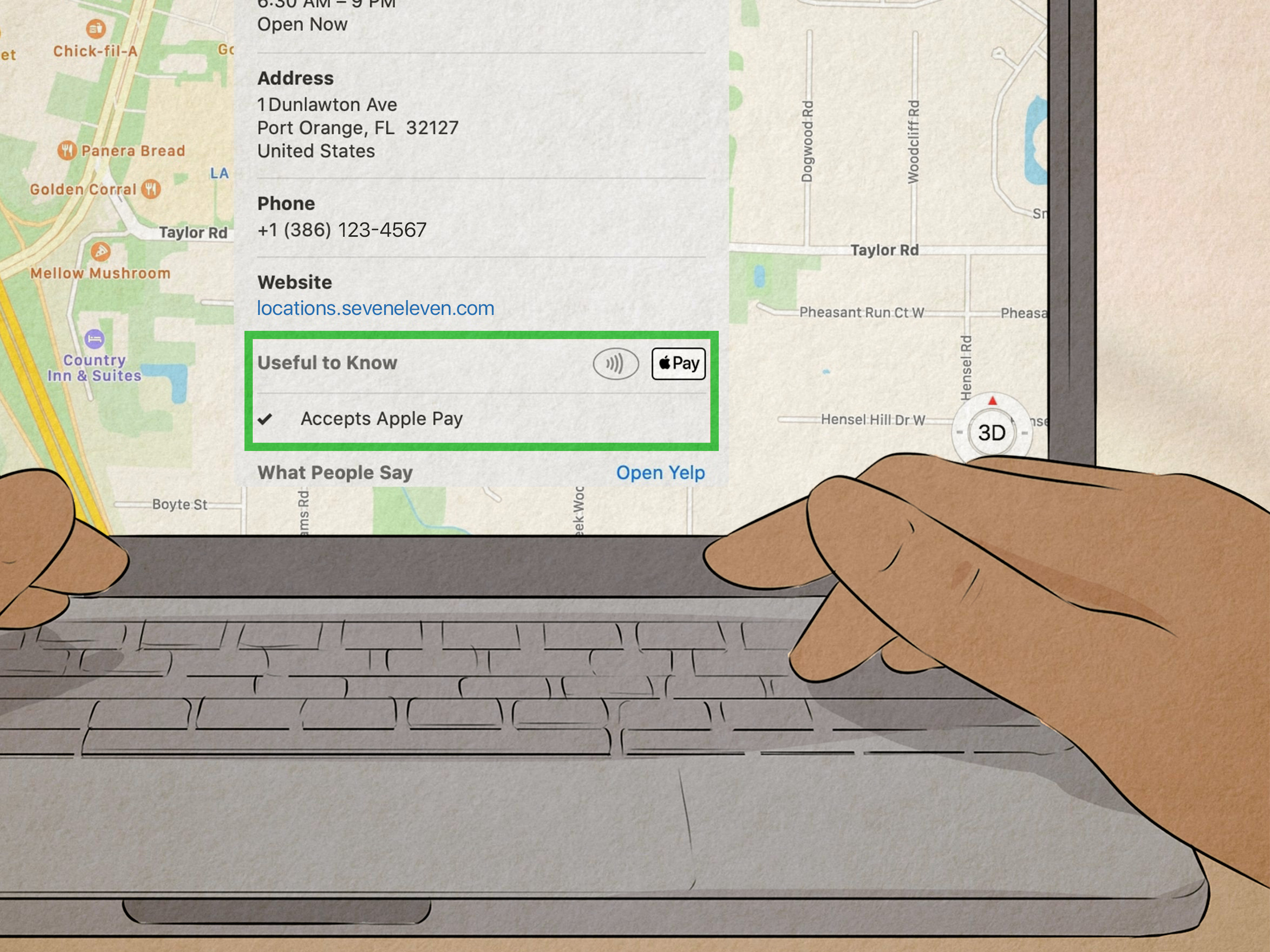
The fastest method is to open Apple Maps and search for “gas stations near me.” Tap a station, open its place card, and check the payment information or “Good to Know” section. Apple Maps can show accepted payment types for some businesses, including whether Apple Pay is listed.
You can also search directly for “Apple Pay gas station near me” or “gas station Apple Pay”. Results may vary by area, but this is a practical first step when you are already on the road and your fuel gauge is flirting with danger.
2. Look for the Contactless Symbol at the Pump
At the pump, look for the Apple Pay logo or the universal contactless payment symbol. The contactless symbol looks like a sideways Wi-Fi icon. If you see it near the card reader or screen, there is a good chance Apple Pay may work.
However, “good chance” is not the same as “guaranteed.” Some pumps have contactless hardware installed but not activated. Others support tap-to-pay cards but may reject mobile wallets. If the pump does not respond, try selecting “Credit,” “Pay Outside,” or “Pay Here” first, then hold your iPhone or Apple Watch near the reader.
3. Use the Gas Station’s Official App
Many major fuel brands now offer mobile apps that support payment at the pump. These apps often let you select the station, choose your pump number, confirm payment with Face ID or Touch ID, and receive a digital receipt. This is one of the most reliable ways to use Apple Pay at gas stations, especially at chains such as Shell, Exxon, Mobil, Sunoco, Chevron, Texaco, Phillips 66, Conoco, 76, and 7-Eleven participating locations.
4. Call or Check the Station Details Before a Long Trip
If you are planning a road trip, do not wait until the fuel light comes on to discover that a rural pump only accepts a physical card, cash, and possibly ancient bartering rituals. Check the station details in Apple Maps, Google Maps, or the brand’s app before you leave. For long drives, save a few Apple Pay-friendly stations along your route.
List of Gas Stations That Commonly Take Apple Pay
Apple Pay availability can vary by location, pump equipment, franchise ownership, and app support. The following major U.S. gas station brands commonly support Apple Pay in at least one way: at the pump, inside the store, or through the official mobile app.
| Gas Station Brand | How Apple Pay May Work | Best Tip |
|---|---|---|
| Exxon | At participating pumps, inside, or through the Exxon Mobil Rewards+ app | Use the app if the pump tap reader fails. |
| Mobil | At participating pumps, inside, or through the Exxon Mobil Rewards+ app | Set Apple Pay as the payment method in the app. |
| Shell | Through the Shell app at the pump or inside at participating stores | Open the app, tap “Pay,” then choose “Pay at the pump.” |
| Chevron | Through the Chevron app, inside, or at participating contactless pumps | Use the app station finder and check mobile payment availability. |
| Texaco | Through the Texaco app, inside, or at participating contactless pumps | Apple Pay may be available as an app payment method in supported areas. |
| Sunoco | Through the Sunoco app at the pump or inside at participating stations | Use the app to redeem rewards and activate the pump. |
| Phillips 66 | Through the Fuel Forward app or at participating locations | The app supports Apple Pay and station finding. |
| Conoco | Through the Fuel Forward app or at participating locations | Check the app for nearby participating stations. |
| 76 | Through the Fuel Forward app or at participating locations | Use mobile pay for receipts and rewards tracking. |
| 7-Eleven | Inside stores, mobile orders, fuel, or 7-Eleven Wallet at participating locations | Load 7-Eleven Wallet with Apple Pay where supported. |
| Wawa | Often inside stores and at some pumps or through app features | If the pump fails, prepay inside with Apple Pay. |
| QuikTrip | Often inside stores and at some contactless-enabled pumps | Look for contactless signage at the pump. |
| BP | Through participating app-based payment options and some station terminals | Check the current bp/earnify app options before fueling. |
| Amoco | Through participating bp/earnify locations and station terminals | Use the app locator to confirm participating stations. |
This list is a practical starting point, not a magic scroll. Gas stations are often franchised or independently operated, so two locations under the same brand can behave differently. One Shell may work perfectly through the app; another may have a pump that acts like it needs a nap. Always check the specific location when possible.
How to Use Apple Pay at a Gas Pump
Using Apple Pay Directly at the Pump
- Pull up to the pump and choose your fuel grade only when prompted.
- Look for the Apple Pay or contactless payment symbol.
- On your iPhone, double-click the side button and authenticate with Face ID, Touch ID, or your passcode.
- Hold your iPhone near the contactless reader until you see “Done” or a checkmark.
- Begin fueling when the pump authorizes the transaction.
For Apple Watch, double-click the side button and hold the watch near the reader. This is one of the smoothest ways to pay, especially when your phone is buried somewhere between the cup holder and yesterday’s snack wrapper.
Using Apple Pay Inside the Gas Station
If the pump does not accept Apple Pay, go inside and tell the cashier your pump number and the amount you want to prepay. Then use Apple Pay at the register. This option is especially useful at older stations or at pumps where the contactless reader is broken, disabled, or simply feeling dramatic.
Using Apple Pay Through a Gas Station App
- Download the official app for the gas station brand.
- Create an account and add Apple Pay or another supported payment method.
- Enable location services so the app can identify the station.
- Select “Pay at Pump” or a similar option.
- Enter your pump number.
- Authorize the payment with Face ID, Touch ID, or your passcode.
- Fuel up and save the digital receipt.
The app method can also unlock rewards, fuel discounts, and receipts. If you regularly use one brand, keeping its app installed may save time and money. If you only stop there once every three years, maybe skip the app unless your wallet is at home and your car is running on fumes.
Why Apple Pay May Not Work at Some Gas Stations
Apple Pay can fail at gas stations for several reasons, and not all of them are your fault. Common causes include:
- The pump does not have a contactless reader.
- The reader exists but is not activated.
- The station accepts Apple Pay inside but not outside.
- The gas brand app supports Apple Pay, but that specific location does not support mobile pump activation.
- Your card issuer declines the transaction because fuel pumps often use temporary preauthorization holds.
- The pump terminal is offline, outdated, or having a very bad Tuesday.
Fuel purchases often involve temporary holds that may be higher than the final amount of gas you pump. This can affect debit cards or low-balance accounts. If Apple Pay fails with one card, try another card in your Wallet. If it still fails, use the station app or pay inside.
Safety Tips for Paying With Apple Pay at Gas Stations
One reason drivers like Apple Pay at gas stations is security. Apple Pay uses tokenized payment information, so the merchant does not receive your actual card number during a standard Apple Pay transaction. That is helpful at fuel pumps, where card skimming has historically been a concern.
Before using any pump, check the card reader. Avoid readers that look loose, crooked, scratched, bulky, taped, or different from the other pumps. When possible, choose a pump close to the store entrance because it is more visible to employees. If something feels off, pay inside. Your instincts are not always perfect, but neither is a pump covered in suspicious tape.
Best Apps for Finding Apple Pay Gas Stations
Apple Maps
Apple Maps is the most natural starting point for iPhone users. It can display station details, directions, hours, phone numbers, and sometimes accepted payment types. Search terms like “gas stations Apple Pay” or “Apple Pay near me” can help narrow your options.
Gas Station Brand Apps
Brand apps are often more accurate for mobile payment availability than general map listings. Shell, Exxon Mobil, Sunoco, Chevron, Texaco, Phillips 66, Conoco, 76, bp, and 7-Eleven apps may show participating stations, available amenities, rewards, and payment options.
Google Maps
Google Maps can help you compare nearby stations, read recent reviews, and call ahead. While it may not always list Apple Pay clearly, customer reviews sometimes mention whether tap-to-pay works at the pump. Search for the station name plus “Apple Pay” or “tap to pay” for better clues.
Quick Troubleshooting: What to Do When Apple Pay Fails
- Try selecting “Credit” before tapping your iPhone.
- Hold the phone closer to the contactless reader for a few seconds.
- Switch to a different card in Apple Wallet.
- Use the gas station’s official app.
- Prepay inside with Apple Pay.
- Move to another pump if the reader looks damaged.
- Ask the cashier whether Apple Pay works at the pump or only inside.
If you are traveling, keep at least one backup payment method. Apple Pay is convenient, but a physical card can save the day when a rural pump decides it is allergic to modern life.
Real-World Experience: Finding Gas Stations That Take Apple Pay
Here is the practical reality: finding gas stations that take Apple Pay gets easier once you stop thinking of it as a yes-or-no question. The better question is, “Which Apple Pay path works at this station?” At many modern locations, the direct pump tap works beautifully. You pull in, double-click your iPhone, tap the reader, pump gas, and leave. It feels almost too easy, like you accidentally found the cheat code for errands.
But at other stations, the contactless reader may be installed and still not work. This is the part that confuses most drivers. A pump can have a shiny contactless symbol and still reject your phone. Sometimes the reader is not activated. Sometimes only physical tap cards work. Sometimes the terminal is temporarily offline. This is why experienced Apple Pay users often have a Plan B: the station app or the indoor register.
The best personal strategy is to build a mini-map of reliable stations in your regular driving area. For example, you might learn that the Shell near work works perfectly through the Shell app, the Exxon near your house accepts Apple Pay through the Exxon Mobil Rewards+ app, and the Wawa by the highway accepts Apple Pay inside even when the pump reader is moody. After a few fill-ups, you will know which stations are worth visiting and which ones deserve to be emotionally ignored.
For road trips, the experience is different. You do not have the luxury of testing five stations while your fuel gauge blinks like a tiny panic alarm. Before leaving, search your route in Apple Maps and save several major-brand gas stations in advance. Big chains near highways are often better bets because they tend to update payment systems more quickly and are more likely to support app-based fueling. Still, always keep a physical card as backup. The goal is convenience, not starring in a roadside survival documentary titled “One Bar of Signal and No Wallet.”
Using official apps can feel annoying at first because nobody dreams of downloading another fuel app. But if you drive often, they can be genuinely helpful. You may get digital receipts, fuel rewards, price details, station locators, and easier pump activation. The app method is also useful when the pump’s card reader looks suspicious or worn out. Paying through the app can reduce how often you insert or swipe a physical card at outdoor terminals.
Another useful habit is checking recent reviews. Search the station on a map app and scan reviews for terms such as “Apple Pay,” “tap to pay,” “contactless,” “pump,” or “mobile pay.” Customers often complain when payment fails, and those complaints can be more useful than official listings. A review saying “Apple Pay works inside but not at pump” can save you five minutes and one dramatic sigh.
Finally, remember that Apple Pay acceptance changes over time. A station that failed last year may have upgraded its pumps. A station that worked last month may have a temporary outage. Treat each first visit as a quick test: check the pump symbol, try Apple Pay, switch to the app if needed, and pay inside as the final fallback. Once you find reliable stations, save them. Future you will be grateful, especially when it is raining, late, and the car is running on the last tablespoon of gasoline.
Conclusion
Finding gas stations that take Apple Pay is not difficult once you know where to look. Start with Apple Maps, check for contactless symbols at the pump, use official gas station apps, and remember that Apple Pay may work inside even when it fails outside. Major brands such as Shell, Exxon, Mobil, Sunoco, Chevron, Texaco, Phillips 66, Conoco, 76, 7-Eleven, Wawa, QuikTrip, BP, and Amoco commonly offer Apple Pay support in at least some locations or payment channels.
The smartest approach is simple: search before you drive, look for the contactless logo, keep brand apps for stations you use often, and carry a backup card for emergencies. Apple Pay makes fueling faster, cleaner, and more secure, but gas pumps are still gas pumps. Some are modern. Some are mysterious. Some appear to have been trained by raccoons. With the right strategy, you can avoid payment drama and get back on the road with fewer taps, fewer lines, and fewer “why is this not working?” moments.
Note: Apple Pay availability can vary by station, pump equipment, app support, region, and franchise operator. Always confirm at the specific location before relying on Apple Pay as your only payment method.