Tap-to-pay is the financial equivalent of a self-opening door: wildly convenient… until it opens when you didn’t ask.
If you’ve ever felt your debit card “tap” a terminal from your pocket like it’s trying to socialize, you’re not alone.
Plenty of people want the speed of modern payments without the anxiety of “Did I just buy gum with my thigh?”
This guide covers what “disabling tap to pay” actually means, what you can and can’t turn off in the U.S., and the
smartest ways to reduce risk without turning your wallet into a DIY science project. We’ll keep it practical, specific,
and mildly entertaining (because banking can be boring, and boredom leads to bad decisionslike cutting your card in half).
What “Tap To Pay” Means (And What It Doesn’t)
When people say “tap to pay,” they usually mean contactless card payments: you hold your debit card near a
checkout terminal and it completes a chip-style transaction over NFC (near-field communication). This is different from:
- Mobile wallets (Apple Pay / Google Pay): your phone/watch taps, not the plastic card.
- Tap to Pay on iPhone / Android (for merchants): a phone acts as the terminal. Different feature entirely.
- Swipe: the old magnetic stripe method, which is generally less secure than chip/contactless.
If your goal is “I never want my physical debit card to tap,” you’re in the right place. If your goal is “I don’t want
my phone to tap,” skip ahead to the digital-wallet section.
Quick Reality Check: Can You Actually Disable Tap-To-Pay on a Debit Card?
Sometimes. But not always in the way people imagine.
The most common U.S. reality
-
Many banks let you lock/turn off the card (which blocks most new transactions, including in-person purchases),
but that’s broader than “contactless only.” - Some banks let you control digital-wallet access, which matters if your concern is tapping with your phone/watch.
- A true “contactless toggle” for the plastic card exists at some institutions, but it’s not universal.
Translation: you can almost always reduce tap-to-pay risk, but the exact switch you want may or may not exist in your bank’s app.
The good news? You still have multiple effective options.
Why People Disable Tap-To-Pay (Totally Valid Reasons)
- Security anxiety: fear of “wireless skimming” or unauthorized taps.
- Budget control: tapping feels frictionless (and friction is sometimes the only thing between you and a $9 latte).
- Accidental payments: rare, but people worry about “phantom taps” in crowded places.
- Teen/kid access: you want the card usable for emergencies, but not effortless impulse spending.
- Privacy: you’d rather insert the chip and take an extra second to confirm the amount.
- Preference: you just don’t like it. That’s enough.
Is Tap-To-Pay Actually Riskier Than Chip or Swipe?
Here’s the part that surprises people: contactless payments are built on EMV-style security. That generally means
transaction data is dynamic (changes each time) rather than static (easy to copy). In plain English: a terminal
can’t just “read your card once” and reuse that info to make endless clones of your purchase.
Also, NFC works at very short range. A legitimate payment requires your card to be extremely close to the reader, which is why you
don’t pay for groceries from the parking lot (even if you’d like to).
None of that means fraud is impossiblefraudsters are creativebut it does mean that disabling tap-to-pay is often more about
comfort, control, and loss prevention (like if the card is stolen) than about stopping a Hollywood-style “wireless heist.”
The Practical Playbook: Ways to Disable (or Neutralize) Tap-To-Pay
1) Use Your Bank’s “Card Controls” (The Best First Move)
Many major U.S. banks offer card controls that let you turn your card on/off or lock/unlock it.
This doesn’t always disable contactless onlyit usually blocks most new transactions across the board. But if your goal is
“no surprise taps,” it’s extremely effective.
Typical steps (varies by bank):
- Open your bank’s mobile app.
- Go to Card Services, Manage Card, or Card Controls.
- Select your debit card.
- Toggle Card Off / Lock (and toggle it back on when you’re about to use it).
A key detail: when you turn a card “off,” some transactions may still go through, like certain recurring payments,
refunds, reversals, or previously authorized charges. So think of “card off” as a bouncer at the door, not a concrete wall.
Good use cases: you can’t find your wallet, you’re traveling, you only want the card active during a short errand,
or you want a “default-off” card that only works when you deliberately enable it.
2) Disable Digital Wallet Access (If Your Real Concern Is Phone Taps)
Sometimes “tap-to-pay fear” is really “I don’t want this debit card usable in a mobile wallet.” That’s a different switch.
Many banks let you manage wallet access, tokenized card numbers, or connected devices.
- If you want to keep the physical card but stop phone taps: remove the card from Apple Pay/Google Pay and check your bank app for wallet controls.
- If you’re worried about a lost phone: enable device passcodes/biometrics and turn on transaction alerts.
Bonus: mobile wallets can be more secure in some scenarios because they use device authentication (Face ID / fingerprint / passcode),
which is something your plastic card definitely does not have. Your debit card, unfortunately, cannot recognize your face. Yet.
3) Ask Your Bank About Contactless Settings (Or a Non-Contactless Replacement)
If you specifically want “chip and PIN/insert only” and you don’t want to keep toggling the entire card on and off, call your bank.
Ask these two questions:
- “Can you disable contactless (NFC) on my existing debit card?”
- “Can you issue a debit card without contactless capability?”
Some issuers can adjust features or issue a replacement card with different capabilities, while others cannot (or won’t).
Even if the answer is “no,” you’ve lost five minutes and gained certainty.
4) Use an RFID-Blocking Sleeve (The “Quiet Quit” of Contactless)
If your bank can’t disable contactless, an RFID/NFC-blocking sleeve or wallet is a simple workaround:
it prevents the card from communicating with terminals unless you remove it.
This doesn’t change your card settingsit just blocks the signal. Think of it like putting your card in airplane mode,
except your card doesn’t have an airplane mode because it’s a rectangle.
Pro tip: choose a sleeve you’ll actually use. The best security tool is the one that leaves the house with you.
5) “DIY Disable” by Damaging the Antenna (Not Recommended, But Let’s Talk About It)
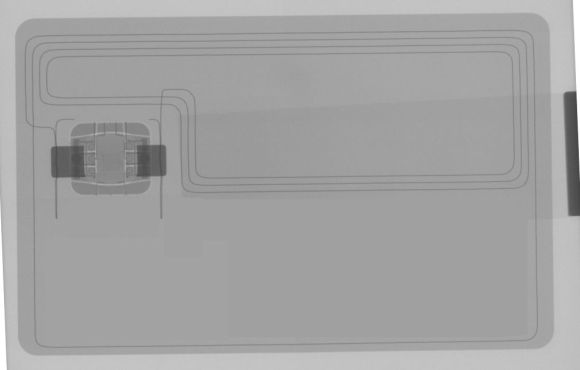
You’ll see tutorials online claiming you can disable contactless by cutting or puncturing the card’s antenna.
Technically, damaging the antenna can stop contactless functionalitybecause the card can’t communicate if you break the part that communicates.
Why this is a bad idea for most people:
- You can damage the chip or the card’s structure and end up with a useless card.
- It may violate card terms and could complicate replacements.
- It’s permanent and messylike getting bangs at 2 a.m.
If you want contactless off, it’s usually better to use bank controls, request a replacement, or use a blocking sleeve.
Save the arts-and-crafts energy for something that won’t ruin your ability to buy gas.
6) Reduce Risk Without Disabling Tap-To-Pay
If you’re on the fence, these options provide real control without fully turning contactless off:
- Turn on real-time alerts for every transaction (push, text, or email).
- Keep less money in the checking account tied to the debit card; move savings elsewhere.
- Use the card lock feature when you’re not actively using the card.
- Set spending limits if your bank offers them.
- Consider using a credit card for daily spending and keep debit for ATM/occasional needs (depends on your situation).
How to Confirm Tap-To-Pay Is Truly Disabled
Don’t rely on vibes. Test it:
- Try a small in-store purchase at a contactless terminal.
- Tap the card. If it fails, insert the chip to complete the transaction.
- If the chip works but tap fails consistently, you’ve likely disabled (or blocked) contactless successfully.
If contactless still works, double-check your app settingsor call the bank to confirm which controls apply to contactless versus “card off” behavior.
If Your Debit Card Is Lost or Stolen: Your Rights and Why Speed Matters
Whether fraud happens via tap, chip, swipe, or an online transaction, the big rule is the same:
report it fast. U.S. protections for unauthorized electronic fund transfers generally limit your liability
depending on how quickly you notify your financial institution.
The practical takeaway is simple:
the sooner you report a missing card or unauthorized transactions, the more protected you tend to be. If you use a “default-off” lock strategy,
you reduce the window in which a lost card can be used at all.
Common Myths (Let’s Retire These Gently)
Myth: “Someone can charge my card from across the room.”
Contactless payments rely on very short-range NFC communication. In real life, successful payment requires close proximity to a terminal,
not a casual stroll past your purse like a magician palming coins.
Myth: “Tap-to-pay is the same as swipe.”
Tap-to-pay is typically EMV-style and uses transaction-specific cryptographic elements. Swipe relies on magnetic stripe data,
which is easier to copy and has historically been a bigger fraud target.
Myth: “If I disable contactless, I’m immune from fraud.”
Disabling tap reduces one pathway. It doesn’t eliminate risks like card-not-present fraud, phishing, compromised merchants,
or good old-fashioned “I dropped my card in a parking lot.”
Troubleshooting: When Contactless Doesn’t Work (Even When You Want It To)
Sometimes people land here because their contactless feature is already failingand they’re wondering if it’s “disabled” or just cranky.
Common causes include:
- Card activation issues: some cards need a chip-insert transaction first.
- Terminal limitations: not every terminal supports contactless, even if it looks like it should.
- Wear and tear: bending the card can damage internal components.
- Network/security flags: issuers may require an inserted chip transaction after suspicious activity.
If contactless is flaky but chip works, it may be a damaged antenna. If you want tap-to-pay back, a replacement card is usually the clean fix.
Real-World Experiences (500+ Words): What People Actually Run Into When Disabling Tap-To-Pay
Below are the most common “lived experience” patterns people report when they try to disable tap-to-pay on debit cards. If you see yourself in one
of these, you’re normaland also not alone in yelling “WHY IS THIS SO COMPLICATED?” at a banking app.
Experience #1: “I just wanted contactless off, but the app only had ‘Lock Card.’”
This is probably the #1 scenario in the U.S. A user opens their bank app expecting a neat toggle that says Contactless: On/Off.
Instead, they find a blunt instrument: Turn Card Off. At first it feels like overkill“I still need the card for ATMs!”but
many people end up liking the control once they adjust their habits.
The trick is routine. People who succeed with “default-off” cards build a mini-checklist: unlock before shopping, relock immediately after.
They also learn the fine print: certain recurring payments may still post, and refunds will still come through. Over time, it becomes
less annoying than expectedkind of like carrying a reusable water bottle. You grumble for a week, then you feel weird without it.
Experience #2: “I disabled wallet access, but tap still worked with the physical card.”
Another common confusion: digital wallet controls are not the same as contactless card controls. Someone disables Apple Pay/Google Pay access and
celebrates… then taps the plastic card and it works fine. That’s because the physical card’s contactless function is separate.
The fix is simple once you know it: decide what you’re actually trying to stop (phone taps, card taps, or both), then set controls accordingly.
Experience #3: “The RFID-blocking sleeve solved it… until I stopped using it.”
RFID sleeves are a classic: cheap, easy, and genuinely effective at blocking NFC. But the long-term success depends on behavior, not technology.
People love the idea of “the sleeve lives in my wallet forever.” Then life happens: you move the card to a different pocket, you switch wallets,
you hand the card to a spouse to run into the store, and now the sleeve is back at home living its best life without you.
The people who make sleeves work do one of two things: they buy multiple sleeves (one per frequently used card), or they use a wallet with a dedicated
blocked pocket and never break the system. If you’re a “systems person,” you’ll love it. If you’re a “my keys are in the fridge” person, you may
prefer app-based controls instead.
Experience #4: “I tried the DIY antenna method and… yeah.”
Every so often someone decides to go full DIY and damage the card to stop contactless. The stories usually end in one of three ways:
(1) it works, but the card looks like it survived a small war; (2) it fails, and contactless still works because the antenna wasn’t actually severed;
or (3) it breaks the card enough that chip reads become unreliable, leading to a replacement anyway.
The lesson people share afterward is consistent: if you want tap disabled, ask your bank first. If the bank can’t do it, block it with a sleeve.
If you’re still tempted to perform surgery on a debit card, at least consider whether you’d rather spend that energy negotiating a better phone plan,
learning to cook one new meal, or doing literally anything else that won’t interfere with access to your money.
Experience #5: “Once I started using alerts, I worried lesseven with contactless on.”
This is the sleeper hit: people who enable real-time transaction alerts often report that their anxiety drops dramatically. Even if contactless remains on,
they feel “in the loop.” And if something looks wrong, they can lock the card immediately and contact the bank. It doesn’t replace good security habits,
but it turns a vague fear into a manageable process.
The bottom line from these experiences: “disabling tap-to-pay” is rarely one single switch. It’s usually a blend of card controls, wallet controls,
blocking methods, and better monitoring. Pick the combination that fits your lifestylebecause the best security plan is the one you’ll actually follow.
Conclusion
Disabling tap-to-pay on a debit card in the U.S. is often less about flipping a magical “NFC OFF” button and more about choosing the right control strategy:
lock/unlock features, wallet access settings, RFID-blocking, or a replacement card request. If you want maximum peace of mind, pair your choice with
transaction alerts and the habit of reporting issues quickly.
Convenience is great. Control is better. And a debit card that behaves exactly how you want? That’s the dream.