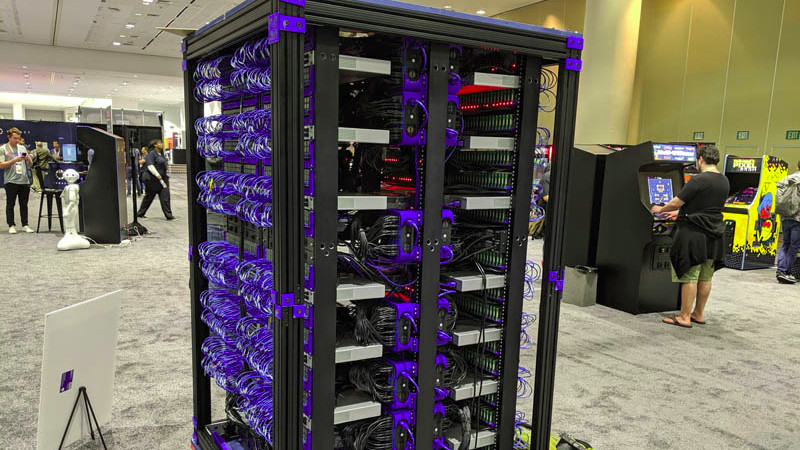
If your Raspberry Pi cluster lives on a shelf, hums politely, and occasionally runs a few containers while you stare at it like a proud backyard mechanic, congratulations: you have built something cool. But it is probably not this cool.
The phrase “Your Raspberry Pi Cluster Is Not Like This One” perfectly fits the kind of build that makes ordinary hobby clusters look like a lemonade stand parked next to a space launch. We are talking about giant Raspberry Pi cluster projects that go far beyond “I stacked four boards and installed Kubernetes.” The most famous example is Oracle’s enormous Raspberry Pi supercomputer, a machine built from more than a thousand boards, custom rack hardware, centralized storage, and enough networking to make a home router break into a nervous sweat.
That kind of Raspberry Pi cluster is not just bigger. It represents a different mindset. A normal home cluster is about learning distributed computing, running services, testing automation, or proving that you can turn tiny ARM boards into a coordinated little swarm. A mega-cluster, by contrast, is part engineering challenge, part teaching tool, part infrastructure experiment, and part “because we absolutely could.” In other words, it is a science fair volcano, except the volcano runs Linux and needs a switch uplink.
This article looks at what makes these extraordinary Raspberry Pi clusters different, what they teach us about cluster computing, where Raspberry Pi nodes really shine, and why your own setup still matters even if it does not occupy a human-sized rack and threaten the room temperature.
What Makes This Raspberry Pi Cluster So Different?
The average Raspberry Pi cluster starts with a familiar recipe: a handful of boards, Ethernet, a power solution that felt clever at midnight, and software chosen somewhere between “best practice” and “what a tutorial said to do.” That is enough for a homelab, a classroom demo, or a small edge computing setup.
But the extraordinary builds are operating on another level entirely. The best-known example is the giant Oracle Raspberry Pi supercomputer that packed 1,060 Raspberry Pi 3 B+ boards into a rack-scale system. That is not a “weekend project.” That is a “you now have opinions about rack density” project.
What separates a cluster like that from a typical Raspberry Pi setup is not just the node count. It is the supporting architecture. Once you move from a few Pi boards to dozens or hundreds, the hard parts stop being cute. Power delivery becomes a design problem. Cooling becomes real. Cabling goes from “manageable” to “this looks like spaghetti had a breakdown.” Storage has to be centralized or carefully coordinated. Boot management matters. Network topology matters. Remote administration matters. Suddenly, your cluster is no longer a pile of boards. It is an ecosystem.
That is the key lesson. A real cluster is not defined by how many boards you own. It is defined by how well the whole thing behaves as one system.
It Is Not Just a Stack of Pis
One of the funniest misconceptions about Raspberry Pi cluster computing is that adding more boards automatically creates more usefulness. If that were true, every drawer full of abandoned SBCs would count as a supercomputer. In reality, cluster performance depends on the relationship between compute, storage, memory, communication overhead, and orchestration.
That is why large Raspberry Pi systems often use custom carriers, carefully planned switch layouts, shared storage, and network booting. Once a cluster reaches serious scale, the boring pieces become the heroic pieces. Nobody frames a photo of a storage server, but without it the glamorous pile of Pi nodes is just an expensive collection of tiny rectangles.
Why Most Raspberry Pi Clusters Do Not Speed Up Everyday Computing
Here comes the part that disappoints exactly half the people who discover cluster computing for the first time: a Raspberry Pi cluster does not magically turn into a monster desktop.
If your dream is to make web browsing faster, edit video like a workstation, or open thirty browser tabs without hearing the hardware sigh, a Raspberry Pi cluster is not the shortcut. Clusters are best when a problem can be split into many independent tasks or into chunks of data that can be processed in parallel. If the workload is full of waiting, synchronization, or heavy back-and-forth chatter between nodes, the network overhead starts eating your lunch.
That is why parallel computing experts often talk about “embarrassingly parallel” workloads. The name is goofy, but the idea is simple: some jobs are easy to divide into many similar pieces with very little communication overhead. Those jobs scale nicely on clusters. Monte Carlo simulations, parameter sweeps, batch rendering, distributed testing, and some data analysis tasks are classic examples.
Meanwhile, workloads that depend on tight coordination, fast shared memory access, or large local resources are much less friendly to a Raspberry Pi cluster. A cluster is not a cheat code for software that was never designed for distributed execution. Four little computers do not become one big computer just because you lined them up nicely and believed in them.
Good Uses for a Raspberry Pi Cluster
Where Pi cluster computing does shine is in learning and experimentation. It is a wonderful way to understand distributed systems, Linux administration, container orchestration, and networked services without buying enterprise hardware. You can learn how manager-and-worker models behave, how job scheduling works, how containers move across nodes, and how fragile “simple infrastructure” becomes the second you involve real networking.
That is also why Raspberry Pi clusters keep appearing in classrooms and labs. A 32-board Raspberry Pi classroom cluster, for example, can let students remotely access individual boards without a separate mess of devices on every desk. That makes the cluster less about raw speed and more about operational sanity. In plain English: fewer cables, fewer hardware excuses, more actual learning.
Where Raspberry Pi Clusters Actually Shine in 2026
The modern Raspberry Pi cluster is most useful in four lanes: education, edge computing, software experimentation, and lightweight distributed research.
1. Education and Skills Training
A Raspberry Pi cluster is a fantastic teaching tool because it makes big computing ideas visible. Students can see nodes, break nodes, re-image nodes, deploy services, and understand what happens when one machine becomes many. That is hard to appreciate when everything lives inside a cloud dashboard and a monthly invoice.
Clusters also teach humility, which may be the most underrated technical skill on Earth. You learn very quickly that “works on my machine” becomes “which machine?” and then “why are three machines fine and one machine is plotting against me?” That is real distributed systems education.
2. Edge Computing and Kubernetes
This is where Raspberry Pi clusters have matured from novelty into something genuinely practical. Edge computing often involves small-footprint devices deployed outside traditional data centers, where bandwidth is limited, latency matters, and hardware must interact with the physical world. That makes Raspberry Pi-class hardware a sensible fit.
In that setting, the goal is not to replace cloud infrastructure. The goal is to bring selected workloads closer to sensors, cameras, actuators, and local processes. A lightweight Kubernetes distribution such as k3s, MicroK8s, or MicroShift can help standardize deployment and management. Suddenly the Raspberry Pi cluster is not just adorable. It is useful.
That is why major technology vendors have used Raspberry Pi hardware in edge-cluster examples. Microsoft demonstrated a Raspberry Pi 4 Kubernetes cluster for Azure Functions, machine learning models, and NGINX-based services. AWS has shown Raspberry Pi devices running k3s and even connecting Raspberry Pi 5 nodes into hybrid Kubernetes architectures. IBM and Red Hat have also framed Raspberry Pi-class clusters as edge nodes where resource limits, mixed architectures, and rough network conditions are part of the job description, not a bug.
3. Container and DevOps Experimentation
If you want to learn orchestration, service discovery, rolling updates, GitOps, configuration drift, or failover behavior, a Raspberry Pi cluster gives you a low-cost lab with high educational value. It is one of the best ways to learn why “declarative infrastructure” sounds peaceful until DNS misbehaves and a node disappears during dinner.
You can prototype multi-node application behavior, practice with automation tools, and test how services respond to node loss. That makes Pi clusters excellent for curiosity-driven engineers, students, and developers building homelabs that are actually instructive instead of merely decorative.
4. Lightweight Research and Specialized Distributed Workloads
Raspberry Pi clusters can also support research prototypes. A good example is federated learning and edge AI experimentation, where many modest devices simulate decentralized computation. In those cases, the Pi cluster is not trying to compete with a data center GPU stack. It is representing a real-world environment where lots of smaller devices collaborate under bandwidth and latency constraints.
That difference matters. A Raspberry Pi cluster is often most valuable when it models the world as it really exists: messy, distributed, resource-limited, and spread across many small machines rather than one huge server.
The Real Lessons from the Monster Builds
Let us return to the giant, glorious builds for a moment. What do they actually teach us?
First, density is only half the story. A 144-node chassis or a 1,060-node rack may look spectacular, but the supporting systems are what make the spectacle function. Networking uplinks, switch selection, centralized storage, boot management, power strategy, and thermal design all become first-class problems.
Second, scale exposes every compromise. USB power is fine until it is not. PoE sounds elegant until heat, cost, and hardware overhead complicate the plan. SD cards are convenient until fleet management shows up and asks whether you enjoy pain. The bigger the cluster gets, the more “small decisions” become infrastructure decisions.
Third, there is a point where a conventional server starts looking suspiciously reasonable. This is the part Pi lovers hate hearing, right before quietly admitting it might be true. Some comparisons between multi-node Raspberry Pi clusters and modern ARM servers make the practical trade-off painfully clear. If your priority is efficient raw compute for certain workloads, fewer beefier nodes may beat a heroic swarm of tiny boards. The cluster still wins for learning, accessibility, modularity, and edge-style experimentation, but not always for pure performance-per-dollar.
And fourth, the giant Raspberry Pi cluster is a storytelling machine. It attracts attention. It turns abstract infrastructure into something people can walk around and understand. Oracle’s supercomputer became famous partly because it was technically interesting and partly because it made distributed computing visible. That matters more than people admit. Sometimes the best engineering demo is the one that makes a crowd say, “Wait, what on earth is that?”
Your Raspberry Pi Cluster Still Matters
Now for the reassuring part: your smaller Raspberry Pi cluster is not less meaningful just because it does not require rack rails and a forklift.
A four-node Raspberry Pi cluster can teach you almost every conceptual lesson that a giant cluster teaches, just with fewer fans and fewer ways to trip over cables. You can still learn orchestration, scheduling, service placement, cluster networking, shared storage patterns, worker coordination, and the eternal truth that distributed systems are where confidence goes to get tested.
In many ways, the small Raspberry Pi cluster is the smarter place to begin. It is affordable, understandable, and easier to recover when something breaks. And something will break. Probably the thing you were most proud of.
The real point is not to imitate the world’s biggest Pi cluster. The real point is to understand what those giant builds reveal. They show that cluster computing is about system design, not just hardware accumulation. They show that distributed computing rewards the right workloads and punishes the wrong assumptions. And they show that tiny computers can become surprisingly useful when organized with care.
Experience: What Building and Living with a Raspberry Pi Cluster Actually Feels Like
The experience of building a Raspberry Pi cluster is part engineering, part puzzle, and part comedy routine performed for an audience of blinking LEDs. At first, it feels wonderfully simple. You gather a few boards, arrange them neatly, imagine glorious distributed workloads, and convince yourself this will be a clean and elegant build. That fantasy usually lasts until the power setup enters the chat.
Then the real experience begins. You discover that a cluster is not one project. It is six projects pretending to be friends. There is the hardware layout, the network plan, the operating system setup, the orchestration layer, the storage question, and the steady drip of little fixes nobody mentioned in the tutorial. One board boots differently. Another gets a flaky cable. A third has the personality of a cat and responds only when it feels respected.
And yet, that is exactly why Raspberry Pi cluster projects are so addictive. Every problem teaches something concrete. A node dropping off the network is not just an annoyance; it is a lesson in visibility and monitoring. Storage bottlenecks stop being abstract theory the first time your “distributed” job spends half its life waiting on I/O. Service placement becomes real when one node runs warm, one runs slow, and one mysteriously thinks Tuesday is optional.
There is also a uniquely satisfying moment when the cluster finally behaves like a cluster instead of a support group for misconfigured computers. You push a workload, watch it spread across nodes, and suddenly understand why distributed systems are so compelling. It is not just that multiple devices are working together. It is that they are cooperating in a structured way. The little boards stop being gadgets and start feeling like infrastructure.
That experience is especially powerful in a learning environment. Students and hobbyists can see the whole stack in action: networking, Linux, automation, remote access, scheduling, containers, and failure recovery. It demystifies the sort of computing people usually imagine only happens in anonymous server rooms. A Raspberry Pi cluster lets you touch the idea. You can physically point to node failures, load distribution, and orchestration decisions. You cannot do that nearly as easily with a cloud account and a billing dashboard.
There is also the emotional side of the project, which nobody talks about enough. A Raspberry Pi cluster makes you weirdly proud of boring things. You stop bragging about clock speed and start bragging about cable management. You become excited that all nodes reboot cleanly. You say phrases like “the uplink looks stable now” and mean them. At some point you realize you have crossed a line and become the sort of person who finds a tidy switch configuration deeply beautiful.
And, yes, there is humor in it. Every Raspberry Pi cluster has at least one moment where the grand dream of distributed computing is interrupted by a power brick, a typo, a bad SD card, or a hostname problem so ridiculous it deserves its own trophy. But that is part of the charm. The cluster does not merely teach you success. It teaches you resilience, patience, debugging discipline, and the ancient art of not panicking when several tiny computers collectively decide to test your character.
In the end, living with a Raspberry Pi cluster feels less like owning a machine and more like running a tiny city. Traffic has to flow. Utilities have to work. Services need supervision. Residents sometimes misbehave. But when everything is running, even for a brief beautiful moment, it is immensely rewarding. That is the magic of it. Not that the cluster is enormous, but that it makes complex computing feel visible, tangible, and unexpectedly human.
Conclusion
Your Raspberry Pi cluster may not look like a conference-floor supercomputer, and that is perfectly fine. The giant builds are impressive because they highlight what cluster computing really involves: coordination, architecture, workload fit, and infrastructure discipline. But the same lessons can be learned on a much smaller scale.
If you are building a Raspberry Pi cluster for education, edge computing, Kubernetes practice, or distributed experimentation, you are using the platform exactly where it makes sense. Just do not expect it to replace a workstation, solve the laws of physics, or make bad software magically parallel. Tiny boards are powerful teachers, but they are still tiny boards.
And honestly, that is part of the appeal. The Raspberry Pi cluster remains one of the most approachable ways to learn how modern systems cooperate under real constraints. Whether your setup is four nodes, thirty-two nodes, or something that makes your electric bill nervous, the lesson stays the same: distributed computing is less about piling up hardware and more about making many small parts act like one smart whole.